



Question: Please let me know what other information is needed for my question to be answered. Thank You. I'm trying to create a PHP file for
Please let me know what other information is needed for my question to be answered. Thank You.
I'm trying to create a PHP file for a program that will connect building schematics, and panoramic images taken within the building to a mysql database. My parameters are that the schematics are in a folder called "Schematics". The panoramic images are in a folder called "Images". The naming convention for the images will be in integers. Example of image name will be: 00_00_00_0000, where it references Location_ID , Building_ID , Floor_ID , and then Image_ID. Below is a diagram of how the program will run and my starter code. The user of the program will be able to look at a floor schematic and select an area which will pull up an image taken in that area. This is the only page I need help with that is trying to connect and pull the images from the database and connecting them . Any help will be greatly appreciated.
My Starter Code in PHP ( I know this is not correct, which is why I'm begging for help):
session_start();
// Database connection info
include $_SERVER['DOCUMENT_ROOT'] . "/include/config.php";
// Try and connect using the info above
$con = mysqli_connect($DATABASE_HOST, $DATABASE_USER, $DATABASE_PASS, $DATABASE_NAME);
if ( mysqli_connect_errno() ) {
// If there is an error with the connection, stop and display the error
exit('Failed to connect to MySQL: ' . mysqli_connect_error());
}
$Location_ID;
$Building_ID;
$Schematic_ID;
$Floor_ID;
$Image_ID;
function(int Location_ID, int Building_ID, int Schematic_ID, int Floor_ID, int Image_ID) {
filepath = "/images/ + /location/ + /building/ + /schematic/ + /floor/ + /image_id/ "
}
?>
Program Diagram:
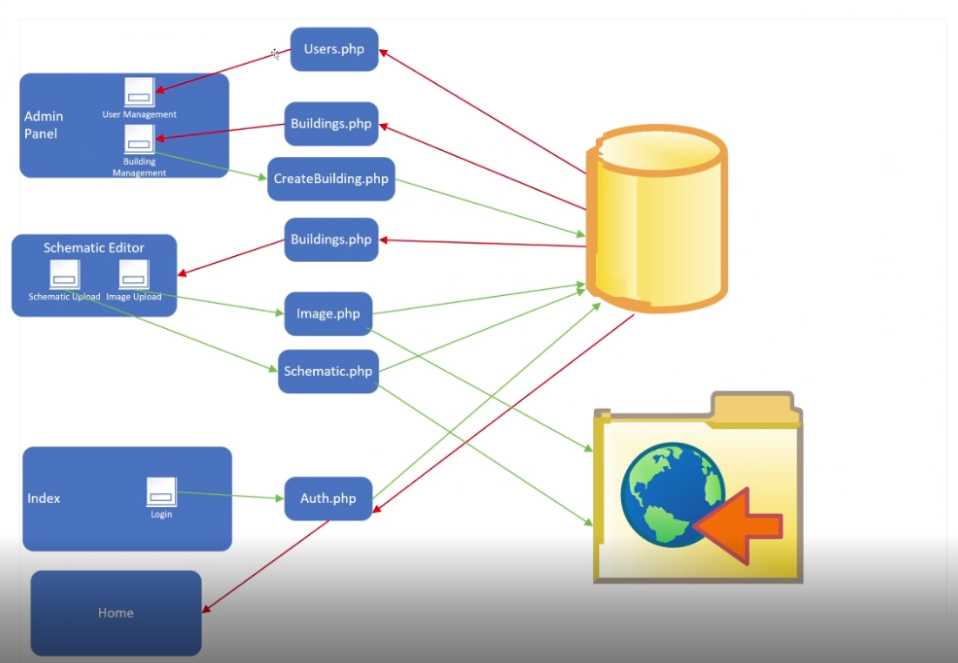
Users.php User Management Admin Panel Buildings.php Building Management CreateBuilding.php Schematic Editor Buildings.php Schematic Upload Image Upload Image.php Schematic.php Index Auth.php Login Home
Step by Step Solution
There are 3 Steps involved in it

Get step-by-step solutions from verified subject matter experts