







Question: Please make some changes to the java programs below with the following modifications, thank you. import java.io.*; import java.net.*; public class DJServer { private static
Please make some changes to the java programs below with the following modifications, thank you.
import java.io.*; import java.net.*;
public class DJServer { private static ServerSocket servSock;
public static void main(String[] args) { System.out.println("Opening port... "); try { // Create a server object if (args.length != 0) { servSock = new ServerSocket(Integer.parseInt(args[0])); } else { servSock = new ServerSocket(3450); }
} catch (IOException e) { /*servSock = new ServerSocket(3450);*/ }
System.out.println("DJServer.main" + servSock.getLocalPort()); do { run(); } while (true); }
private static void run() { Socket link = null; try {
// Put the server into a waiting state link = servSock.accept(); // Set up input and output streams for socket BufferedReader in = new BufferedReader(new InputStreamReader(link.getInputStream())); PrintWriter out = new PrintWriter(link.getOutputStream(), true); // print local host name String host = InetAddress.getLocalHost().getHostName(); System.out.println("Client has estabished a connection to " + host); // Receive and process the incoming data int numMessages = 0; String message = in.readLine(); while (!message.equals("DONE")) { System.out.println(message); numMessages++; message = in.readLine(); } // Send a report back and close the connection out.println("Server received " + numMessages + " messages"); } catch (IOException e) { e.printStackTrace(); } finally { try { System.out.println("!!!!! Closing connection... !!!!! " + "!!! Waiting for the next connection... !!!"); link.close(); } catch (IOException e) { System.out.println("Unable to disconnect!"); System.exit(1); } } } }
-----------------------------------------------------------------------------------------------------------------------
import java.io.*; import java.net.*; import java.util.Scanner;
public class DJClient { private static InetAddress host; private static String user; public static void main(String[] args) { try { // Get server IP-address if(args[0] != null){ user = args[0]; }else{ Scanner sc = new Scanner(System.in); System.out.print(" Enter the User name : "); user = sc.next(); } host = InetAddress.getByName(args[1]); } catch(UnknownHostException e){ host = InetAddress.getLocalHost(); } try{ int n = Integer.parseInt(args[2]); run(n); }catch(Exception e){ run(3450);} } private static void run(int port) { Socket link = null; try{ // Establish a connection to the server link = new Socket(host,port); System.out.println("USER : "+user); // Set up input and output streams for the connection BufferedReader in = new BufferedReader( new InputStreamReader(link.getInputStream())); PrintWriter out = new PrintWriter( link.getOutputStream(),true); //Set up stream for keyboard entry BufferedReader userEntry = new BufferedReader(new InputStreamReader(System.in)); String message, response; // Get data from the user and send it to the server do{ System.out.print("Enter message: "); message = userEntry.readLine(); out.println(message); }while (!message.equals("DONE")); // Receive the final report and close the connection response = in.readLine(); System.out.println(response); } catch(IOException e){ e.printStackTrace(); } finally{ try{ System.out.println(" !!!!! Closing connection... !!!!!"); link.close(); } catch(IOException e){ System.out.println("Unable to disconnect!"); System.exit(1); } } } }
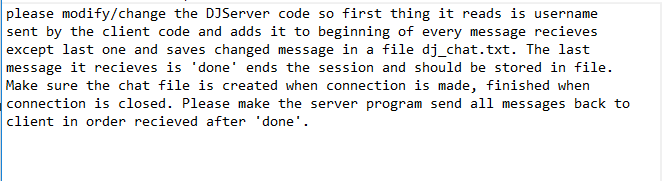
please modify/change the DJServer code so first thing it reads is username sent by the client code and adds it to beginning of every message recieves except last one and saves changed message in a file dj_chat.txt. The last message it recieves is 'done' ends the session and should be stored in file. Make sure the chat file is created when connection is made, finished when connection is closed. Please make the server program send all messages back to client in order recieved after "done
Step by Step Solution
There are 3 Steps involved in it

Get step-by-step solutions from verified subject matter experts
 Study Help