





Question: Please make sure to add a deafult constructor to the program and create a class diagram. This is the V3 to help with the V8
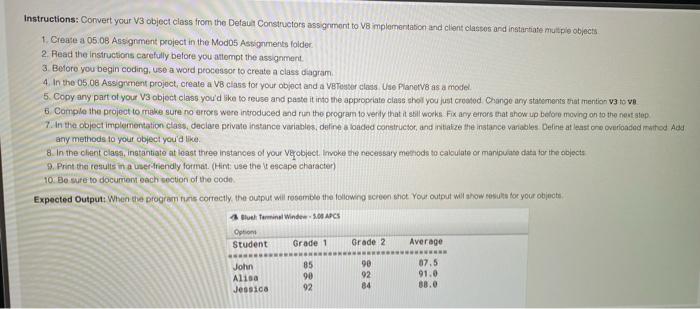
Please make sure to add a deafult constructor to the program and create a class diagram.
 Please make sure to add a deafult constructor to the program
This is the V3 to help with the V8
import java.text.ParseException;
import java.text.SimpleDateFormat;
import java.util.Date;
import java.util.Scanner;
public class GradeV3 {
private double grade1;
private double grade2;
private double average;
private long time_diff;
public double getGrade1()
{
return grade1;
}
public void setGrade1(double grade1)
{
this.grade1 = grade1;
}
public double getGrade2()
{
return grade2;
}
public void setGrade2(double grade2)
{
this.grade2 = grade2;
}
public double getAverage()
{
average = (grade1+grade2)/2.0;
return average;
}
private long difference(String start, String stop) throws ParseException
{
SimpleDateFormat format = new SimpleDateFormat("HH:mm:ss");
Date date1 = format.parse(start);
Date date2 = format.parse(stop);
long difference = date2.getTime() - date1.getTime();
return(difference);
}
public double timeInSeconds(String start, String stop) throws ParseException
{
time_diff = difference(start,stop);
time_diff = time_diff / 60_000;
return time_diff;
}
public static void main(String [] args) throws Exception
{
Scanner input = new Scanner(System.in);
GradeV3 gradeV3 = new GradeV3();
System.out.print("Enter grade 1: ");
double grade1 = input.nextDouble();
gradeV3.setGrade1(grade1);
System.out.print("Enter grade 2: ");
double grade2 = input.nextDouble();
gradeV3.setGrade2 (grade2);
System.out.print("Enter start time in format(HH:mm:ss) ");
String start= input.next();
System.out.print("Enter end time in format(HH:mm:ss) ");
String stop= input.next();
System.out.println(" ***************Your Grade details**************** ");
System.out.println("Grade1\t\tGrade2\t\tAverage\t\tDifference");
System.out.println("**********************************************************");
System.out.println(gradeV3.getGrade1()+"\t\t"+gradeV3.getGrade2()+"\t\t"+
gradeV3.getAverage()+"\t\t"+gradeV3.timeInSeconds(start,stop)+" mins");
}
}

Instructions: Convert your V3 object class from the Default Constructors assignment to V8 mplementation and client classes and instantiate multiple objects 1. Create a 05.08 Assignment project in the Modos Assignments folder 2. Read the instructions carefully before you attempt the assignment 3. Before you begin coding, use a word processor to create a class diagram 4. In the 05.08 Assignment project, create a V8 class for your object and a VB Toster class Use Planets as a model 5. Copy any part of your V3 object class you'd like to reuse and paste it into the appropriate claus choll you just created Change any statements that mention va love 6 Comple the project to make sure no errors were introduced and run the program to venly that it still works Fix any errors that show up before moving on to the next stop 7. In the object implementation class, declare private instance verlables, define a baded construcior, and iritalize the instance variables Deline at least come overloaded method Ad any methods to your object you'd like 8. In the chant class, instantiate at igast three instances of your Vey object. Invoke the necessary merods to calculate or manipuinate data for the objects 9. Print the results in a user friendly format. (Hint: use the tescape character) 10. Be sure to document each section of the code Expected Output: When the program uns correctly, the output will resemble the following screenshot Yout output will show rest for your objects Buah Terminal Winde 5.00 CS Option Student Grade 1 Grade 2 Average 07.5 John Alisa Jessica 85 90 92 90 92 84 91.0 88.0

Step by Step Solution

There are 3 Steps involved in it

1 Expert Approved Answer
Step: 1 Unlock blur-text-image
Question Has Been Solved by an Expert!

Get step-by-step solutions from verified subject matter experts

Step: 2 Unlock
Step: 3 Unlock

Students Have Also Explored These Related Databases Questions!