







Question: IN JAVA Before you begin coding, use a word processor to create a class diagram. In the 05.08 Assignment project, create a V8 class for
IN JAVA
- Before you begin coding, use a word processor to create a class diagram.
- In the 05.08 Assignment project, create a V8 class for your object and a V8Tester class.
- Copy your V3 object class and paste it into the appropriate class shell you just created. Change any statements that mention V3 to V8.
MY V3 implementation class code:
class StudentV3 {
// declare private variable
private double grade1;
private double grade2;
// set the constructor
public StudentV3(double g1, double g2) {
this.grade1 = g1;
this.grade2 = g2;
}
// calculate the average of grade
public double calculateAverage() {
return (grade1 + grade2) / 2;
}
// calculate the grade difference
public int calculateDifference() {
if (grade1 > grade2)
return (int) (grade1 - grade2);
else
return (int) (grade2 - grade1);
}
}
MY V3 client class code:
import java.util.Scanner;
public class StudentTesterV3 {
public static void main(String[] args) {
// declare variable
int grade1 = 85;
int grade2 = 92;
// create student object and pass the grade the value
StudentV3 obj1 = new StudentV3(grade1, grade2);
// calculate the average and difference
double average = obj1.calculateAverage();
int difference = obj1.calculateDifference();
// display the value
System.out.println("\t\t\tGrades:");
System.out.println("Grade1\t\tGrade2\t\tAverage\t\tDifference");
System.out.println("==========================================================");
System.out.print(grade1 + "\t\t" + grade2 + "\t\t" + average + "\t\t" + difference);
}
}
IMPORTANT STEPS:
- Compile the project to make sure no errors were introduced and run the program to verify that it still works. Fix any errors that show up before moving on to the next step.
- MAKE 2 CLASSES--> Implementation class(StudentV8) and Client class(StudentV8Tester) using my V3 classes as a base code.
- In the object implementation class(StudentV8):
- Declare private instance variables
- Define an overloaded constructor (a loaded constructor with parameters)
- Initialize the instance variables
- Define at least one overloaded method.
- Add getter and setter methods for each instance variable
- Add any methods to your object you would like.
- In the client class(StudentV8Tester):
- Instantiate at least three instances of your V8 object
- Use the default constructor at least once
- Use at least one loaded constructor (with parameters)
- Do not use variables, just enter the values in the parameter list
- Invoke the necessary methods to calculate or manipulate data for the objects
- Use each overloaded method at least once
- Use the getter methods when printing objects created with the loaded constructor
- Instantiate at least three instances of your V8 object
- Print the results in a user-friendly format. (Hint: use the \t escape character)
- Be sure to document each section of the code.
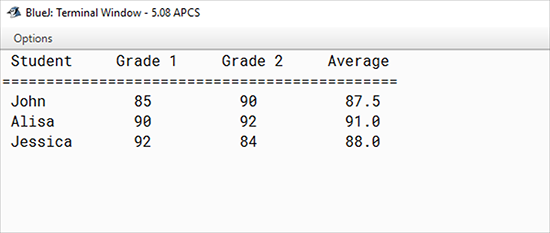
Expected Output: When the program runs correctly, the output will resemble the following screen shot. Your output will show results for your objects.
| Components | Points Possible | Points Earned |
|---|---|---|
| Class diagram included. | 1 | |
| Comments include name, date, and purpose of program. | 1 | |
| Project consists of two separate classes in two separate files (implementation and client classes). | 1 | |
| Default constructor correctly written, including documentation. | 2 | |
| Objects constructed in main() method (in client class). | 2 | |
| Method headers correctly written (in implementation class). | 2 | |
| Individual methods invoked on an object in main() method (in client class). | 2 | |
| All calculations and data manipulation are accurate. | 1 | |
| Escape characters used to format output. | 1 | |
| No compiler or runtime errors. | 1 | |
| Thoughtful PMR included. | 1 | |
| Total | 15 |
Blue): Terminal Window - 5.08 APCS Options Student Grade 1 Grade 2 Average 85 John Alisa Jessica 90 90 92 84 87.5 91.0 88.0 92
Step by Step Solution
There are 3 Steps involved in it

Get step-by-step solutions from verified subject matter experts
 Study Help