Question: please modify the HTML file using Task 3 and Task 4 INDEX.HTML FILE: Pacific Trails Resort Pacific Trails Resort Home Yurts Activities Reservations Enjoy Nature

please modify the HTML file using Task 3 and Task 4
please modify the HTML file using Task 3 and Task 4 INDEX.HTML
FILE: Pacific Trails Resort Pacific Trails Resort Home Yurts Activities Reservations Enjoy

Nature in Luxury Pacific Trails Resort offers a special lodging experience on

INDEX.HTML FILE:

Pacific Trails Resort

Pacific Trails Resort

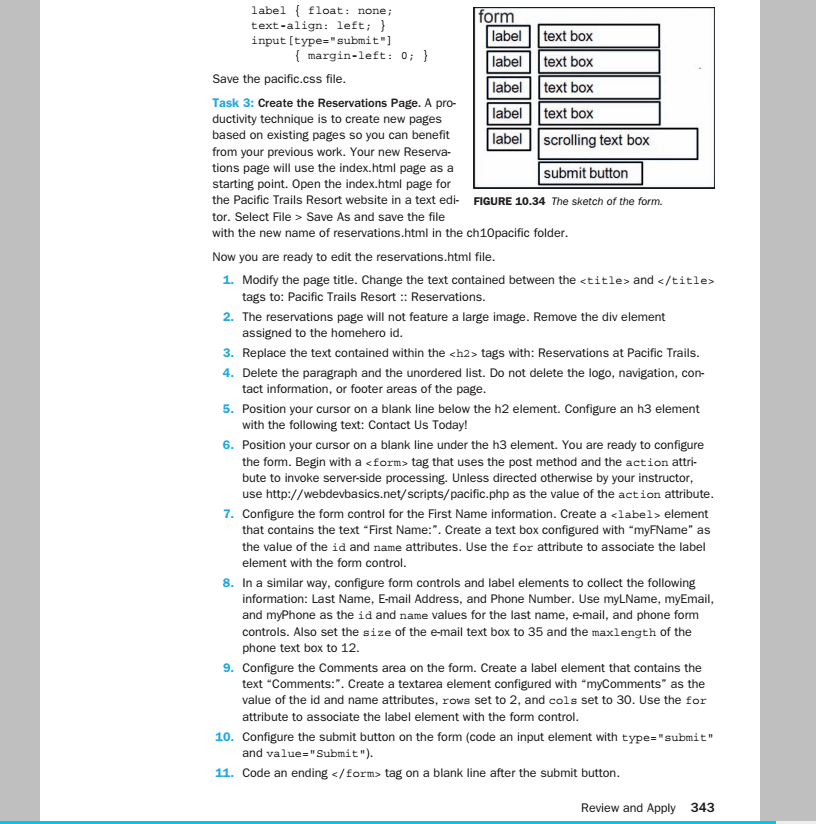
label float: nonei text-align: left; ) input [type-"submit"] orm label text box label text box label text box label text box label scrolling text box margin-left: 0; ve the pacific.css file Task 3: Create the Reservations Page. A pro- ductivity technique is to create new pages based on existing pages so you can benefit from your previous work. Your new Reserva- tions page will use the index.html page as a starting point. Open the index.html page for the Pacific Trails Resort website in a text edi FIGURE 10.34 The sketch of the form. tor. Select File Save As and save the file with the new name of reservations.html in the ch10pacific folder submit button Now you are ready to edit the reservations.html file 1. Modify the page title. Change the text contained between the

2. The reservations page will not feature a large image. Remove the div element 3. Replace the text contained within the <h2> tags with: Reservations at Pacific Trails. tags to: Pacific Trails Resort : Reservations. assigned to the homehero id 4. Delete the paragraph and the unordered list. Do not delete the logo, navigation, con- 5. Position your cursor on a blank line below the h2 element. Configure an h3 element 6. Position your cursor on a blank line under the h3 element. You are ready to configure tact information, or footer areas of the page with the following text: Contact Us Today! the form. Begin with a </h2><form> tag that uses the post method and the action attri- bute to invoke server-side processing. Unless directed otherwise by your instructor use http://webdevbasics.net/scripts/pacific.php as the value of the action attribute 7. Configure the form control for the First Name information. Create a <label> element that contains the text "First Name:". Create a text box configured with myFName" as the value of the id and name attributes. Use the for attribute to associate the label element with the form control. 8. In a similar way, configure form controls and label elements to collect the following information: Last Name, E-mail Address, and Phone Number. Use myLName, myEmail and myPhone as the id and name values for the last name, e-mail, and phone form controls. Also set the size of the e-mail text box to 35 and the maxlength of the phone text box to 12. 9. Configure the Comments area on the form. Create a label element that contains the text "Comments:". Create a textarea element configured with "myComments" as the value of the id and name attributes, rows set to 2, and cols set to 30. Use the for attribute to associate the label element with the form control 10. Configure the submit button on the form (code an input element with type-submit'" and value-"Submit"). 11. Code an ending </label></form> tag on a blank line after the submit button Review and Apply 343

Step by Step Solution

There are 3 Steps involved in it

1 Expert Approved Answer
Step: 1 Unlock blur-text-image
Question Has Been Solved by an Expert!

Get step-by-step solutions from verified subject matter experts

Step: 2 Unlock
Step: 3 Unlock

Students Have Also Explored These Related Databases Questions!