







Question: my css & index.html: css; * { box-sizing: border-box; } body { background-color:#B8DBED; color:#666666; font-family: Arial, Helvetica, sans-serif; } header { background-color: #000033; color:#FFFFFF; height:
Pacific Trails Resort
Enjoy Nature in Luxury
Pacific Trails Resort offers a special lodging experience on the California North Coast. Relax in serenity with panoramic views of the Pacific Ocean.
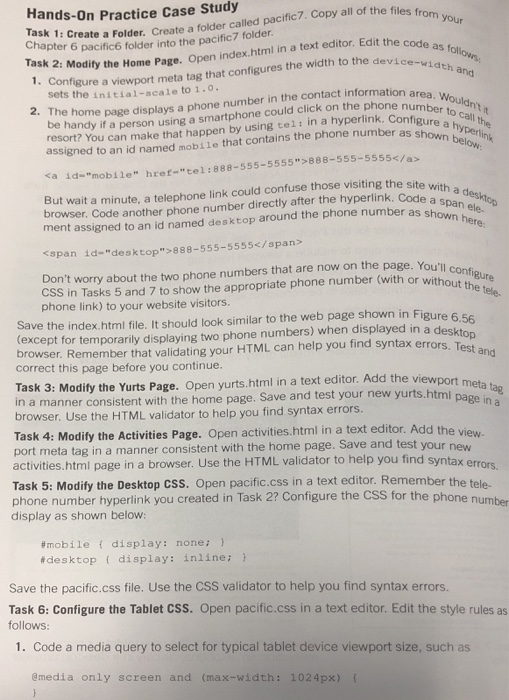
Hands-On Practice Case Study Task 1: ask 2: Modity the Home Page. Open index.html in a text editor. Edit the code 1. Con sk 1: Create a Folder. Create a folder called pacific7.Copy all of the files fo Chapter as t the device-width er 6 pacific6 folder into the pacific7 folder figure a viewport meta tag that configures the width to the device area. Wouldn number to call t sets the initial-scale to 1.0 2. The home page displays a phone number in the contact information be ha resort? Y ndy if a person using a smartphone could click on the phone assigned to an id named mobile that contains the phone number as s a> shown below ou can make that happen by using tel: in a hyperlink. Configu 888-555-5555 with a desktop t assigned to an id named desktop around the phone number as sp span id-"desktop">888-555-5555/span ut wait a minute, a telephone link could confuse those visiting the browser. Code another phone number directly after the hyperlink. Code a s shown here Don't worry about the two phone numbers that are now on the page. You'll c CSS in Tasks 5 and 7 to show the appropriate phone number (with or without phone link) to your website visitors. in Figure except for temporarily displaying two phone numbers) when displayed in a des browser. Remember that validating your HTML can help you find syntax errors correct this page before you continue. Save the index.html file. It should look similar to the web page shown in Figure Task 3: Modify the Yurts Page. Open yurts.html in a text editor. Add the viewport n a manner consistent with the home page. Save and test your new yurts.html pace tag page in a browser. Use the HTML validator to help you find syntax errors. Task 4: Modity the Activities Page. Open activities.html in a text editor. Add the por t meta tag in a manner consistent with the home page. Save and test your activities.html page in a browser. Use the HTML validator to help you find new Task 5: Modify the Desktop CSS. Open pacific.css in a text editor. Remember the tele. phone number hyperlink you created in Task 2? Configure the CSS for the phone number display as shown below: #mobile { display: none; } desktop { display: inline; Save the pacific.css file. Use the CSS validator to help you find syntax errors Task 6: Configure the Tablet CSS. Open pacific.css in a text editor. Edit the style rules as follows: 1. Code a media query to select for typical tablet device viewport size, such as Cmedia only screen and (max-wi
Step by Step Solution
There are 3 Steps involved in it

Get step-by-step solutions from verified subject matter experts
 Study Help