







Question: Please need help ASAP. The tables are in the google docs because I can't upload them here. https://docs.google.com/document/d/1NuU5dJkDJjOhZqw7QEL3WOmO8-PP3RD0OnfY1_-UYKQ/edit Answer the following questions: 1. Write SQL
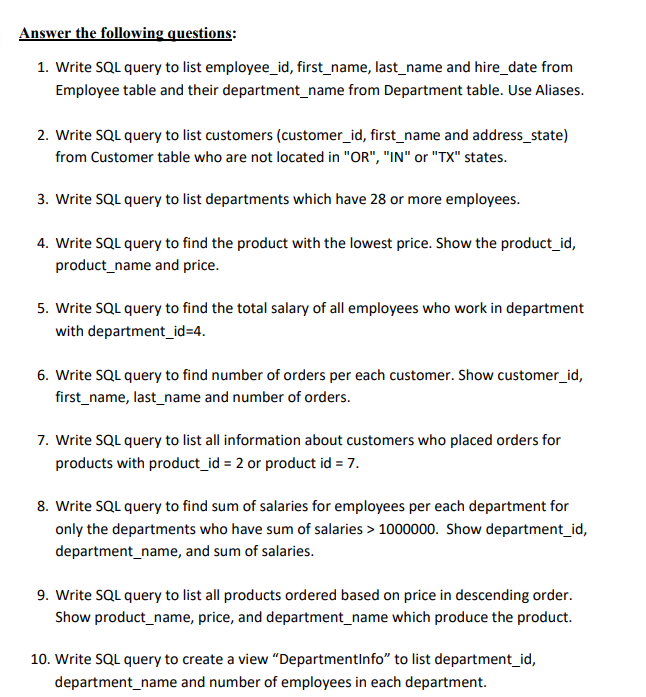
Please need help ASAP. The tables are in the google docs because I can't upload them here.
https://docs.google.com/document/d/1NuU5dJkDJjOhZqw7QEL3WOmO8-PP3RD0OnfY1_-UYKQ/edit
Answer the following questions: 1. Write SQL query to list employee_id, first_name, last_name and hire_date from Employee table and their department_name from Department table. Use Aliases. 2. Write SQL query to list customers (customer_id, first_name and address_state) from Customer table who are not located in "OR", "IN" or "TX" states. 3. Write SQL query to list departments which have 28 or more employees. 4. Write SQL query to find the product with the lowest price. Show the product_id, product_name and price. 5. Write SQL query to find the total salary of all employees who work in department with department_id=4. 6. Write SQL query to find number of orders per each customer. Show customer_id, first_name, last_name and number of orders. 7. Write SQL query to list all information about customers who placed orders for products with product_id = 2 or product id = 7. 8. Write SQL query to find sum of salaries for employees per each department for only the departments who have sum of salaries > 1000000. Show department_id, department_name, and sum of salaries. 9. Write SQL query to list all products ordered based on price in descending order. Show product_name, price, and department_name which produce the product. 10. Write SQL query to create a view "DepartmentInfo" to list department_id, department_name and number of employees in each department
Step by Step Solution
There are 3 Steps involved in it

Get step-by-step solutions from verified subject matter experts
 Study Help