







Question: Please Note: Must be done in PYTHON! My code is working, however it is currently offset to the bottom left corner. I think I am
Please Note: Must be done in PYTHON!
My code is working, however it is currently offset to the bottom left corner. I think I am doing the math wrong but I dont know for sure. Thanks!
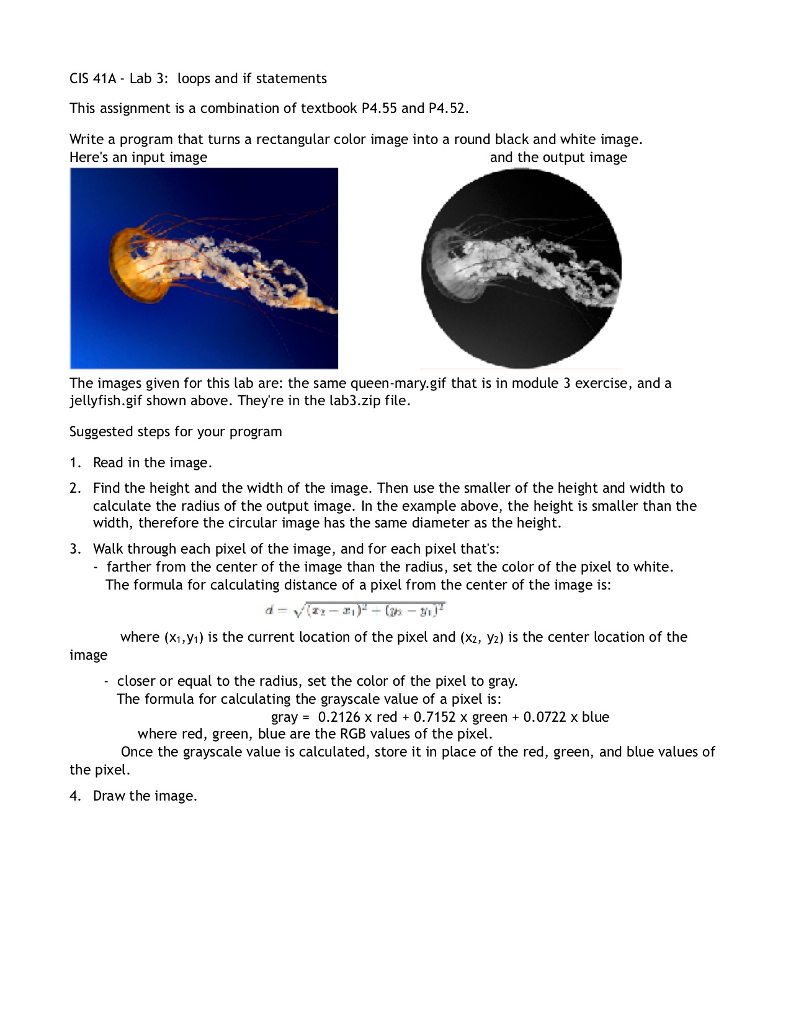
Write a program that turns a rectangular color image into a round black and white image.
Here's an input image:
The images given for this lab are: the same queen-mary.gif that is in module 3 exercise, and a jellyfish.gif shown above. They're in the lab3.zip file.
Suggested steps for your program
Read in the image.
Find the height and the width of the image. Then use the smaller of the height and width to calculate the radius of the output image. In the example above, the height is smaller than the width, therefore the circular image has the same diameter as the height.
Walk through each pixel of the image, and for each pixel that's: - farther from the center of the image than the radius, set the color of the pixel to white. The formula for calculating distance of a pixel from the center of the image is:
(Regular distance fromula from math)
where (x1,y1) is the current location of the pixel and (x2, y2) is the center location of the image
- closer or equal to the radius, set the color of the pixel to gray.
The formula for calculating the grayscale value of a pixel is:
gray = 0.2126 x red + 0.7152 x green + 0.0722 x blue
where red, green, blue are the RGB values of the pixel.
Once the grayscale value is calculated, store it in place of the red, green, and blue values of the pixel.
Draw the image.
THANKS!!
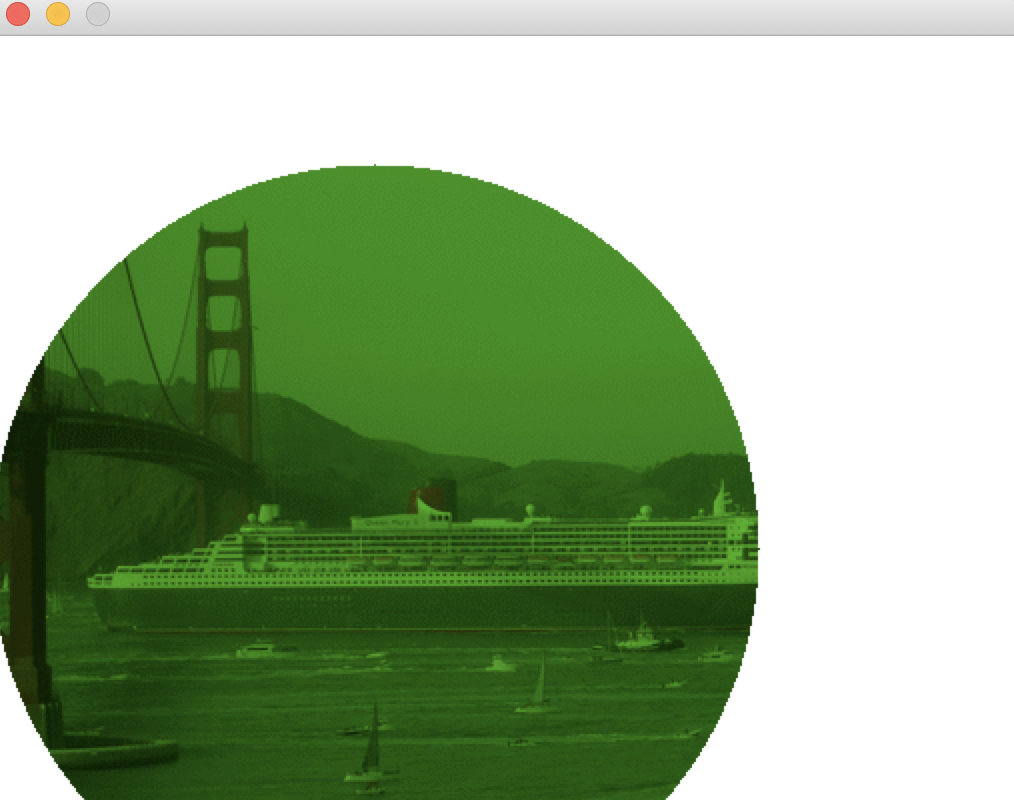 MY CURRENT OUTPUT! YOU CAN SEE ITS OFFSET!
Here is my code thus far:
from ezgraphics import GraphicsImage, GraphicsWindow from math import sqrt filename = "queen-mary.gif"
#preexisting python functions run fatser than our code!
origImage = GraphicsImage(filename) width = origImage.width() height = origImage.height()
newImage = GraphicsImage(width, height)
if(width > height): radius = (height /2) else: radius = (width / 2) centerx = int(width / 2) centery = int(height / 2) debugg = True if(debugg == True): print("Width", width) print("Height", height) print("CenterX", centerx) print("CenterY", centery) print("Radius", radius) #put pseduo code on canvas ''' width = orgional image width height = origional image height
'''
for x in range(height):#This is right for y in range(width):#this is right redPix, greenPix, bluePix = origImage.getPixel(x,y) distance = (sqrt((centerx - x)**2 + (centery - y)**2))#Might be root of issue ##### is that a + and then a - right after the variable centery? if(distance > radius): newImage.setPixel(x,y, "white") else: newImage.setPixel(x,y,(int(0.2126 * redPix), int(0.7152 * greenPix), int(0.0722 * bluePix))) # use shell to play around with how to get rgb value of image at a certain pixel! # Need to find a way to get current rgb color value
# Save the new image with a new name. newImage.save("grey-" + filename)
# Draw the image win = GraphicsWindow() canvas = win.canvas() canvas.drawImage(newImage) win.wait()
THANKS!!!
CIS 41A - Lab 3: loops and if statements This assignment is a combination of textbook P4.55 and P4.52 Write a program that turns a rectangular color image into a round black and white image Here's an input image and the output image The images given for this lab are: the same queen-mary.gif that is in module 3 exercise, and a jellyfish.gif shown above. Theyre in the lab3.zip file. Suggested steps for your program 1. Read in the image. 2. Find the height and the width of the image. Then use the smaller of the height and width to calculate the radius of the output image. In the example above, the height is smaller than the width, therefore the circular image has the same diameter as the height. 3. Walk through each pixel of the image, and for each pixel that's: - farther from the center of the image than the radius, set the color of the pixel to white The formula for calculating distance of a pixel from the center of the image is where (xi,y) is the current location of the pixel and (x2, y2) is the center location of the mage closer or equal to the radius, set the color of the pixel to gray. The formula for calculating the grayscale value of a pixel is: gray = 0.2126 x red + 0.7152 x green + 0.0722 x blue where red, green, blue are the RGB values of the pixel. Once the grayscale value is calculated, store it in place of the red, green, and blue values of the pixel 4. Draw the image
Step by Step Solution
There are 3 Steps involved in it

Get step-by-step solutions from verified subject matter experts
 Study Help