







Question: please please I need help in writing this program in C++ and an easier compiler with just iostream and iomanip... pls It is important that
please please I need help in writing this program in C++ and an easier compiler with just iostream and iomanip... pls It is important that the calender output has a grid just like the attached picture please. would be appreciated
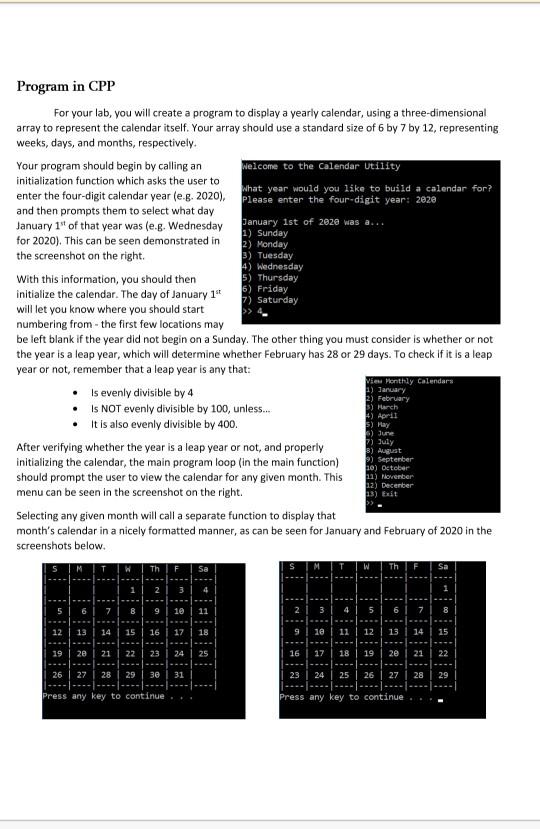
6) Friday Program in CPP For your lab, you will create a program to display a yearly calendar, using a three-dimensional array to represent the calendar itself. Your array should use a standard size of 6 by 7 by 12, representing weeks, days, and months, respectively. Your program should begin by calling an welcome to the Calendar Utility initialization function which asks the user to what year would you like to build a calendar for? enter the four-digit calendar year (e.g. 2020). Please enter the four-digit year: 2020 and then prompts them to select what day January 1" of that year was (e.g. Wednesday January 1st of 2020 was a... 1) Sunday for 2020). This can be seen demonstrated in 2) Monday the screenshot on the right 3) Tuesday 4) Wednesday With this information, you should then 5) Thursday initialize the calendar. The day of January 1" 7) Saturday will let you know where you should start numbering from the first few locations may be left blank if the year did not begin on a Sunday. The other thing you must consider is whether or not the year is a leap year, which will determine whether February has 28 or 29 days. To check if it is a leap year or not, remember that a leap year is any that: View Monthly Calendars Is evenly divisible by 4 1) January 3) February Is NOT evenly divisible by 100, unless... It is also evenly divisible by 400. 5) May After verifying whether the year is a leap year or not, and properly initializing the calendar, the main program loop (in the main function) should prompt the user to view the calendar for any given month. This menu can be seen in the screenshot on the right Selecting any given month will call a separate function to display that month's calendar in a nicely formatted manner, as can be seen for January and February of 2020 in the screenshots below. 5) March 4) April 6) June 1) July 3) August >) September 10) October 12) November 12) December 13) Exit 3 6 GO 12 13 14 15 16 17 18 10 14 15 19 20 21 22 23 24 25 16 17 18 19 20 21 26 27 28 29 38 31 23 24 25 26 27 28 29 Press any key to continue Press any key to continue
Step by Step Solution
There are 3 Steps involved in it

Get step-by-step solutions from verified subject matter experts
 Study Help