







Question: PLEASE PLEASE ONLY GIVE ME THE CODE THAT YOU WILL PUT ON MATLAB TO RUN THIS SOLUTION. PLEASE ONLY THE CODE! I WILL TRULY APPRECIATE

PLEASE PLEASE ONLY GIVE ME THE CODE THAT YOU WILL PUT ON MATLAB TO RUN THIS SOLUTION. PLEASE ONLY THE CODE! I WILL TRULY APPRECIATE IT. THANK YOU! IF YOU NEED ANY EXTRA INFORMATION PLEASE SPECIFY. IF YOU DONT UNDERSTAND LEAVE IT FOR SOMEONE ELSE.
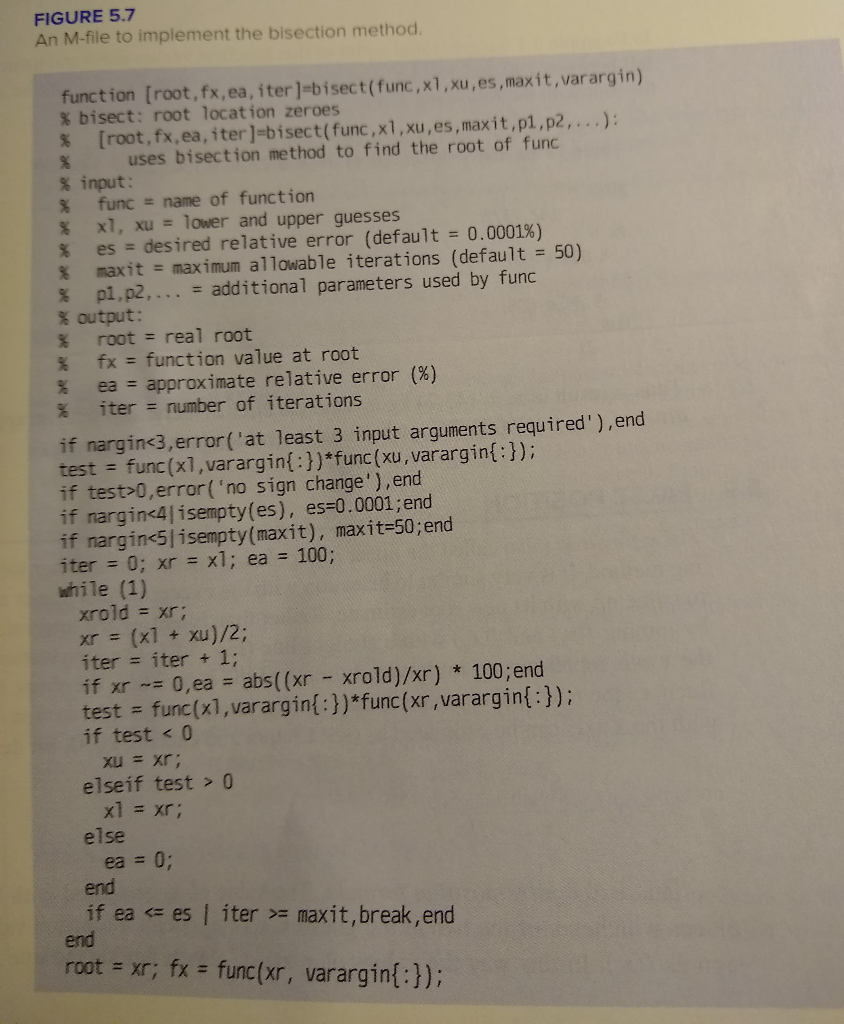
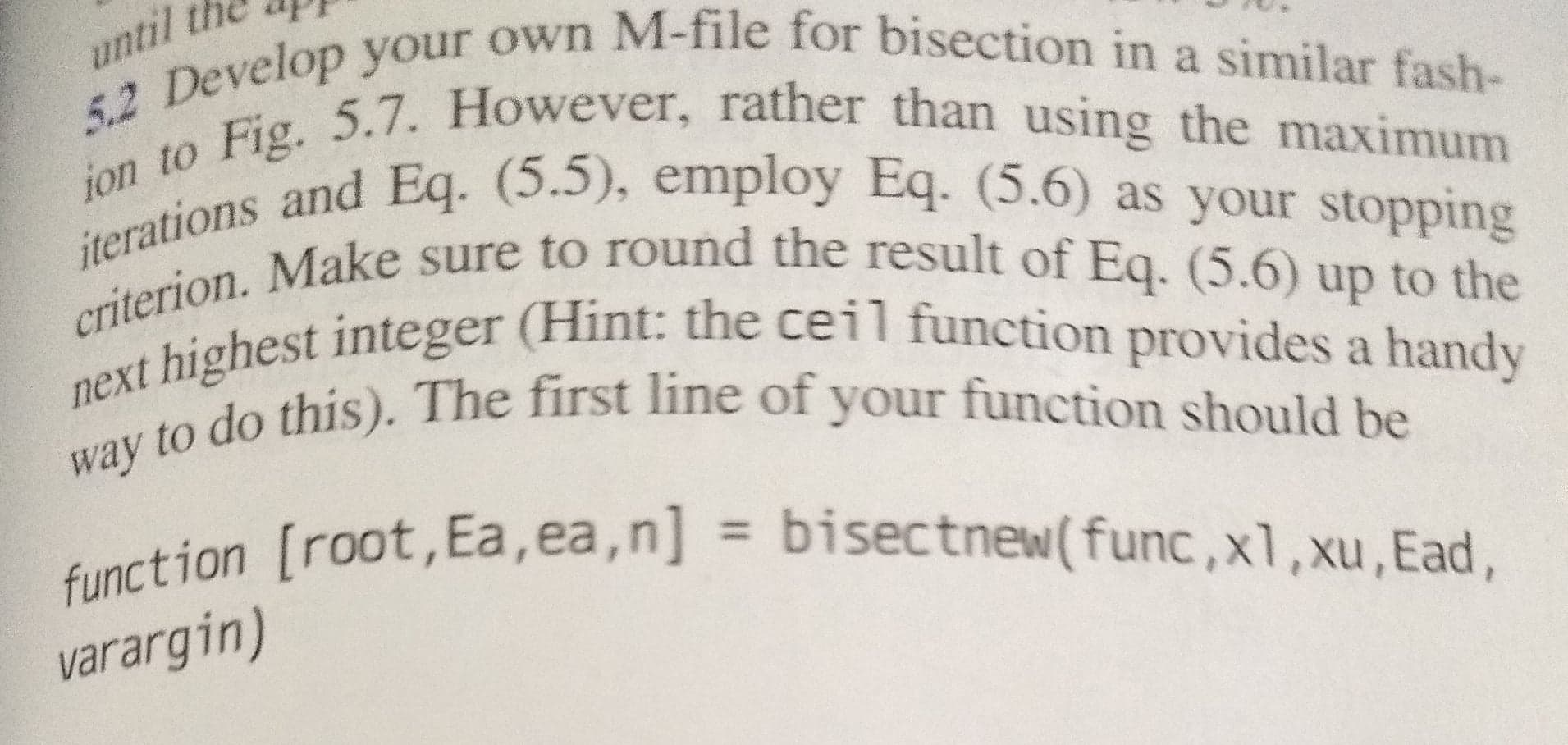
FIGURE 5.7 An M-file to implement the bisection method. function [root, fx, ea, iter]=bisect(func, x1,xu, es, maxit,varargin) % bisect: root location zeroes % [root, fx, ea, iter]=bisect(func,x1,xu, es, maxit,p1.p2,...): % uses bisection method to find the root of func % input: % func = name of function % x1, xu = lower and upper guesses % es = desired relative error (default = 0.0001%) % maxit = maximum allowable iterations (default = 50) % p1, p2, ... = additional parameters used by func % output: % root = real root % fx = function value at root % ea = approximate relative error (%) % iter = number of iterations if nargin0,error('no sign change'), end if nargin 0 x1 = xr; else ea = 0; end if ea = maxit, break, end end root = xr; fx = func(xr, varargin{:}); until the app 52 Develop your own ion to Fig. 5.7. H. iterations and Eq. (5 criterion. Make sure next highest integer (Hir way to do this). The our own M-file for bisection in a similar fash- However, rather than using the maximum a Eq. (5.5), employ Eq. (5.6) as your stopping ve sure to round the result of Eq. (5.6) up to the Integer (Hint: the ceil function provides a handy this). The first line of your function should be on froot, Ea, ea, n] = bisectnew(func, x1, xu, Ead, function [root. Ea varargin) If End is the desired error, this equation can be solved for? log(Ax/Eu) log 2 "" = log, (4x) (5.6) Let's test the formula For Example 5.4, the initial interval was Axo = 200 50 = 150. After eight iterations, the absolute error was FIGURE 5.7 An M-file to implement the bisection method. function [root, fx, ea, iter]=bisect(func, x1,xu, es, maxit,varargin) % bisect: root location zeroes % [root, fx, ea, iter]=bisect(func,x1,xu, es, maxit,p1.p2,...): % uses bisection method to find the root of func % input: % func = name of function % x1, xu = lower and upper guesses % es = desired relative error (default = 0.0001%) % maxit = maximum allowable iterations (default = 50) % p1, p2, ... = additional parameters used by func % output: % root = real root % fx = function value at root % ea = approximate relative error (%) % iter = number of iterations if nargin0,error('no sign change'), end if nargin 0 x1 = xr; else ea = 0; end if ea = maxit, break, end end root = xr; fx = func(xr, varargin{:}); until the app 52 Develop your own ion to Fig. 5.7. H. iterations and Eq. (5 criterion. Make sure next highest integer (Hir way to do this). The our own M-file for bisection in a similar fash- However, rather than using the maximum a Eq. (5.5), employ Eq. (5.6) as your stopping ve sure to round the result of Eq. (5.6) up to the Integer (Hint: the ceil function provides a handy this). The first line of your function should be on froot, Ea, ea, n] = bisectnew(func, x1, xu, Ead, function [root. Ea varargin) If End is the desired error, this equation can be solved for? log(Ax/Eu) log 2 "" = log, (4x) (5.6) Let's test the formula For Example 5.4, the initial interval was Axo = 200 50 = 150. After eight iterations, the absolute error was
Step by Step Solution
There are 3 Steps involved in it

Get step-by-step solutions from verified subject matter experts
 Study Help