



Question: please post the steps for both questions Exp19_Exc... Q Search in Document Layout References Mailings >> Home Insert Draw Design 3+ Sha A Pages Table
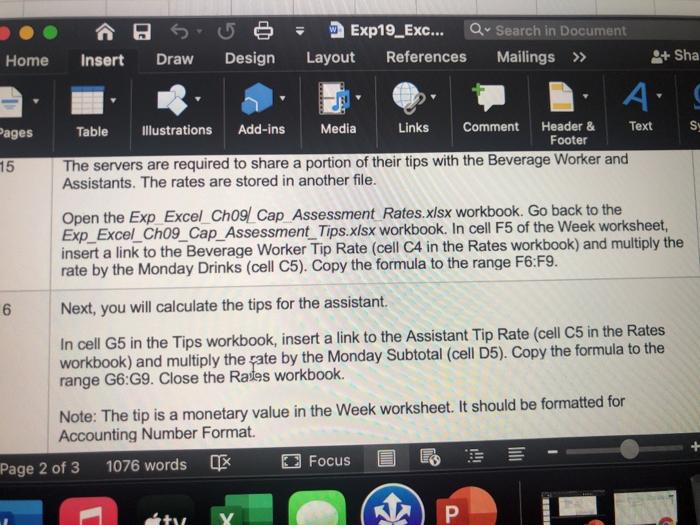
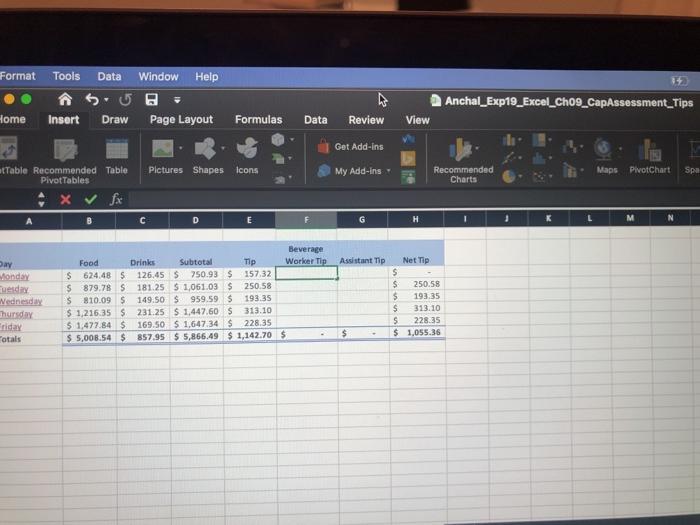
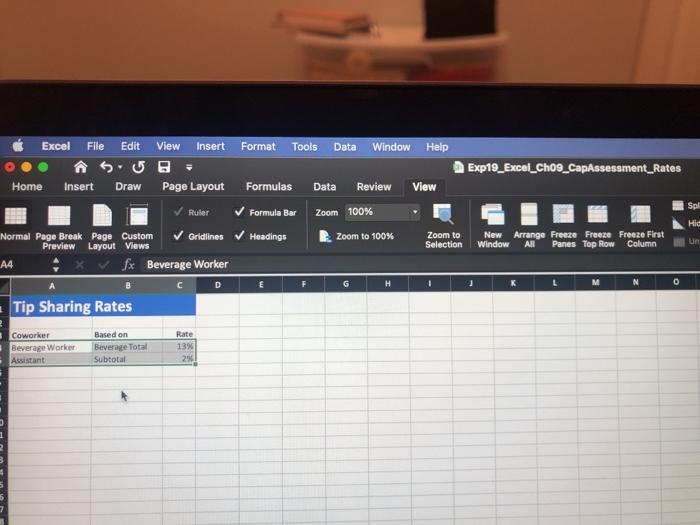
Exp19_Exc... Q Search in Document Layout References Mailings >> Home Insert Draw Design 3+ Sha A Pages Table Illustrations Add-ins Media Links Comment Header & Text Sy Footer 15 The servers are required to share a portion of their tips with the Beverage Worker and Assistants. The rates are stored in another file. Open the Exp Excel Ch09/ Cap Assessment Rates.xlsx workbook. Go back to the Exp_Excel_Ch09_Cap_Assessment_Tips.xlsx workbook. In cell F5 of the Week worksheet, insert a link to the Beverage Worker Tip Rate (cell C4 in the Rates workbook) and multiply the rate by the Monday Drinks (cell C5). Copy the formula to the range F6:F9. 6 Next, you will calculate the tips for the assistant. In cell G5 in the Tips workbook, insert a link to the Assistant Tip Rate (cell C5 in the Rates workbook) and multiply the ate by the Monday Subtotal (cell D5). Copy the formula to the range G6:69. Close the Rates workbook. Note: The tip is a monetary value in the Week worksheet. It should be formatted for Accounting Number Format. Page 2 of 3 1076 words Focus P Y BB Format Tools Data Window Help Anchal_Exp19_Excel_Cho9_CapAssessment_Tips Home Insert Draw Page Layout Formulas Data Review View Get Add-ins Pictures Shapes Icons Table Recommended Table Pivot Tables My Add-ins- Maps Recommended Charts PivotChart Spa D H M Assistant Tip Dar Monday Tuesday Wednesday hursday Friday otals Food S 624.485 $ 879.78 $ 810.09 $ 1,216.35 S $ 1,477.84 $ $ 5,008.54 $ Beverage Drinks Subtotal Tip Worker Tip 126,45 $ 750.93 $ 157.32 181.25 5 1,061.03 $ 250.58 149.50 $959.59 $ 193.35 231.25 $ 1,447.60 $ 313.10 169.50 $ 1,647.34 $ 228.35 857.95 $ 5,856.49 $ 1,142.70 $ Net Tip $ $ 250.58 $ 193.35 $ 313.10 S 228.35 $ 1,055.36 $ Excel File Edit View Insert Format Tools Data Window Help Exp19_Excel_Cho9_CapAssessment_Rates Home Insert Draw Page Layout Formulas Data Review View Ruler Formula Bar Zoom 100% Normal Page Break Page Custom Gridlines Headings Zoom to 100% Zoom to New Arrange Freeze Freeze Freeze First Preview Layout Views Selection Window All Panes Top Row Column A4 fx Beverage Worker B D G M N - Tip Sharing Rates Spl Hid Un F H 1 1 K L 0 Rate Coworker Beverage Worker Assistant Based on Beverage Total Subtotal 13% 23
Step by Step Solution
There are 3 Steps involved in it

Get step-by-step solutions from verified subject matter experts