







Question: Please provide step by step instruction using C# in visual studio Tracking Stocks Create an application that connects to a new Stock.mdf database that you
Please provide step by step instruction using C# in visual studio
Tracking Stocks
Create an application that connects to a new Stock.mdf database that you create.
Create a database that has a table named Stock, with the following columns:
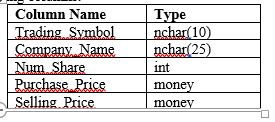
Be sure that there are at least five sample rows of data in the Stock table. The main form shall display the Stock table in a DataGridView control.
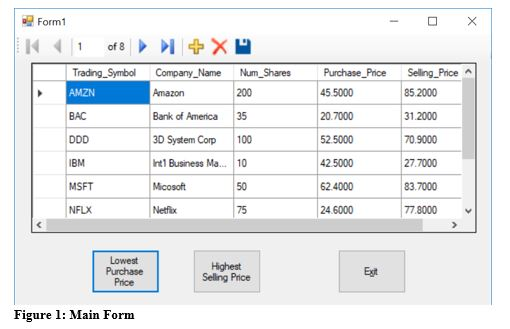
The applications form will display the Stock table in a DataGridView control. The form will also have the following controls:
A button that, when clicked, displays a message indicating the highest (maximum) selling price in the table.
A button that, when clicked, displays a message indicating the lowest (minimum) purchase price in the table.
Iype nchar 10 nchar(25) Column Name Company Name Num Shareint Purchase Price Selling Price mone mone Form1 Trading Symbo Company Name Num_Shares Purchase Price Selling PriceA 45 5000 20.7000 52.5000 42.5000 62.4000 24.6000 200 Amazon Bank of America35 3D System Corp 100 Int1 Business Ma... 10 Micosoft Netfix 85.2000 31.2000 70.9000 27.7000 83.7000 77.8000 BM MSFT NFLX 50 75 Egit Selling Price Figure 1: Main Form Iype nchar 10 nchar(25) Column Name Company Name Num Shareint Purchase Price Selling Price mone mone Form1 Trading Symbo Company Name Num_Shares Purchase Price Selling PriceA 45 5000 20.7000 52.5000 42.5000 62.4000 24.6000 200 Amazon Bank of America35 3D System Corp 100 Int1 Business Ma... 10 Micosoft Netfix 85.2000 31.2000 70.9000 27.7000 83.7000 77.8000 BM MSFT NFLX 50 75 Egit Selling Price Figure 1: Main Form
Step by Step Solution
There are 3 Steps involved in it

Get step-by-step solutions from verified subject matter experts
 Study Help