







Question: Please provide the code for Form.cs and Form.Designer.cs The objectives of this lab assignment are as follows: Develop a Windows Forms Graphical User Interface (GUI).
Please provide the code for Form.cs and Form.Designer.cs
The objectives of this lab assignment are as follows:
- Develop a Windows Forms Graphical User Interface (GUI).
- Implement the picture box control on a form.
- Work with files (images) external to the application.
- Work with arrays (multiple arrays).
- Work with arrays in parallel with one another.
- Work with nested for loops.
Assignment User Story: As a user I want a new Windows application so that I can play a modified version of the card game called War.
Acceptance Criteria:
- A Windows Forms GUI will be developed.
- Required form controls include: two PictureBox controls each holding the computer's and player's card, two TextBox controls for the computer's and player's scores, a TextBox control for the text status of the last hand dealt.
- In addition to the controls noted above, there will be three button controls: New Game, Draw, and Close. When the clicks New Game, all of the variables will be initialized and the deck of cards will be shuffled. The Draw button will cause random cards to be drawn for both the computer and the user, and the code will determine which of the two cards represents the higher value awarding a point to the winning hand.
Technical Requirements:
- The principle logic of this application will be handled via arrays. Specifically, there will be several arrays working in parallel with one another.
- Each time the Draw button is clicked two different cards will be displayed. This can be handled either by selecting the cards randomly or by moving sequentially through a shuffled deck. The shuffled deck, in this case, is represented by an array of pointers back to an unshuffled deck.
Game Requirements:
- This is a "modified" game of War. Traditionally, this game begins by dividing the deck evenly between two players, and the play of the game continues until one of the players is out of cards. Additionally, in the event of a tie most rule use as a tie breaker the draw of two additional cards from each players pile with the overturning of one of the two cards determining the winner of all six cards at stake.
- These rules are simple, for the most part, but their implementation is a little much for this assignment.
- Therefore, the rules of our game will be simple. Once the deck is shuffled we will proceed until we have gone through the entire deck, at which time the winner will be determined solely by the number of hands won. The winning of a hand is simply the evaluation of whose card has a higher value (from aces down to the lowest numbered cards). In the event that the draw deals cards of the same value (two kings, for example), this is a tie and no points are awarded.
Technical Thoughts and Tips:
- Since this exercise is all about using arrays in parallel to process data, you will want to think about how a deck of cards can be represented as arrays. There are 52 cards in a deck (not counting the Jokers, which we will not be using). You need a way of keeping track of the point value of each card in addition to know what the actual card is or even the image of the card. These can all be represented by separate arrays, each having 52 elements.
- The PictureBox control has an Image property to which you can load an external image file from your computer's drive. Everything you need to know about this property for this assignment can be found at this link.
- The images for the cards are all provided to you. And, you will notice the naming of each card follows the same pattern as all the rest: x_of_y.png: where x is the rank of the card (2, 3, 4 . . . jack, king, ace), and y is the suit (clubs, diamonds, hearts, spades). This makes it easy to programmatically load each card's image into an array.
- The image array would simply be constructed as Image nameOfArray = new Image(52); Next, you will have to figure out how to load the actual image of each card into the array. The link just above will help you in this activity.
- You need a way of randomly selecting cards from the deck to display to the user. You could do this dynamically (that is, select a random card and display the image only when it is needed. But, I would recommend that you create a shuffled deck array that is an array of integers (in random order) that will point to the actual cards in your deck of cards array. I recommend this strategy over doing it dynamically because here we will sequentially go through our shuffled deck, otherwise, we would have to find a way of keeping track of which cards had already been selected.
Example Output:
Start of game before play has commenced:
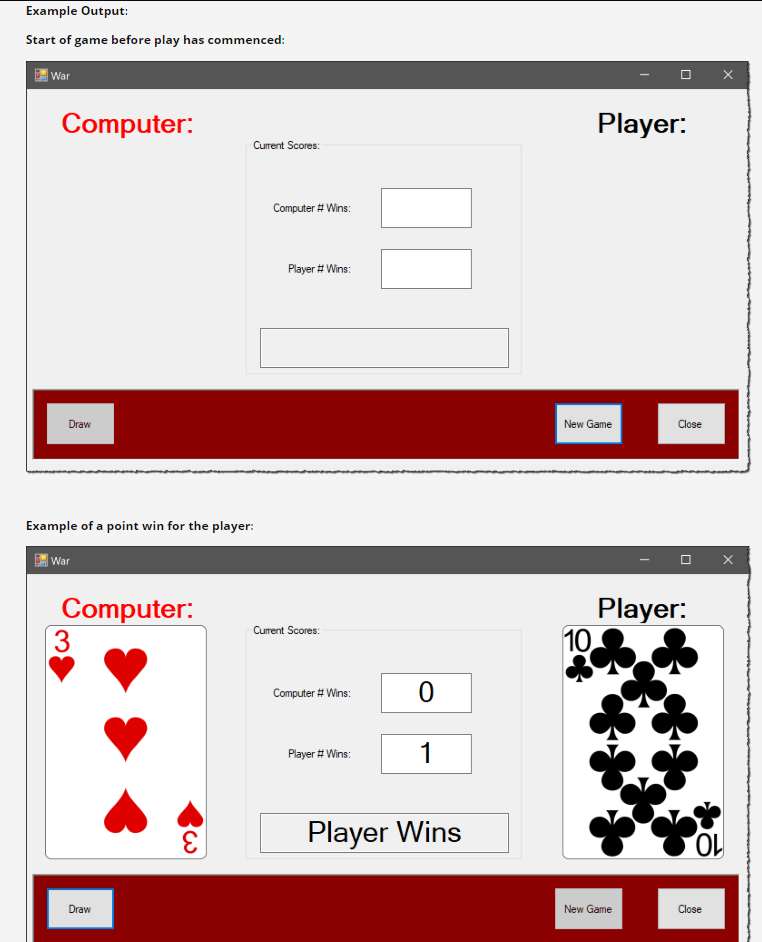
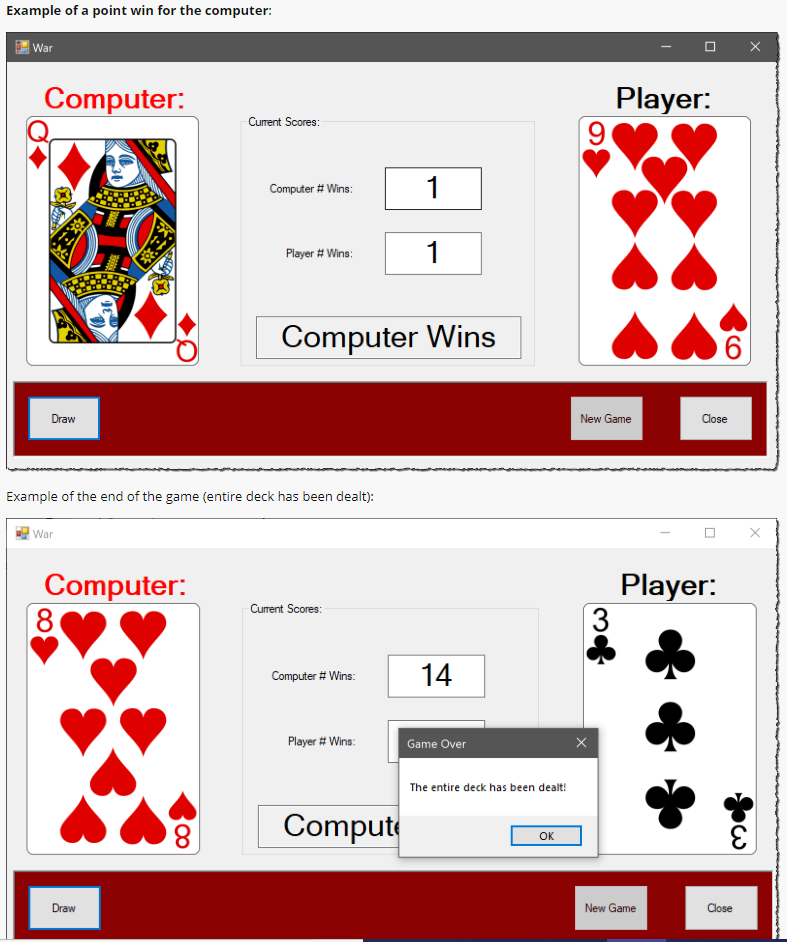
Example Output: Start of game before play has commenced War Computer: Player: Current Scores: Computer # Wins Player # Vins Draw New Game Close Example of a point win for the player: War Computer: 3 Player: 10 Current Scores: 0 Computer # Vins. Player # Wins Player Wins Draw New Game Example of a point win for the computer: War Computer: Player. Current Scores Computer # Wins Player # Wins Computer Wins New Game Example of the end of the game (entire deck has been dealt) War Computer: 8 Player: 3 Current Scores Computer # Wins Player # Wins Game Over The entire deck has been dealt! 8 Compute OK Draw New Game Example Output: Start of game before play has commenced War Computer: Player: Current Scores: Computer # Wins Player # Vins Draw New Game Close Example of a point win for the player: War Computer: 3 Player: 10 Current Scores: 0 Computer # Vins. Player # Wins Player Wins Draw New Game Example of a point win for the computer: War Computer: Player. Current Scores Computer # Wins Player # Wins Computer Wins New Game Example of the end of the game (entire deck has been dealt) War Computer: 8 Player: 3 Current Scores Computer # Wins Player # Wins Game Over The entire deck has been dealt! 8 Compute OK Draw New Game
Step by Step Solution
There are 3 Steps involved in it

Get step-by-step solutions from verified subject matter experts
 Study Help