







Question: PLEASE PROVIDE THE FUNCTIONS, PLEASE ANSWER THE QUESTIONS OR WILL RECEIVE THUMBS DOWN On the workbook's Project Evaluation tab: 1.Calculate the NPV using Excel's NPV
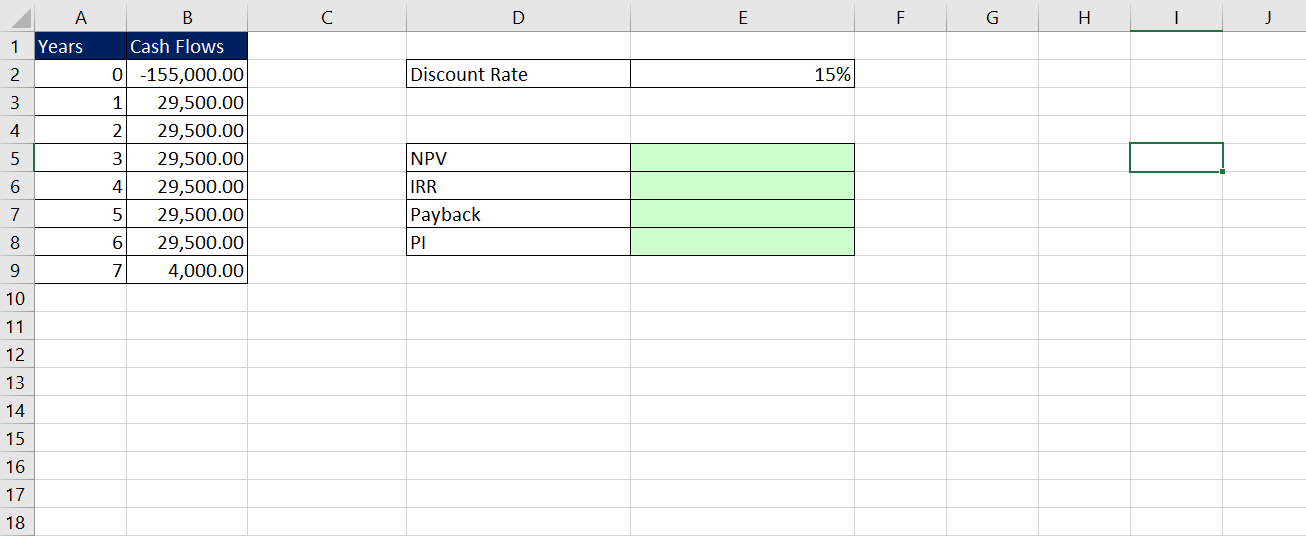
PLEASE PROVIDE THE FUNCTIONS, PLEASE ANSWER THE QUESTIONS OR WILL RECEIVE THUMBS DOWN
On the workbook's Project Evaluation tab:
- 1.Calculate the NPV using Excel's NPV function.
- 2.Calculate the IRR using Excel's IRR function.
- 3.Calculate the Payback Period using the formula: Initial Invesment / Cash Flows. Note: Nest this formula in the ABS (absolute value) function to remove the negative sign.
- 4.Calculate the Profitability Index using Excel's NPV function. Note: Nest this function in the ABS (absolute value) function to remove the negative sign.
- 5.Evaluate whether or not the results indicate you should accept the project by recording a "Yes" or "No" for alongside each result in column F. Use the PowerPoint slide presentation for reference as needed.
Step by Step Solution
There are 3 Steps involved in it
1 Expert Approved Answer
Step: 1 Unlock

Question Has Been Solved by an Expert!
Get step-by-step solutions from verified subject matter experts
Step: 2 Unlock
Step: 3 Unlock
 Study Help