







Question: Please provide the Javafxml code. Please comment your code. We will create the Graphical User Interface for a JavaFX project using Scene Builder. Things to
Please provide the Javafxml code.
Please comment your code.
We will create the Graphical User Interface for a JavaFX project using Scene Builder.
Things to note as you create the GUI:
- There is no need to include the minimize, maximize, and close buttons these are built in to the system.
- The Deitel bug is used as the company logo. You can use any reasonable graphics or picture for this.
- You must use a label for the numeric display field, which should be initialized to zero as shown in the sample GUI.
- You must use a container, or containers, of some sort to hold all of the fields (buttons, labels, etc.) that are used on the calculator.
- You will probably find it to be beneficial if you go ahead and create your JavaFX program at this time. However, only the only thing that needs to be submitted at this time is the FXML file that you create and the graphics/image file that you use for the company logo.
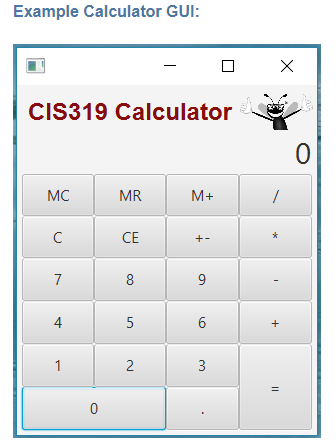
Example Calculator GUI: CIS319 Calculator 0 MC MR CE 4
Step by Step Solution
There are 3 Steps involved in it
1 Expert Approved Answer
Step: 1 Unlock

Question Has Been Solved by an Expert!
Get step-by-step solutions from verified subject matter experts
Step: 2 Unlock
Step: 3 Unlock
 Study Help