







Question: PLEASE PUT FORMULAS WITH NUMBERS FROM THE PICTURES! PLEASE MAKE SURE THAT NUMBERS MATCH UP WITH EACH OTHER. PLEASE SHOW FORMULAS ON EVERYTHING! Xercise Cycles
PLEASE PUT FORMULAS WITH NUMBERS FROM THE PICTURES! PLEASE MAKE SURE THAT NUMBERS MATCH UP WITH EACH OTHER. PLEASE SHOW FORMULAS ON EVERYTHING!
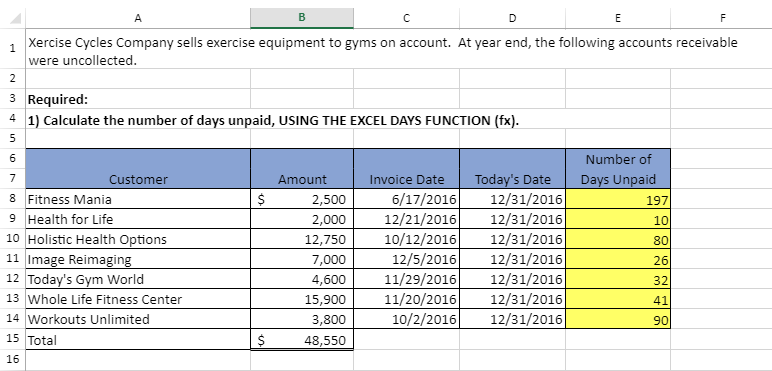
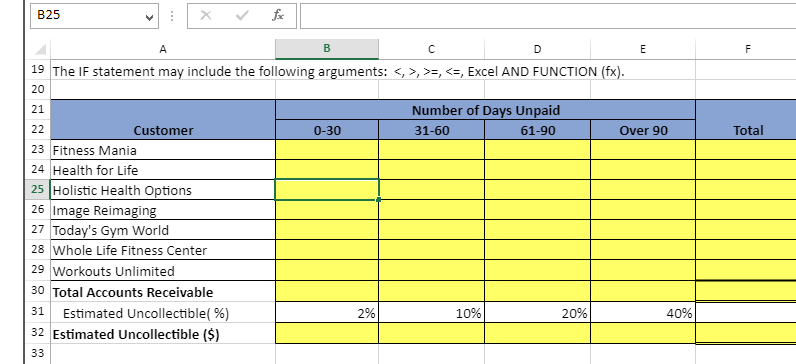
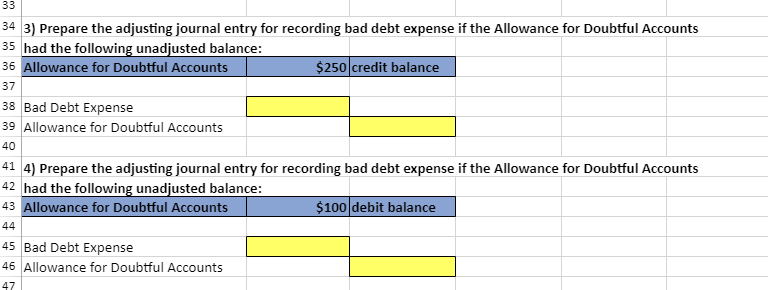
Xercise Cycles Company has provided its year ended accounts receivables that were uncollected. The Controller has asked you to help prepare the Aging of Accounts Receivable Schedule and the corresponding journal entries. Use the information included in the Excel Simulation and the Excel functions described below to complete the task.
PLEASE PUT FORMULAS WITH NUMBERS FROM THE PICTURES! PLEASE MAKE SURE THAT NUMBERS MATCH UP WITH EACH OTHER. PLEASE SHOW FORMULAS ON EVERYTHING!
A D E F 1 Xercise Cycles Company sells exercise equipment to gyms on account. At year end, the following accounts receivable were uncollected. 2 3 Required: 1) Calculate the number of days unpaid, USING THE EXCEL DAYS FUNCTION (fx). 4 5 6 Number of Days Unpaid 1971 10 $ 80 7 Customer 8 Fitness Mania 9 Health for Life 10 Holistic Health Options 11 Image Reimaging 12 Today's Gym World 13 Whole Life Fitness Center 14 Workouts Unlimited Amount 2,500 2,000 12,750 7,000 4,600 15,900 3,800 48,550 Invoice Date 6/17/2016 12/21/2016 10/12/2016 12/5/2016 11/29/2016 11/20/2016 10/2/2016 Today's Date 12/31/2016 12/31/2016 12/31/2016 12/31/2016 12/31/2016 12/31/2016 12/31/2016 26 ml 32 41 90 15 Total $ 16 B25 fo A B D E F Total 19 The IF statement may include the following arguments: , >>, , >>,
Step by Step Solution
There are 3 Steps involved in it

Get step-by-step solutions from verified subject matter experts
 Study Help