







Question: PLEASE READ INSTRUCTIONS FIRST AND PLEASE PROVIDE CELL FORMULAS!! Chapter 4: Applying Excel: Excel Worksheet (Part 1 of 2) Download the Applying Excel form and
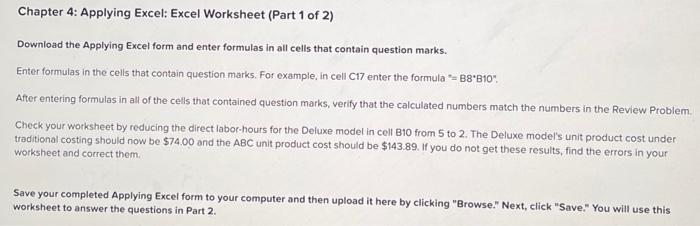
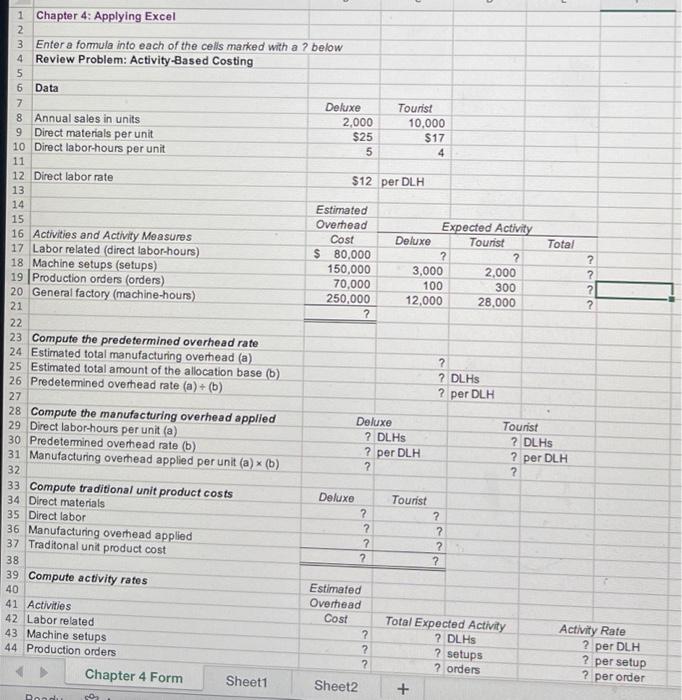
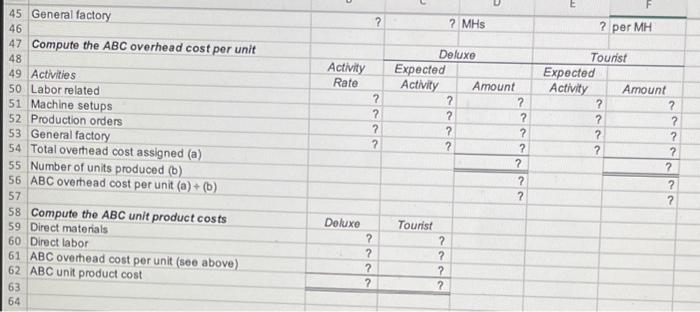
Chapter 4: Applying Excel: Excel Worksheet (Part 1 of 2) Download the Applying Excel form and enter formulas in all cells that contain question marks. Enter formulas in the cells that contain question marks. For example, in cell C17 enter the formula "= 8B10 ". After entering formulas in all of the cells that contained question marks, verify that the calculated numbers match the numbers in the Review Problem Check your worksheet by reducing the direct labor-hours for the Deluxe model in cell B10 from 5 to 2 . The Deluxe model's unit product cost under traditional costing should now be $74.00 and the ABC unit product cost should be $143.89. If you do not get these results, find the errors in your worksheet and correct them. Save your completed Applying Excel form to your computer and then upload it here by clicking "Browse." Next, click "Save." You will use this worksheet to answer the questions in Part 2. Chapter 4: Applying Excel Enter a formula into each of the cells marked with a ? below Review Problem: Activity-Based Costing Data
Step by Step Solution
There are 3 Steps involved in it

Get step-by-step solutions from verified subject matter experts
 Study Help