







Question: please screen shot and with step Part 2: wireless network 1) Connect the following devices as shown in the following figure: door, two windows, air
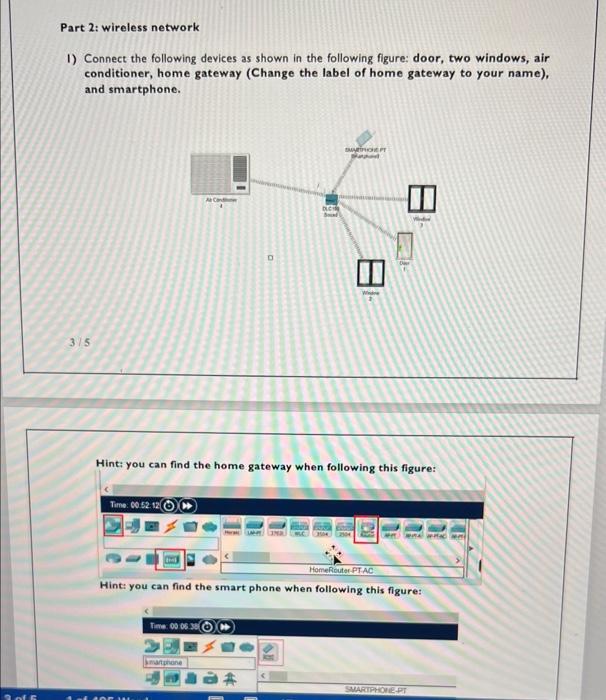
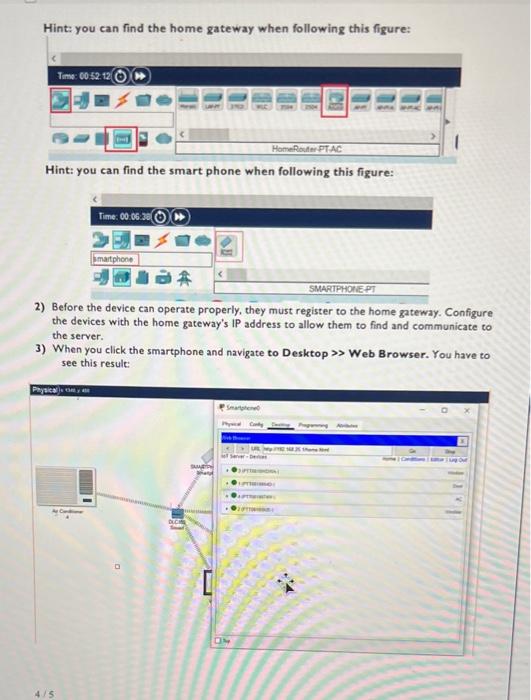
Part 2: wireless network 1) Connect the following devices as shown in the following figure: door, two windows, air conditioner, home gateway (Change the label of home gateway to your name), and smartphone. 3/5 Hint; you can find the home gateway when following this figure: Hint: you can find the smart phone when following this figure: Hint: you can find the home gateway when following this figure: Hint: you can find the smart phone when following this figure: 2) Before the device can operate properly, they must register to the home gateway. Configure the devices with the home gateway's IP address to allow them to find and communicate to the server. 3) When you click the smartphone and navigate to Desktop > Web Browser. You have to see this result
Step by Step Solution
There are 3 Steps involved in it

Get step-by-step solutions from verified subject matter experts
 Study Help