







Question: Please show all steps and explanations using MATLAB. 1 Create an m-file to compute the value of an nth-degree polynomial: g(x) = Q. +ajx +
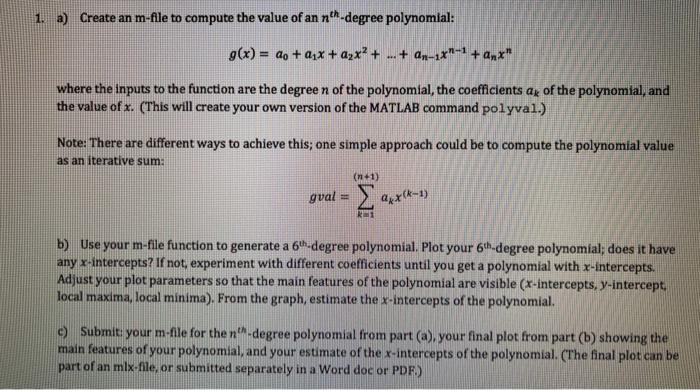
1 Create an m-file to compute the value of an nth-degree polynomial: g(x) = Q. +ajx + ayx? + ... + An-zxn-1 + ant" where the inputs to the function are the degree n of the polynomial, the coefficients ax of the polynomial, and the value of x. (This will create your own version of the MATLAB command polyval.) Note: There are different ways to achieve this; one simple approach could be to compute the polynomial value as an iterative sum: (n+1) gval axx (4-1) RE b) Use your m-file function to generate a 61.degree polynomial. Plot your 6-degree polynomial; does it have any x-intercepts? If not, experiment with different coefficients until you get a polynomial with x-intercepts. Adjust your plot parameters so that the main features of the polynomial are visible (x-intercepts, y-intercept. local maxima, local minima). From the graph, estimate the x-intercepts of the polynomial. c) Submit your m-file for the n-degree polynomial from part (a), your final plot from part (b) showing the main features of your polynomial, and your estimate of the x-intercepts of the polynomial. (The final plot can be part of an mlx-file or submitted separately in a Word doc or PDF.)
Step by Step Solution
There are 3 Steps involved in it

Get step-by-step solutions from verified subject matter experts
 Study Help