



Question: please show all the formulas you used in excel. I started the bugdet but I need help with completing it. thank you Introduction NYP; Now
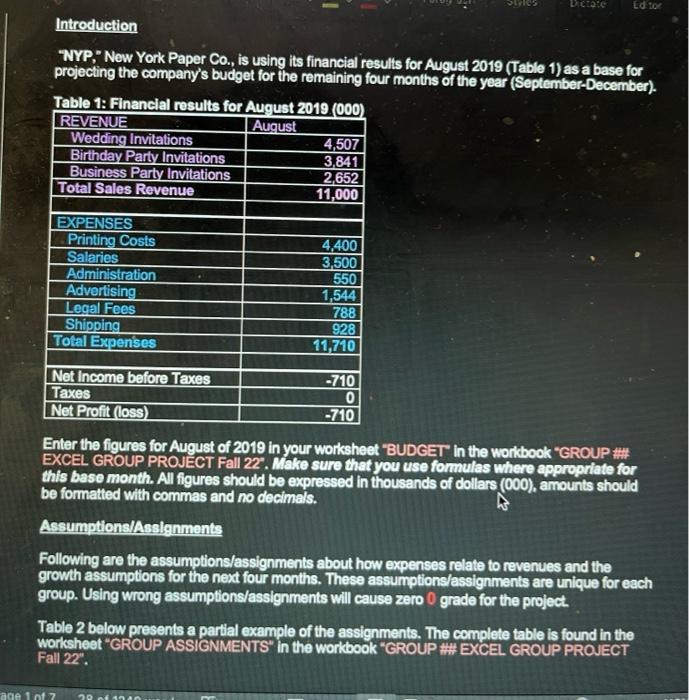
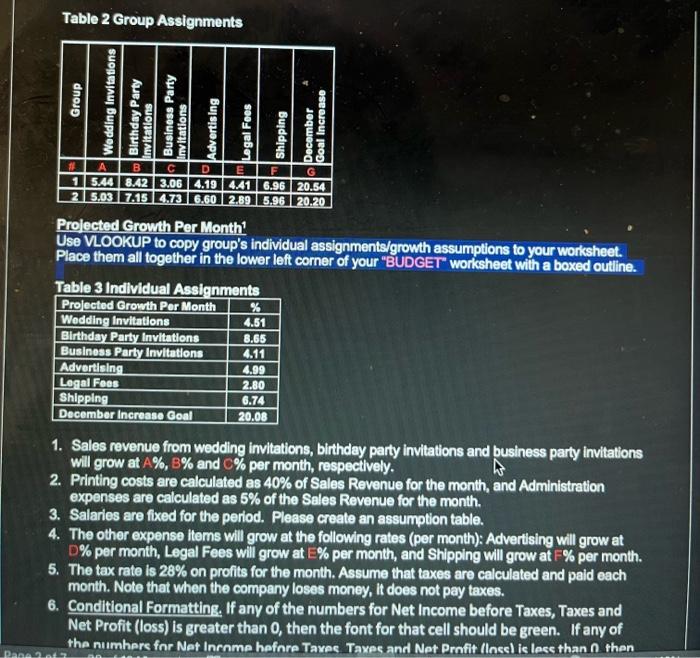
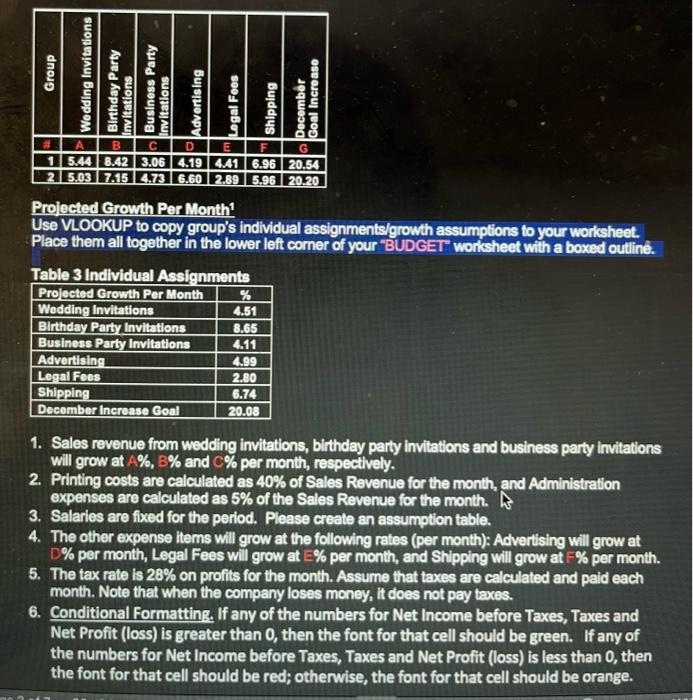
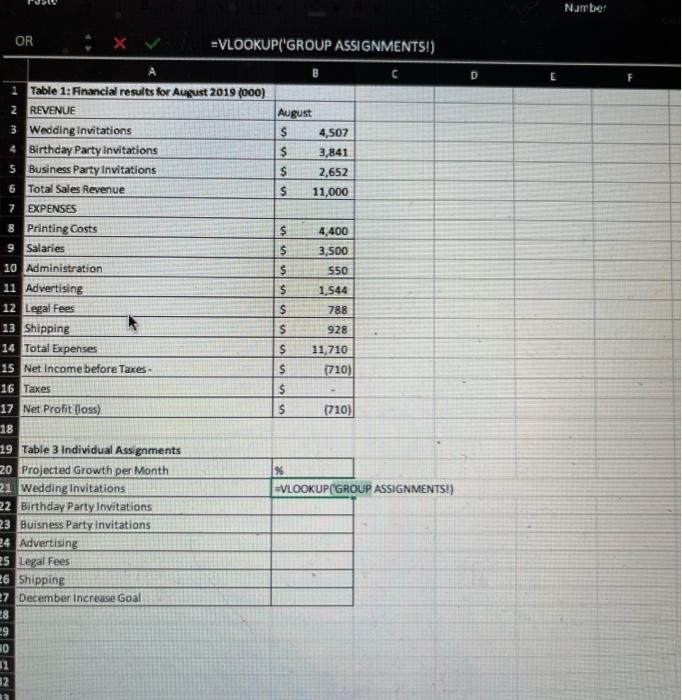
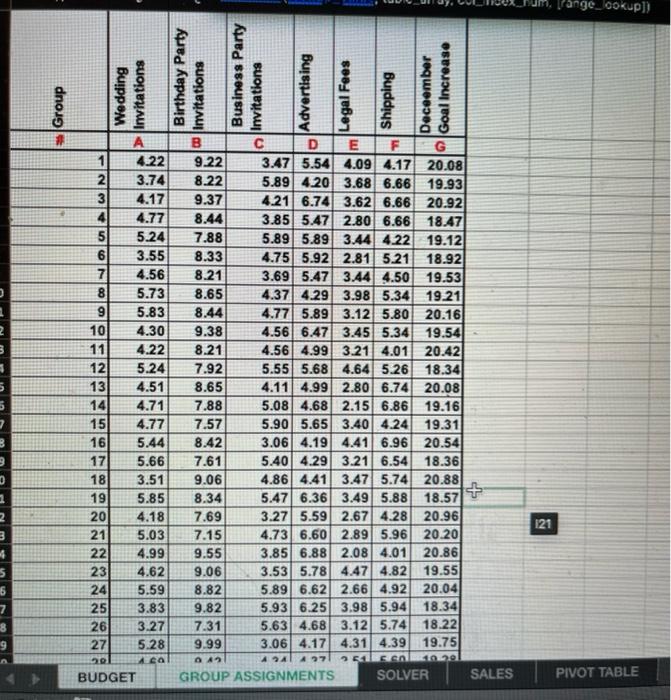
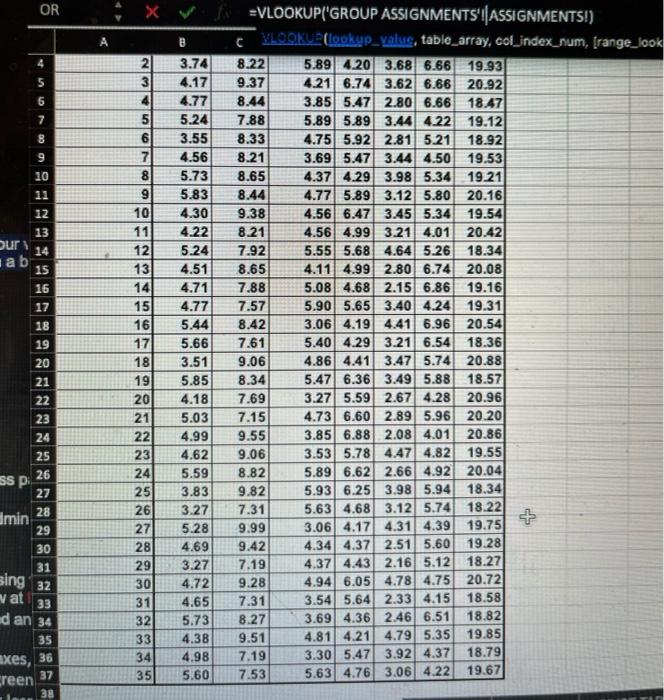
Introduction "NYP;" Now York Paper Co., is using its financial results for August 2019 (Table 1) as a base for projecting the company's budget for the remaining four months of the year (September-December). Enter the figures for August of 2019 in your worksheet "BUDGET in the workbook "GROUP "\#\#\#\#" EXCEL GROUP PROUECT Fall 22". Make sure that you use formulas where approprlate for this base month. All figures should be expressed in thousands of dollars (000), amounts should be formatted with commas and no decimals. Assumptions/Asslgnments Following are the assumptions/assignments about how expenses relate to revenues and the growth assumptions for the next four months. These assumptions/assignments are unique for each group. Using wrong assumptions/assignments will cause zero 0 grade for the project. Table 2 below presents a partial example of the assignments. The complete table is found in the workshoet "GROUP ASSIGNMENTS" in the workbook "GROUP #\#\# EXCEL GROUP PROUECT Fall 22". Prolected Crowth Per Month 1 Use VLOOKUP to copy group's individual assignments/growth assumptions to your worksheet. Place them all together in the lower left corner of your "BUDGET" worksheet with a boxed outline. Table 3 Indlyidual Assionments 1. Sales revenue from wedding invitations, birthday party invitations and business party invitations will grow at A%,B% and C% per month, respectively. 2. Printing costs are calculated as 40% of Sales Revenue for the month, and Administration expenses are calculated as 5% of the Sales Revenue for the month. 3. Salaries are fixed for the period. Please create an assumption table. 4. The other expense ltems will grow at the following rates (per month): Advertising will grow at D\% per month, Legal Fees will grow at E\% per month, and Shipping will grow at =% per month. 5. The tax rate is 28% on profits for the month. Assume that taxes are calculated and paid each month. Note that when the company loses money, it does not pay taxes. 6. Conditional Formatting, If any of the numbers for Net Income before Taxes, Taxes and Net Profit (loss) is greater than 0 , then the font for that cell should be green. If any of tha numhers for Nat Inrome hafinre Taxes. Taxes and Nat Prnfit (Ines) is lese than C then Prolected Growth Per Month 1 Use VLOOKUP to copy group's individual assignments/growth assumptions to your worksheet. Place them all togother in the lower left corner of your "BUDGET" worksheet with a boxed outline. Table 3 Individual Assienments 1. Sales revenue from wedding invitations, birthday party invitations and business party invitations will grow at A%,B% and C% per month, respectively. 2. Printing costs are calculated as 40% of Sales Revenue for the month, and Administration expenses are calculated as 5% of the Sales Revenue for the month. 3. Salaries are fixed for the period. Please create an assumption table. 4. The other expense items will grow at the following rates (per month): Advertising will grow at D\% per month, Legal Fees will grow at E\% per month, and Shipping will grow at F\% per month. 5. The tax rate is 28% on profits for the month. Assume that taxes are calculated and paid each month. Note that when the company loses money, it does not pay taxes. 6. Conditional Formatting, If any of the numbers for Net Income before Taxes, Taxes and Net Profit (loss) is greater than 0 , then the font for that cell should be green. If any of the numbers for Net Income before Taxes, Taxes and Net Profit (loss) is less than 0 , then the font for that cell should be red; otherwise, the font for that cell should be orange. =VLOOKUP('GROUP ASSIGNMENTS!) L29 Introduction "NYP;" Now York Paper Co., is using its financial results for August 2019 (Table 1) as a base for projecting the company's budget for the remaining four months of the year (September-December). Enter the figures for August of 2019 in your worksheet "BUDGET in the workbook "GROUP "\#\#\#\#" EXCEL GROUP PROUECT Fall 22". Make sure that you use formulas where approprlate for this base month. All figures should be expressed in thousands of dollars (000), amounts should be formatted with commas and no decimals. Assumptions/Asslgnments Following are the assumptions/assignments about how expenses relate to revenues and the growth assumptions for the next four months. These assumptions/assignments are unique for each group. Using wrong assumptions/assignments will cause zero 0 grade for the project. Table 2 below presents a partial example of the assignments. The complete table is found in the workshoet "GROUP ASSIGNMENTS" in the workbook "GROUP #\#\# EXCEL GROUP PROUECT Fall 22". Prolected Crowth Per Month 1 Use VLOOKUP to copy group's individual assignments/growth assumptions to your worksheet. Place them all together in the lower left corner of your "BUDGET" worksheet with a boxed outline. Table 3 Indlyidual Assionments 1. Sales revenue from wedding invitations, birthday party invitations and business party invitations will grow at A%,B% and C% per month, respectively. 2. Printing costs are calculated as 40% of Sales Revenue for the month, and Administration expenses are calculated as 5% of the Sales Revenue for the month. 3. Salaries are fixed for the period. Please create an assumption table. 4. The other expense ltems will grow at the following rates (per month): Advertising will grow at D\% per month, Legal Fees will grow at E\% per month, and Shipping will grow at =% per month. 5. The tax rate is 28% on profits for the month. Assume that taxes are calculated and paid each month. Note that when the company loses money, it does not pay taxes. 6. Conditional Formatting, If any of the numbers for Net Income before Taxes, Taxes and Net Profit (loss) is greater than 0 , then the font for that cell should be green. If any of tha numhers for Nat Inrome hafinre Taxes. Taxes and Nat Prnfit (Ines) is lese than C then Prolected Growth Per Month 1 Use VLOOKUP to copy group's individual assignments/growth assumptions to your worksheet. Place them all togother in the lower left corner of your "BUDGET" worksheet with a boxed outline. Table 3 Individual Assienments 1. Sales revenue from wedding invitations, birthday party invitations and business party invitations will grow at A%,B% and C% per month, respectively. 2. Printing costs are calculated as 40% of Sales Revenue for the month, and Administration expenses are calculated as 5% of the Sales Revenue for the month. 3. Salaries are fixed for the period. Please create an assumption table. 4. The other expense items will grow at the following rates (per month): Advertising will grow at D\% per month, Legal Fees will grow at E\% per month, and Shipping will grow at F\% per month. 5. The tax rate is 28% on profits for the month. Assume that taxes are calculated and paid each month. Note that when the company loses money, it does not pay taxes. 6. Conditional Formatting, If any of the numbers for Net Income before Taxes, Taxes and Net Profit (loss) is greater than 0 , then the font for that cell should be green. If any of the numbers for Net Income before Taxes, Taxes and Net Profit (loss) is less than 0 , then the font for that cell should be red; otherwise, the font for that cell should be orange. =VLOOKUP('GROUP ASSIGNMENTS!) L29
Step by Step Solution
There are 3 Steps involved in it

Get step-by-step solutions from verified subject matter experts