







Question: please show how to compute the calculations in excel Problem 9-13 Complete the steps below using cell references to given data or previous calculations. In
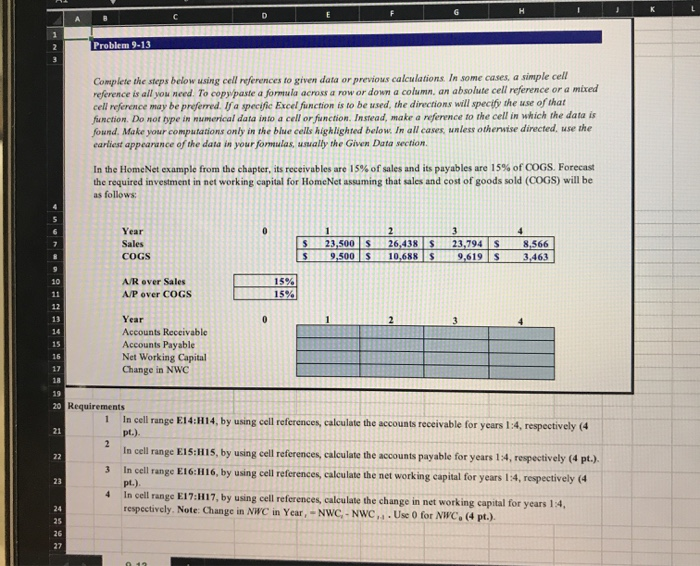
Problem 9-13 Complete the steps below using cell references to given data or previous calculations. In some cases, simple cell reference is all you need to copy paste a formula across a row or down a column, an absolute cell reference or a mixed cell w rence may be preferred. Ia specific Excel function is to be used the directions will specify the use of that function. Do not rype in numerical data into a cell or function. Instead, make a reference to the cell in which the data is Jound, Make your computation only in the blue cells highlighted below. In all cases, unless otherwise directed, use the earliest appearance of the data in your formulas, usually the Gwen Data section In the HomeNet example from the chapter, its receivables are 15% of sales and its payables are 15% of COGS, Forecast the required investment in networking capital for HomeNet assuming that sales and cost of goods sold (COGS) will be as follows: Year Sales COGS 23,500 S 26,438 10,688 S S 23,794 S 9,619 $ 8,566 3,463 A/Rover Sales A/P over COGS Year Accounts Receivable Accounts Payable Net Working Capital Change in NWC Requirements In cell range E14:H14, by using cell references, calculate the accounts receivable for years 1:4. respectively (4 pt.) In cell range E15:H15, by using cell references, calculate the accounts payable for years 1:4, respectively (4 pt.). In cell range E16H16, by using cell references, calculate the networking capital for years 1:4, respectively (4 pt.) In cell range E17:H17, by using cell references, calculate the change in net working capital for years 1:4. respectively. Note: Change in NWC in Year, -NWC, -NWC . Use 0 for NWC. (4 pt.)
Step by Step Solution
There are 3 Steps involved in it

Get step-by-step solutions from verified subject matter experts
 Study Help