







Question: Please show in Python 3.9 and show all options/error messages. Objectives: Practice using lists Continue working past programming practices O Assignment: This week's lab involves
Please show in Python 3.9 and show all options/error messages.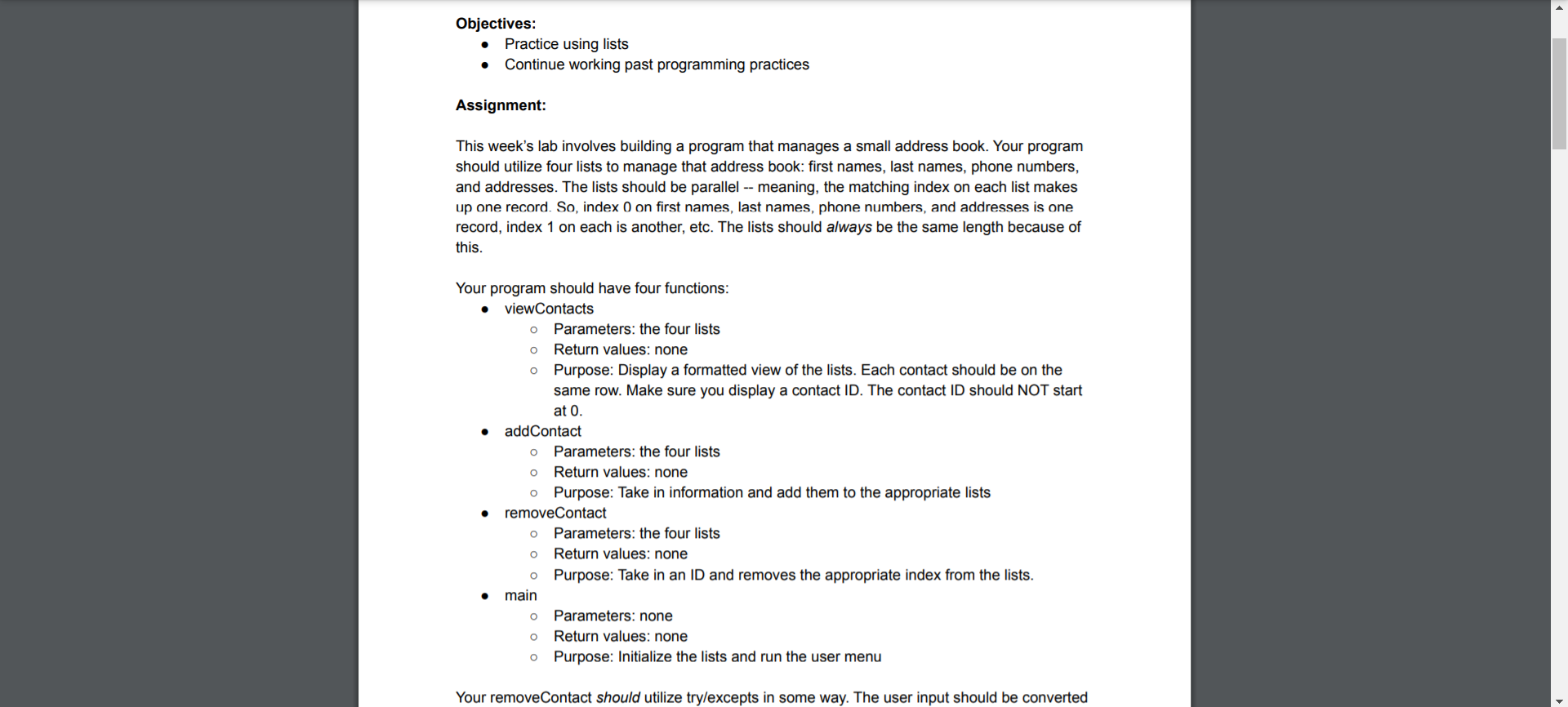
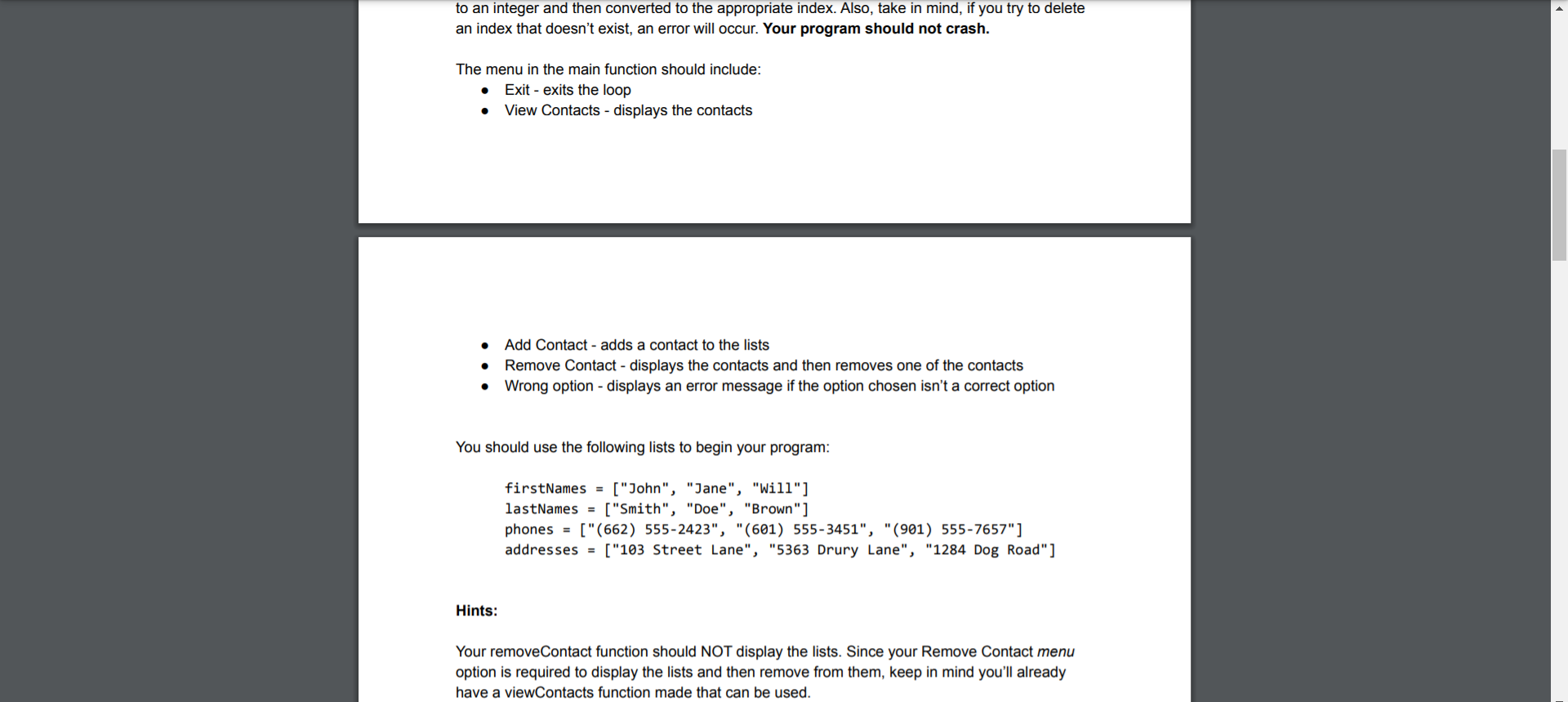
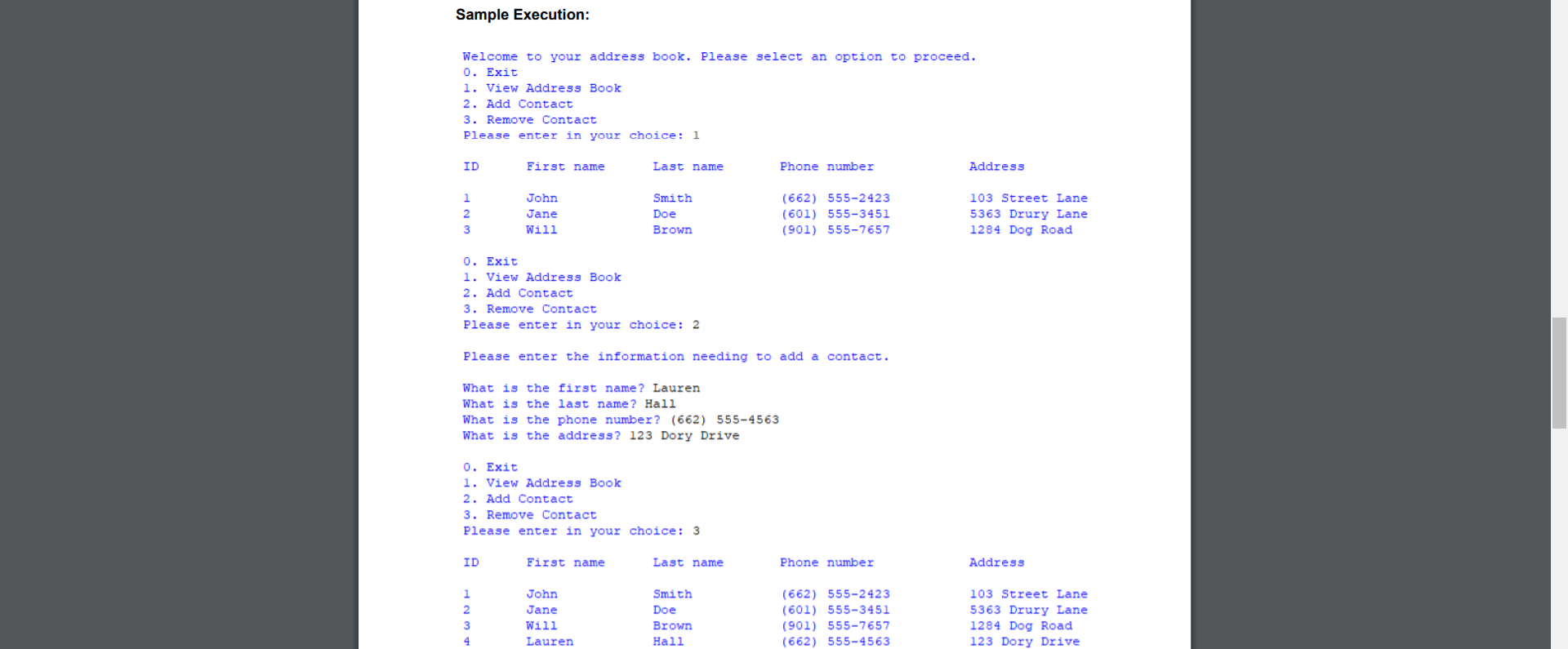

Objectives: Practice using lists Continue working past programming practices O Assignment: This week's lab involves building a program that manages a small address book. Your program should utilize four lists to manage that address book: first names, last names, phone numbers, and addresses. The lists should be parallel -- meaning, the matching index on each list makes up one record. So, index 0 on first names, last names, phone numbers, and addresses is one record, index 1 on each is another, etc. The lists should always be the same length because of this. O O . o Your program should have four functions: viewContacts Parameters: the four lists Return values: none Purpose: Display a formatted view of the lists. Each contact should be on the same row. Make sure you display a contact ID. The contact ID should NOT start at 0. addContact Parameters: the four lists Return values: none Purpose: Take in information and add them to the appropriate lists removeContact Parameters: the four lists Return values: none Purpose: Take in an ID and removes the appropriate index from the lists. main Parameters: none Return values: none Purpose: Initialize the lists and run the user menu o O . O o Your removeContact should utilize try/excepts in some way. The user input should be converted to an integer and then converted to the appropriate index. Also, take in mind, if you try to delete an index that doesn't exist, an error will occur. Your program should not crash. The menu in the main function should include: Exit - exits the loop View Contacts - displays the contacts Add Contact - adds a contact to the lists Remove Contact - displays the contacts and then removes one of the contacts Wrong option - displays an error message if the option chosen isn't a correct option . You should use the following lists to begin your program: firstNames = ["John", "Jane", "Will"] lastNames = ["Smith", "Doe", "Brown"] phones = ["(662) 555-2423", "(601) 555-3451", "(901) 555-7657"] addresses = ["103 Street Lane", "5363 Drury Lane", "1284 Dog Road"] Hints: Your removeContact function should NOT display the lists. Since your Remove Contact menu option is required to display the lists and then remove from them, keep in mind you'll already have a viewContacts function made that can be used. Sample Execution: Welcome to your address book. Please select an option to proceed. 0. Exit 1. View Address Book 2. Add Contact 3. Remove Contact Please enter in your choice: 1 ID First name Last name Phone number Address 1 2 3 John Jane Will Smith Doe Brown (662) 555-2423 (601) 555-3451 (901) 555-7657 103 Street Lane 5363 Drury Lane 1284 Dog Road 0. Exit 1. View Address Book 2. Add Contact 3. Remove Contact Please enter in your choice: 2 Please enter the information needing to add a contact. What is the first name? Lauren What is the last name? Hall What is the phone number? (662) 555-4563 What is the address? 123 Dory Drive 0. Exit 1. View Address Book 2. Add Contact 3. Remove Contact Please enter in your choice: 3 ID First name Last name Phone number Address John Jane 1 2 3 4 Smith Doe Brown Hall (662) 555-2423 (601) 555-3451 (901) 555-7657 (662) 555-4563 103 Street Lane 5363 Drury Lane 1284 Dog Road 123 Dory Drive Will Lauren What contact ID would you like to remove? 3 0. Exit 1. View Address Book 2. Add Contact 3. Remove Contact Please enter in your choice: 1 ID First name Last name Phone number Address 1 2 3 John Jane Lauren Smith Doe (662) 555-2423 (601) 555-3451 (662) 555-4563 103 Street Lane 5363 Drury Lane 123 Dory Drive Hall
Step by Step Solution
There are 3 Steps involved in it

Get step-by-step solutions from verified subject matter experts
 Study Help