







Question: Please show input and output clearly Lab Assignment 3- Chinese Zodiad CSCI 251 Problem Statement The Chinese Zodiac is based on a twelve-year cycle, with
Please show input and output clearly
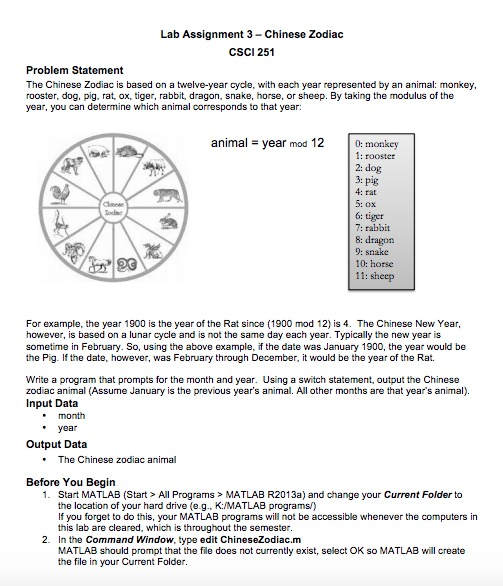
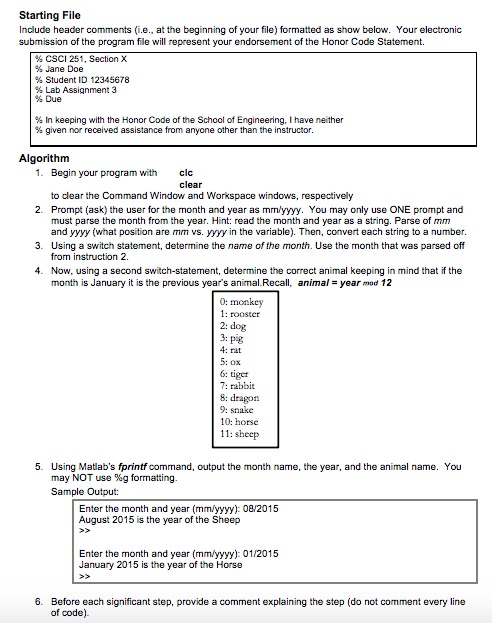
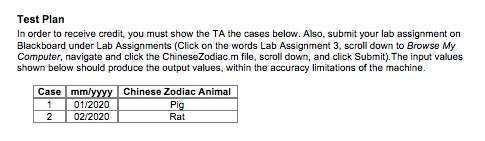
Lab Assignment 3- Chinese Zodiad CSCI 251 Problem Statement The Chinese Zodiac is based on a twelve-year cycle, with each year represented by an animal: monkey rooster, dog, pig, rat, ox, tiger, rabbit, dragon, snake, horse, or sheep. By taking the modulus of the year, you can determine which animal corresponds to that year animal- year mod 12 0: monkey 1: rooster 2: dog 3: pig Cleese 6: tiger 7: rabbit 8: dragon 9: snake 10: horse 11: sheep For example, the year 1900 is the year of the Rat since (1900 mod 12) is 4. The Chinese New Year, however, is based on a lunar cycle and is not the same day each year. Typically the new year is sometime in February. So, using the above example, if the date was January 1900, the year would be the Pig. If the date, however, was February through December, it would be the year of the Rat. Write a program that prompts for the month and year. Using a switch statement, output the Chinese zodiac animal (Assurne January is the previous year's animal. All other months are that year's animal). Input Data . month year Output Data . The Chinese zodiac animal Before You Begin 1. Start MATLAB (Start > All Programs> MATLAB R2013a) and change your Current Folder to the location of your hard drive (e.g., K:/MATLAB programs) If you forget to do this, your MATLAB programs will not be accessible whenever the computers in this lab are cleared, which is throughout the semester 2. In the Command Window, type edit ChineseZodiac.m MATLAB should prompt that the file does not currently exist, select OK so MATLAB will create the file in your Current Folder
Step by Step Solution
There are 3 Steps involved in it

Get step-by-step solutions from verified subject matter experts
 Study Help