







Question: Please show the code of the server side Once you have your list of dragons working... add a form that allows you to filter dragon
Please show the code of the server side
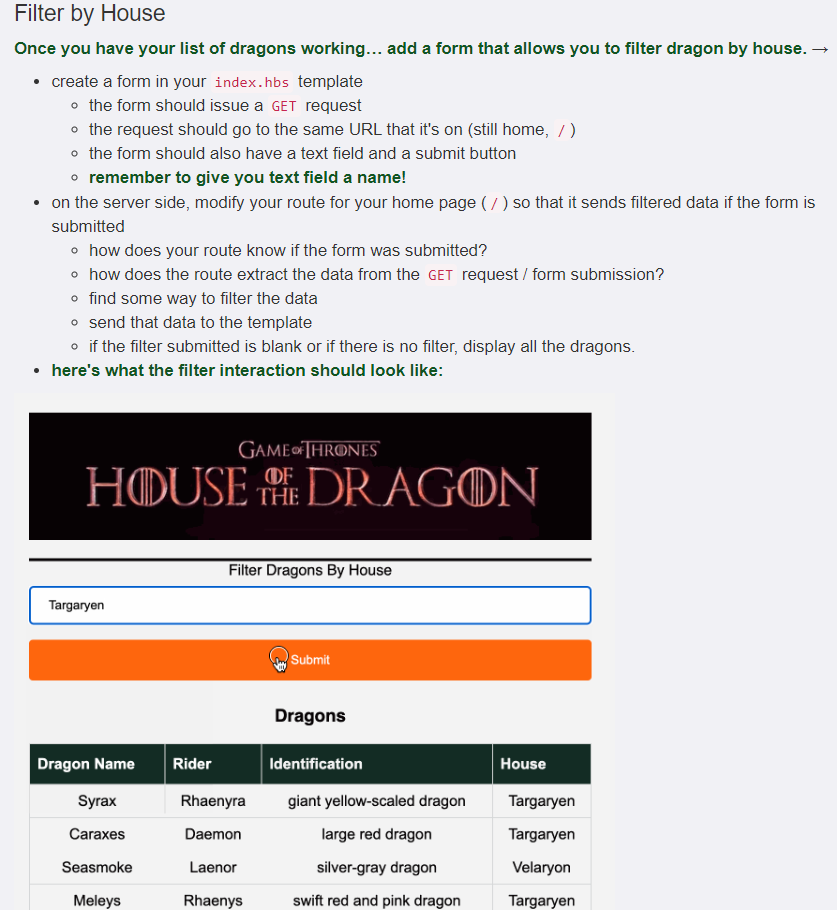
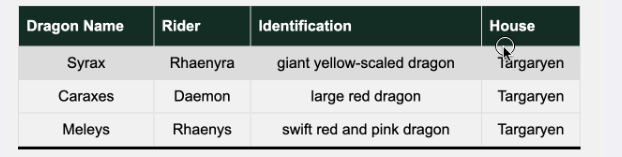
Once you have your list of dragons working... add a form that allows you to filter dragon by house. - create a form in your index.hbs template - the form should issue a GET request - the request should go to the same URL that it's on (still home, / ) - the form should also have a text field and a submit button - remember to give you text field a name! - on the server side, modify your route for your home page ( / ) so that it sends filtered data if the form is submitted - how does your route know if the form was submitted? - how does the route extract the data from the GET request / form submission? - find some way to filter the data - send that data to the template - if the filter submitted is blank or if there is no filter, display all the dragons. - here's what the filter interaction should look like: \begin{tabular}{c|l|c|c|} \hline Dragon Name & Rider & Identification & House \\ \hline Syrax & Rhaenyra & giant yellow-scaled dragon & Targaryen \\ \hline Caraxes & Daemon & large red dragon & Targaryen \\ Meleys & Rhaenys & swift red and pink dragon & Targaryen \\ \hline \end{tabular} Once you have your list of dragons working... add a form that allows you to filter dragon by house. - create a form in your index.hbs template - the form should issue a GET request - the request should go to the same URL that it's on (still home, / ) - the form should also have a text field and a submit button - remember to give you text field a name! - on the server side, modify your route for your home page ( / ) so that it sends filtered data if the form is submitted - how does your route know if the form was submitted? - how does the route extract the data from the GET request / form submission? - find some way to filter the data - send that data to the template - if the filter submitted is blank or if there is no filter, display all the dragons. - here's what the filter interaction should look like: \begin{tabular}{c|l|c|c|} \hline Dragon Name & Rider & Identification & House \\ \hline Syrax & Rhaenyra & giant yellow-scaled dragon & Targaryen \\ \hline Caraxes & Daemon & large red dragon & Targaryen \\ Meleys & Rhaenys & swift red and pink dragon & Targaryen \\ \hline \end{tabular}
Step by Step Solution
There are 3 Steps involved in it

Get step-by-step solutions from verified subject matter experts
 Study Help