



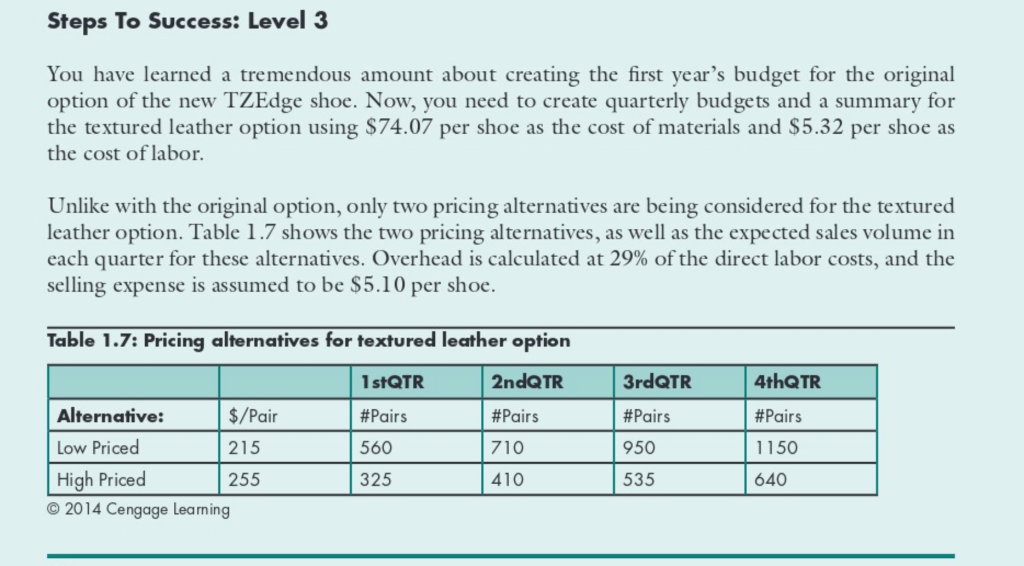
Question: please show the formulas for each box Steps To Success: Level 3 You have learned a tremendous amount about creating the first year's budget for
please show the formulas for each box
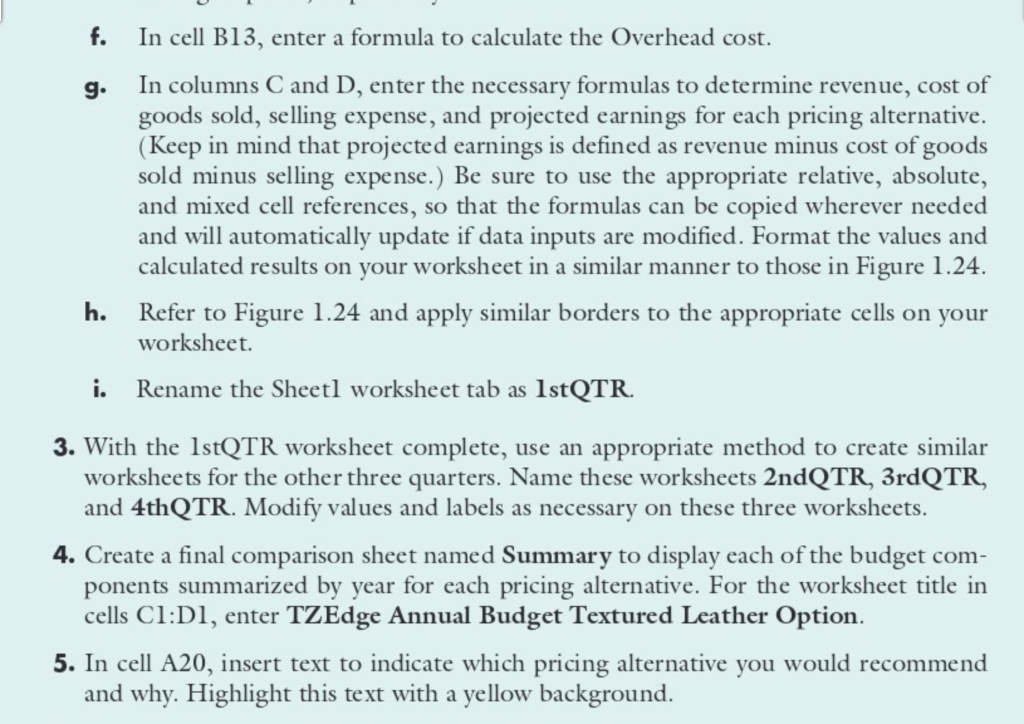
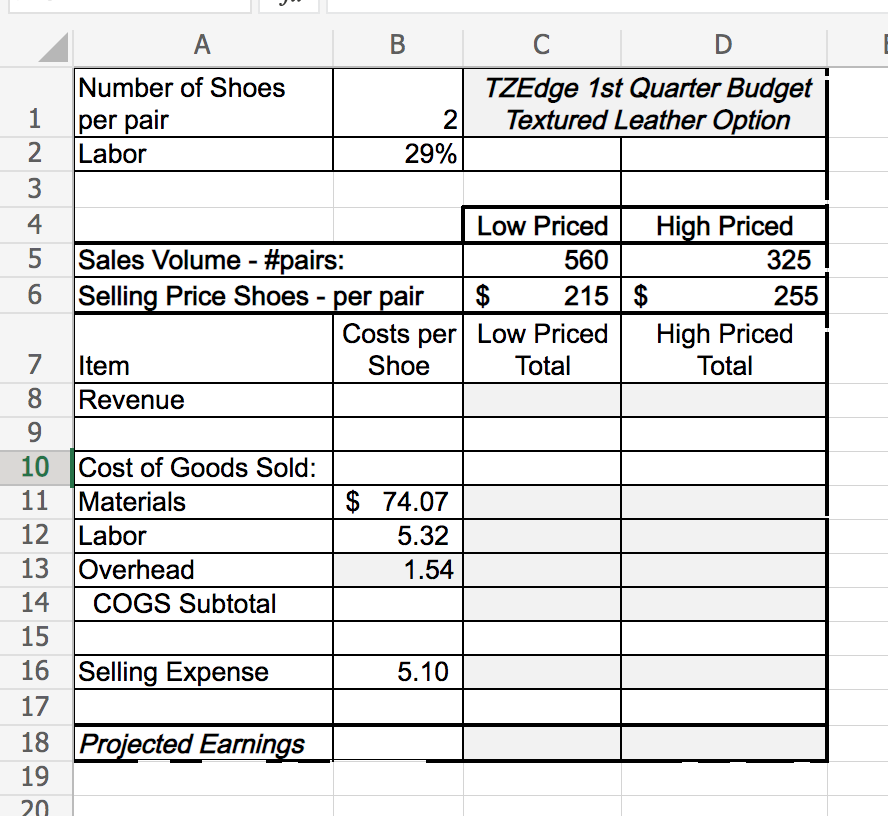
Steps To Success: Level 3 You have learned a tremendous amount about creating the first year's budget for the original option of the new TZEdge shoe. Now, you need to create quarterly budgets and a summary for the textured leather option using $74.07 per shoe as the cost of materials and $5.32 per shoe as the cost of labor. Unlike with the original option, only two pricing alternatives are being considered for the textured leather option. Table 1.7 shows the two pricing alternatives, as well as the expected sales volume in each quarter for these alternatives. Overhead is calculated at 29% of the direct labor costs, and the selling expense is assumed to be $5.10 per shoe. Table 1.7: Pricing alternatives for textured leather option 1 stQTR 2ndQTR 3rdQTR 4thQTR #Pairs #Pairs #Pairs #Pairs 560 710 950 1150 Alternative: $/Pair Low Priced 215 High Priced 255 2014 Cengage learning 325 410 535 640 f. g. In cell B13, enter a formula to calculate the Overhead cost. In columns C and D, enter the necessary formulas to determine revenue, cost of goods sold, selling expense, and projected earnings for each pricing alternative. (Keep in mind that projected earnings is defined as revenue minus cost of goods sold minus selling expense.) Be sure to use the appropriate relative, absolute, and mixed cell references, so that the formulas can be copied wherever needed and will automatically update if data inputs are modified. Format the values and calculated results on your worksheet in a similar manner to those in Figure 1.24. h. Refer to Figure 1.24 and apply similar borders to the appropriate cells on your worksheet. Rename the Sheetl worksheet tab as 1st QTR. i. 3. With the 1stQTR worksheet complete, use an appropriate method to create similar worksheets for the other three quarters. Name these worksheets 2ndQTR, 3rd QTR, and 4thQTR. Modify values and labels as necessary on these three worksheets. 4. Create a final comparison sheet named Summary to display each of the budget com- ponents summarized by year for each pricing alternative. For the worksheet title in cells C1:D1, enter TZEdge Annual Budget Textured Leather Option. 5. In cell A20, insert text to indicate which pricing alternative you would recommend and why. Highlight this text with a yellow background. J" A B D W NA Number of Shoes TZEdge 1st Quarter Budget 1 per pair 2 Textured Leather Option 2 Labor 29% 3 4 Low Priced High Priced 5 Sales Volume - #pairs: 560 325 6 Selling Price Shoes - per pair $ 215$ 255 Costs per Low Priced High Priced 7 Item Shoe Total Total 8 Revenue 9 10 Cost of Goods Sold: 11 Materials $ 74.07 12 Labor 5.32 13 Overhead 1.54 14 COGS Subtotal 15 16 Selling Expense 5.10 17 18 Projected Earnings 19 20
Step by Step Solution
There are 3 Steps involved in it

Get step-by-step solutions from verified subject matter experts