







Question: Please solve for todo task4: In TODO 4, you will implement the export_phone_call_counts function that exports the output of the most_frequently_called function into a plain
Please solve for todo task4:
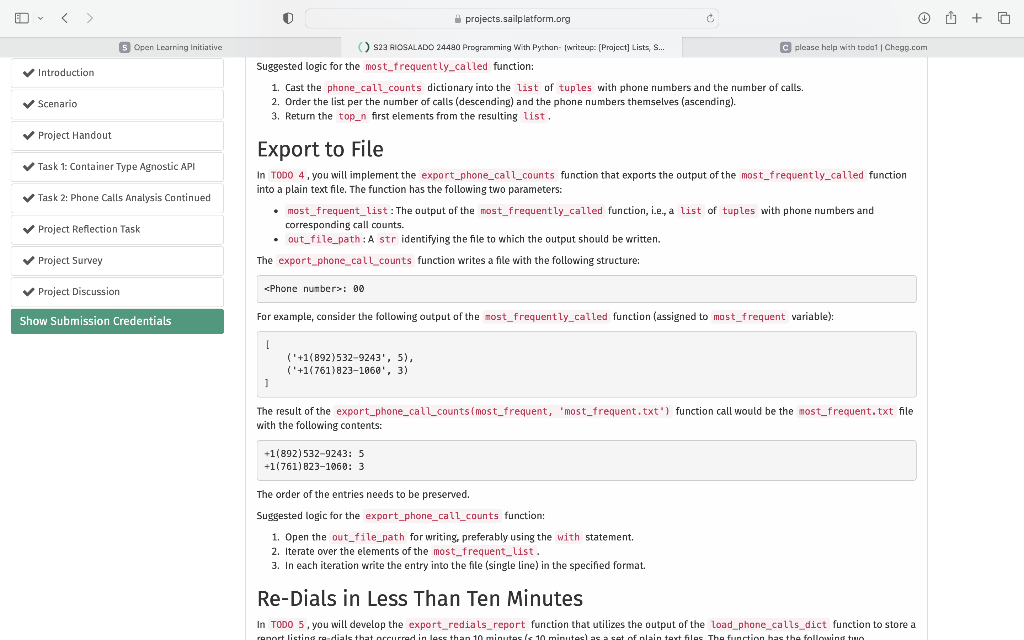
In TODO 4, you will implement the export_phone_call_counts function that exports the output of the most_frequently_called function into a plain text file. The function has the following two parameters:
most_frequent_list: The output of the most_frequently_called function, i.e., a list of tuples with phone numbers and corresponding call counts.
out_file_path: A str identifying the file to which the output should be written.
The export_phone_call_counts function writes a file with the following structure:
: 00
For example, consider the following output of the most_frequently_called function (assigned to most_frequent variable):
[ ('+1(892)532-9243', 5), ('+1(761)823-1060', 3) ] The result of the export_phone_call_counts(most_frequent, 'most_frequent.txt') function call would be the most_frequent.txt file with the following contents:
+1(892)532-9243: 5 +1(761)823-1060: 3
The order of the entries needs to be preserved.
Suggested logic for the export_phone_call_counts function:
Open the out_file_path for writing, preferably using the with statement.
Iterate over the elements of the most_frequent_list.
In each iteration write the entry into the file (single line) in the specified format.
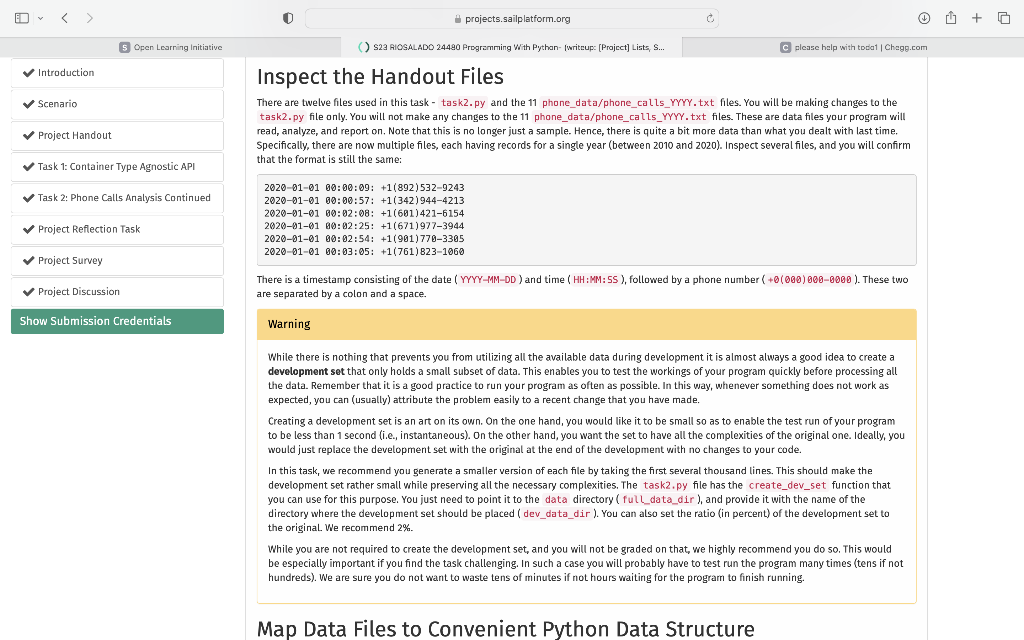
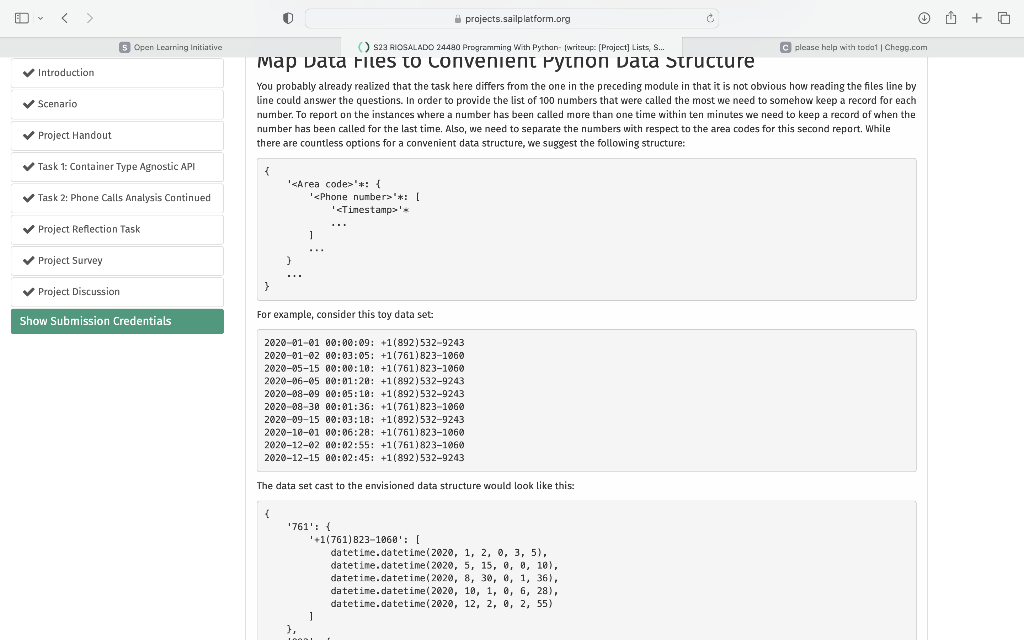
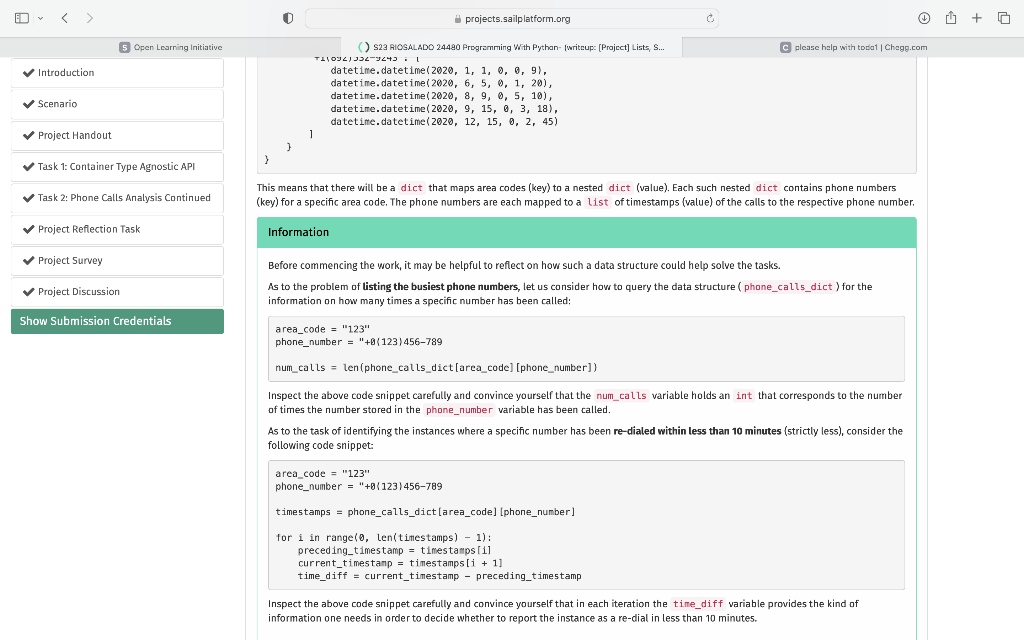
Inspect the Handout Files There are twelve files used in this task - task2.py and the 11 phone_data/phone_calls_Yrry.txt files. You will be making changes to the task2.py file only. You will not make any changes to the 11 phone_data/phone_calls_YYYY.txt files. These are data files your program will read, analyze, and report on. Note that this is no longer just a sample. Hence, there is quite a bit more data than what you dealt with last time. Specifically, there are now multiple files, each having records for a single year (between 2010 and 2020). Inspect several files, and you will confirm that the format is still the same: 2020010100:00:09:+1(892)53292432020010100:00:57:+1(342)94442132020010100:02:08:+1(601)42161542020010100:02:25:+1(671)97739442020010100:02:54:+1(901)77033052020010100:03:05:+1(761)8231060 There is a timestamp consisting of the date ( YYYYMMDD) and time ( HH:MM: SS), followed by a phone number (+0(000)0000000). These two are separated by a colon and a space. Warning While there is nothing that prevents you from utilizing all the available data during development it is almost always a good idea to create a development set that only holds a small subset of data. This enables you to test the workings of your program quickly before processing all the data. Remember that it is a good practice to run your program as often as possible. In this way, whenever something does not work as expected, you can (usually) attribute the problem easily to a recent change that you have made. Creating a development set is an art on its own. On the one hand, you would like it to be small so as to enable the test run of your program to be less than 1 second (i.e., instantaneous). On the other hand, you want the set to have all the complexities of the original one. Ideally, you would just replace the development set with the original at the end of the development with no changes to your code. In this task, we recommend you generate a smaller version of each file by taking the first several thousand lines. This should make the development set rather small while preserving all the necessary complexities. The task2.py file has the create_dev_set function that you can use for this purpose. You just need to point it to the data directory ( full_data_dir), and provide it with the name of the directory where the development set should be placed ( dev_data_dir). You can also set the ratio (in percent) of the development set to the original We recommend 2%. While you are not required to create the development set, and you will not be graded on that, we highly recommend you do so. This would be especially important if you find the task challenging. In such a case you will probably have to test run the program many times (tens if not hundreds). We are sure you do not want to waste tens of minutes if not hours waiting for the program to finish running. Map Data Files to Convenient Python Data Structure map vata riles co convenent ryton vata structure You probably already realized that the task here differs from the one in the preceding module in that it is not obvious how reading the files line by line could answer the questions. In order to provide the list of 100 numbers that were called the most we need to somehow keep a record for each number. To report on the instances where a number has been called more than one time within ten minutes we need to keep a record of when the number has been called for the last time. Also, we need to separate the numbers with respect to the area codes for this second report. While there are countless options for a convenient data structure, we suggest the following structure: For example, consider this toy data set: 2020010100:00:09:+1(892)53292432020010200:03:05:+1(761)82310602020051500:00:10:+1(761)82310602020060500:01:20:+1(892)53292432020080900:05:10:+1(892)53292432020083000:01:36:+1(761)82310602020091500:03:18:+1(892)53292432020100160:06:28:+1(761)82310602020120200:02:55:+1(761)82310602020121500:02:45:+1(892)5329243 The data set cast to the envisioned data structure would look like this: () S23 AiOGALADO 24490 Programming With Pythan- fwritzups [Prajcct] Lists, S... C please halp with todat 1 Chagg.cor This means that there will be a dict that maps area codes (key) to a nested dict (value). Each such nested dict contains phone numbers (key) for a specific area code. The phone numbers are each mapped to a list of timestamps (value) of the calls to the respective phone number. Information Before commencing the work, it may be helpful to reflect on how such a data structure could help solve the tasks. As to the problem of listing the busiest phone numbers, let us consider how to query the data structure (phone_calls_dict) for the information on how many times a specific number has been called: area_code = "123" phone_number = "10 0123)456789 num_calls = len(phone_calls_dict[area_code] [phone_number]) Inspect the above code snippet carefully and convince yourself that the num_calls variable holds an int that corresponds to the number of times the number stored in the phone_number variable has been called. As to the task of identifying the instances where a specific number has been re-dialed within less than 10 minutes (strictly less), consider the following code snippet- area_code = "123" phone_number ="+0123)456789 timestamps = phone_calls_dict[area_code] [phone_number] for i in range (0, len(tinestamps) 1): preceding_timestamp = timestamps [1] current_timestanp = timestamps[i +1] time_diff = current_timestamp - preceding_timestamp Inspect the above code snippet carefully and convince yourself that in each iteration the time_diff variable provides the kind of information one needs in order to decide whether to report the instance as a re-dial in less than 10 minutes. Suggested logic for the most_frequently_called function: 1. Cast the phone_call_counts dictionary into the list of tuples with phone numbers and the number of calls. 2. Order the list per the number of calls (descending) and the phone numbers themselves (ascending). 3. Return the top_n first elements from the resulting list. Export to File In TOD0 4, you will implement the export_phone_call_counts function that exports the output of the most_frequently_called function into a plain text file. The function has the following two parameters: - most_frequent_list: The output of the most_frequently_called function, i.e., a list of tuples with phone numbers and corresponding call counts. - out_file_path: A str identifying the file to which the output should be written. The export_phone_call_counts function writes a file with the following structure: :Phone number 00 For example, consider the following output of the most_frequently_called function (assigned to most_f requent variable): [ (+1(892)5329243,5),(+1(761)8231060,3) 1 The result of the export_phone_call_counts (most_frequent, 'most_frequent,txt') function call would be the most_frequent.txt file with the following contents: +1(892)5329243:5+1(761)8231060:3 The order of the entries needs to be preserved. Suggested logic for the export_phone_call_counts function: 1. Open the out_file_path for writing, preferably using the with statement. 2. Iterate over the elements of the most_frequent_list. 3. In each iteration write the entry into the file (single line) in the specified format. Re-Dials in Less Than Ten Minutes In TOD0 5, you will develop the export_redials_report function that utilizes the output of the load_phone_calls_dict function to store a
Step by Step Solution
There are 3 Steps involved in it

Get step-by-step solutions from verified subject matter experts
 Study Help