







Question: Please solve this cpp Rapsberry Pi program as soon as possible. Code to be edited: Logger Integration In logger.h/.cpp in the DIGetLogger Readings function: 1.
Please solve this cpp Rapsberry Pi program as soon as possible.
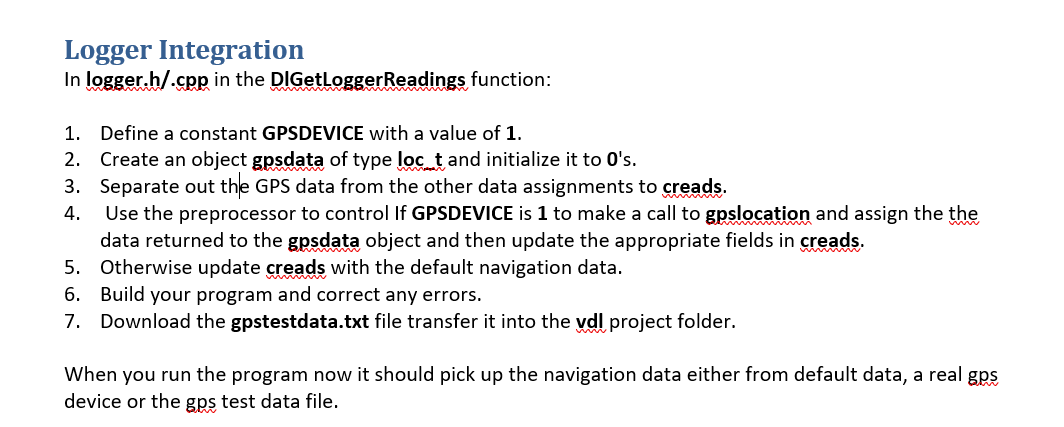
Code to be edited:
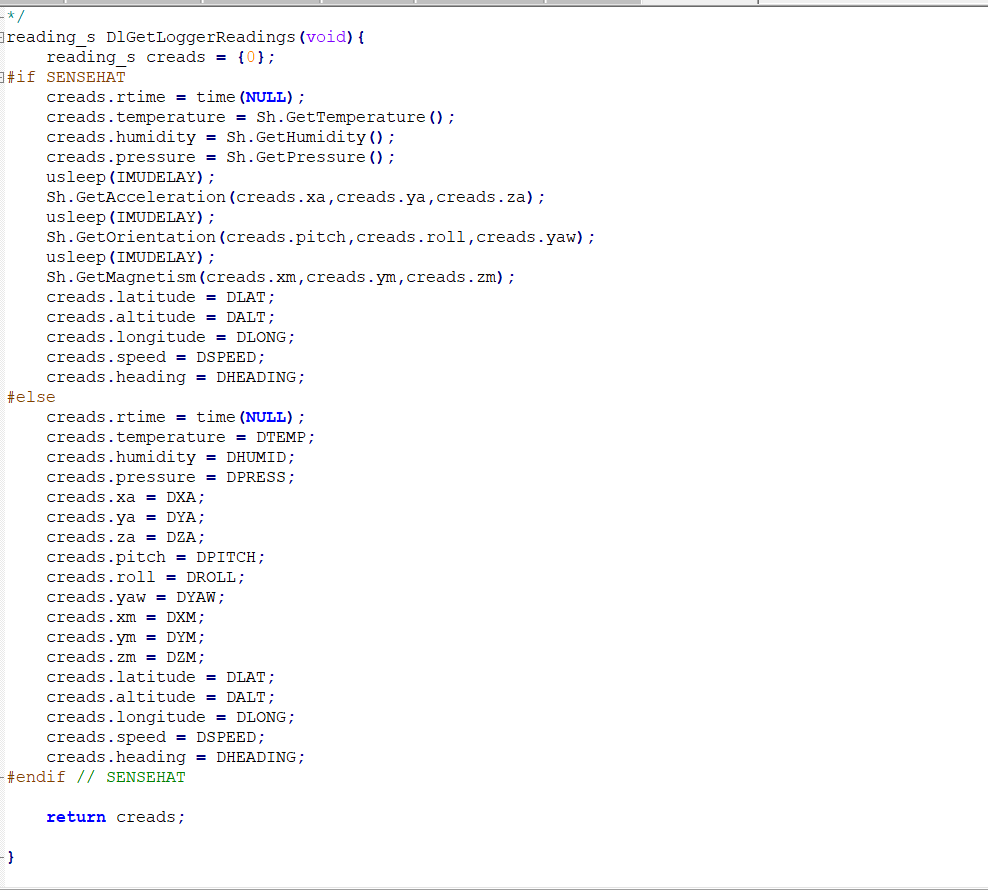
Logger Integration In logger.h/.cpp in the DIGetLogger Readings function: 1. Define a constant GPSDEVICE with a value of 1. 2. Create an object gpsdata of type loc_t and initialize it to O's. 3. Separate out the GPS data from the other data assignments to creads. 4. Use the preprocessor to control If GPSDEVICE is 1 to make a call to gpslocation and assign the the data returned to the gpsdata object and then update the appropriate fields in creads. 5. Otherwise update creads with the default navigation data. 6. Build your program and correct any errors. 7. Download the gpstestdata.txt file transfer it into the vdl project folder. When you run the program now it should pick up the navigation data either from default data, a real gps device or the gps test data file. reading_s DiGetLoggerReadings (void) { reading_s creads = {0}; #if SENSEHAT creads.rtime = time (NULL); creads. temperature = Sh.GetTemperature (); creads.humidity = Sh.GetHumidity(); creads.pressure = Sh.GetPressure(); usleep (IMUDELAY); Sh.GetAcceleration (creads.xa, creads.ya, creads.za); usleep (IMUDELAY); Sh.GetOrientation (creads.pitch,creads.roll,creads.yaw); usleep (IMUDELAY); Sh.GetMagnetism (creads.xm, creads.ym, creads.zm); creads.latitude = DLAT; creads.altitude = DALT; creads.longitude = DLONG; creads. speed = DSPEED; creads.heading = DHEADING; #else creads.rtime = time (NULL); creads. temperature = DTEMP; creads.humidity = DHUMID; creads.pressure = DPRESS; creads.xa = DXA; creads.ya = DYA; creads.za = DZA; creads.pitch = DPITCH; creads.roll = DROLL; creads.yaw = DYAW; creads.xm = DXM; creads.ym = DYM; creads.zm = DZM; creads.latitude = DLAT; creads.altitude = DALT; creads.longitude = DLONG; creads. speed = DSPEED; creads.heading = DHEADING; - #endif // SENSEHAT return creads; Logger Integration In logger.h/.cpp in the DIGetLogger Readings function: 1. Define a constant GPSDEVICE with a value of 1. 2. Create an object gpsdata of type loc_t and initialize it to O's. 3. Separate out the GPS data from the other data assignments to creads. 4. Use the preprocessor to control If GPSDEVICE is 1 to make a call to gpslocation and assign the the data returned to the gpsdata object and then update the appropriate fields in creads. 5. Otherwise update creads with the default navigation data. 6. Build your program and correct any errors. 7. Download the gpstestdata.txt file transfer it into the vdl project folder. When you run the program now it should pick up the navigation data either from default data, a real gps device or the gps test data file. reading_s DiGetLoggerReadings (void) { reading_s creads = {0}; #if SENSEHAT creads.rtime = time (NULL); creads. temperature = Sh.GetTemperature (); creads.humidity = Sh.GetHumidity(); creads.pressure = Sh.GetPressure(); usleep (IMUDELAY); Sh.GetAcceleration (creads.xa, creads.ya, creads.za); usleep (IMUDELAY); Sh.GetOrientation (creads.pitch,creads.roll,creads.yaw); usleep (IMUDELAY); Sh.GetMagnetism (creads.xm, creads.ym, creads.zm); creads.latitude = DLAT; creads.altitude = DALT; creads.longitude = DLONG; creads. speed = DSPEED; creads.heading = DHEADING; #else creads.rtime = time (NULL); creads. temperature = DTEMP; creads.humidity = DHUMID; creads.pressure = DPRESS; creads.xa = DXA; creads.ya = DYA; creads.za = DZA; creads.pitch = DPITCH; creads.roll = DROLL; creads.yaw = DYAW; creads.xm = DXM; creads.ym = DYM; creads.zm = DZM; creads.latitude = DLAT; creads.altitude = DALT; creads.longitude = DLONG; creads. speed = DSPEED; creads.heading = DHEADING; - #endif // SENSEHAT return creads
Step by Step Solution
There are 3 Steps involved in it

Get step-by-step solutions from verified subject matter experts
 Study Help