







Question: please solve this with explanation. tnx Task ( IPv 6 ) : Using the GNS 3 simulator, configure according to the topology from the IPv
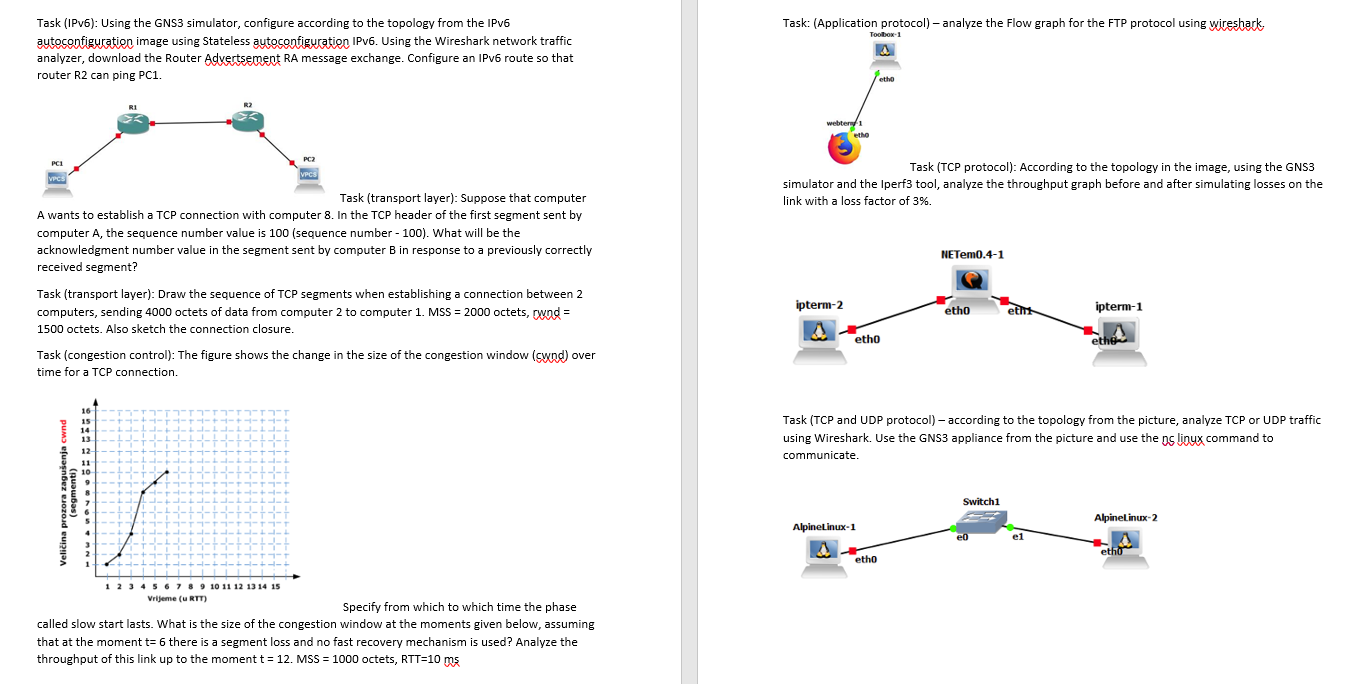
please solve this with explanation. tnx Task IPv: Using the GNS simulator, configure according to the topology from the IPv autoconfiguratied image using Stateless autoconfiguration IPv Using the Wireshark network traffic analyzer, download the Router Advertsement RA message exchange. Configure an IPv route so that router R can ping PC
A wants to establish a TCP connection with computer In the TCP header of the first segment sent by computer A the sequence number value is sequence number What will be the acknowledgment number value in the segment sent by computer B in response to a previously correctly received segment?
Task transport layer: Draw the sequence of TCP segments when establishing a connection between computers, sending octets of data from computer to computer MSS octets, cwnd octets. Also sketch the connection closure.
Task congestion control: The figure shows the change in the size of the congestion window cynd over time for a TCP connection.
Specify from which to which time the phase called slow start lasts. What is the size of the congestion window at the moments given below, assuming that at the moment t there is a segment loss and no fast recovery mechanism is used? Analyze the throughput of this link up to the moment mathrmt MSS octets, mathrmRTTmathrm~ms
Task: Application protocol analyze the Flow graph for the FTP protocol using wireshark
usk TCP protocol: According to the topology in the image, using the GNS simulator and the Iperf tool, analyze the throughput graph before and after simulating losses on the link with a loss factor of
Task TCP and UDP protocol according to the topology from the picture, analyze TCP or UDP traffic using Wireshark. Use the GNS appliance from the picture and use the OS linux command to communicate.
Step by Step Solution
There are 3 Steps involved in it
1 Expert Approved Answer
Step: 1 Unlock

Question Has Been Solved by an Expert!
Get step-by-step solutions from verified subject matter experts
Step: 2 Unlock
Step: 3 Unlock
 Study Help