







Question: Please solve using MATLAB Function Name: piEdmontPark Inputs: 1. (cell) MxN map of the area around piedmont park Outputs: 1. (cell) MxN modified map 2.
Please solve using MATLAB
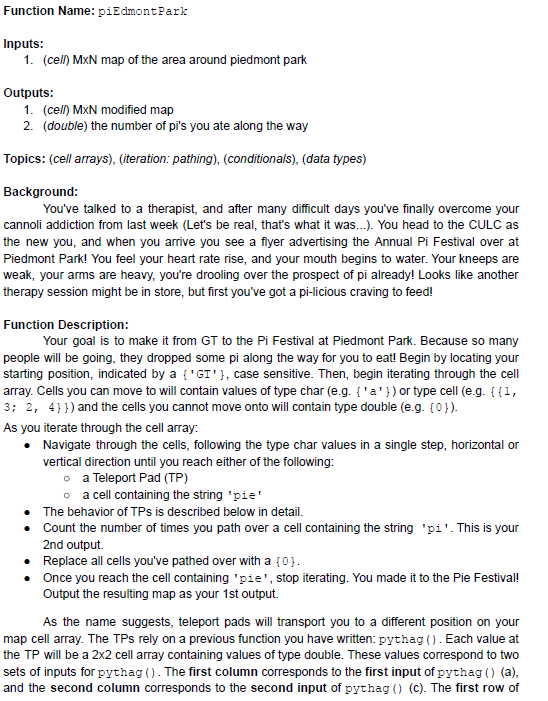
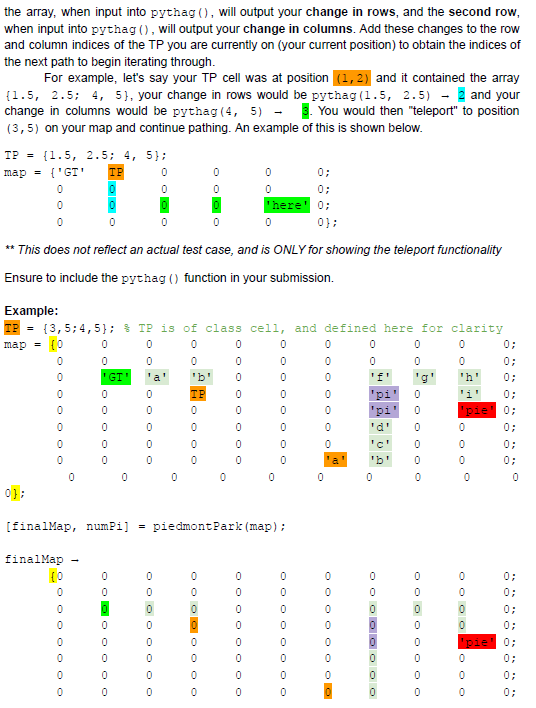
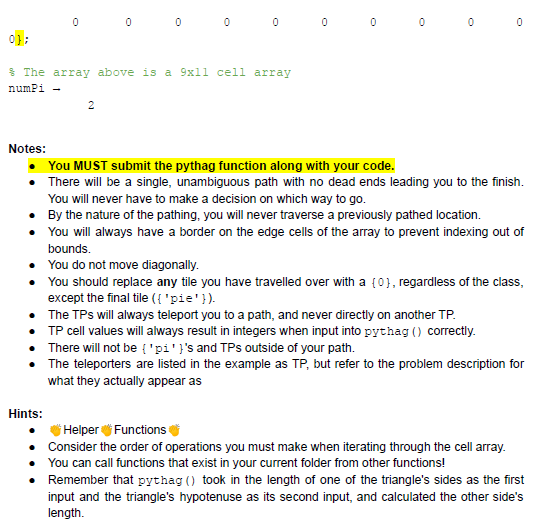
Function Name: piEdmontPark Inputs: 1. (cell) MxN map of the area around piedmont park Outputs: 1. (cell) MxN modified map 2. (double) the number of pi's you ate along the way Topics: (cell arrays), (iteration: pathing), (conditionals), (data types) Background: You've talked to a therapist, and after many difficult days you've finally overcome your cannoli addiction from last week (Let's be real, that's what it was...). You head to the CULC as the new you, and when you arrive you see a flyer advertising the Annual Pi Festival over at Piedmont Park! You feel your heart rate rise, and your mouth begins to water. Your kneeps are weak, your arms are heavy, you're drooling over the prospect of pi already! Looks like another therapy session might be in store, but first you've got a pi-licious craving to feed! Function Description: Your goal is to make it from GT to the Pi Festival at Piedmont Park. Because so many people will be going, they dropped some pi along the way for you to eat! Begin by locating your starting position, indicated by a {'GT'}, case sensitive. Then, begin iterating through the cell array. Cells you can move to will contain values of type char (e.g. {'a'}) or type cell (e.g. 11, 3; 2, 4}}) and the cells you cannot move onto will contain type double (e.g. {0}). As you iterate through the cell array: Navigate through the cells, following the type char values in a single step, horizontal or vertical direction until you reach either of the following: o a Teleport Pad (TP) o a cell containing the string 'pie' The behavior of TPs is described below in detail. Count the number of times you path over a cell containing the string 'pi'. This is your 2nd output Replace all cells you've pathed over with a {0}. Once you reach the cell containing 'pie', stop iterating. You made it to the Pie Festival! Output the resulting map as your 1st output As the name suggests, teleport pads will transport you to a different position on your map cell array. The TPs rely on a previous function you have written: pythag(). Each value at the TP will be a 2x2 cell array containing values of type double. These values correspond to two sets of inputs for pythag(). The first column corresponds to the first input of pythag() (a), and the second column corresponds to the second input of pythag() (C). The first row of TP = the array, when input into pythag(), will output your change in rows, and the second row, when input into pythag(), will output your change in columns. Add these changes to the row and column indices of the TP you are currently on (your current position) to obtain the indices of the next path to begin iterating through. For example, let's say your TP cell was at position (1,2) and it contained the array (1.5, 2.5; 4, 5), your change in rows would be pythag(1.5, 2.5) - and your change in columns would be pythag (4, 5) - . You would then "teleport" to position (3,5) on your map and continue pathing. An example of this is shown below. {1.5, 2.5; 4, 5); map = {'GT 0 0; 0 0; 'here! 0; 0 0 0}; ** This does not reflect an actual test case, and is ONLY for showing the teleport functionality Ensure to include the pythag() function in your submission. Example: TP = {3,5; 4,5); $TP is of class cell, and defined here for clarity map = {0 0 0 0 0 0 0 OOO 0 0 0 0; 0; 0 0 0 0 0 'GT' O O O OOO OOOO!-OO O O O O O OOO O O O OO 0 0 0 0 0 0 0 'f' pi pi 0; 0; 0 0 0 0 0 0 0 0: 0; 'c' pie 0 0 0 0 0 0 0 0 0 0 0 0 0]; [finalMap, numpi] = piedmontPark (map); finalMap 0 0 0 0 0 0 0 0 0 OOO OOO OO 0 0 0 0 0 0 0 0 OOO OOO OO O O O O O O O O 0 0 pie 0 0 0; 0: 0 0 0 0}; The array above is a 9xll cell array numi - 2 Notes: You MUST submit the pythag function along with your code. There will be a single, unambiguous path with no dead ends leading you to the finish. You will never have to make a decision on which way to go. By the nature of the pathing, you will never traverse a previously pathed location. You will always have a border on the edge cells of the array to prevent indexing out of bounds. You do not move diagonally. You should replace any tile you have travelled over with a {0}, regardless of the class, except the final tile({ 'pie' }). The TPs will always teleport you to a path, and never directly on another TP. TP cell values will always result in integers when input into pythag() correctly. There will not be ('pi')'s and TPs outside of your path. The teleporters are listed in the example as TP, but refer to the problem description for what they actually appear as Hints: Helper Functions Consider the order of operations you must make when iterating through the cell array. You can call functions that exist in your current folder from other functions! Remember that pythag() took in the length of one of the triangle's sides as the first input and the triangle's hypotenuse as its second input, and calculated the other side's length Function Name: piEdmontPark Inputs: 1. (cell) MxN map of the area around piedmont park Outputs: 1. (cell) MxN modified map 2. (double) the number of pi's you ate along the way Topics: (cell arrays), (iteration: pathing), (conditionals), (data types) Background: You've talked to a therapist, and after many difficult days you've finally overcome your cannoli addiction from last week (Let's be real, that's what it was...). You head to the CULC as the new you, and when you arrive you see a flyer advertising the Annual Pi Festival over at Piedmont Park! You feel your heart rate rise, and your mouth begins to water. Your kneeps are weak, your arms are heavy, you're drooling over the prospect of pi already! Looks like another therapy session might be in store, but first you've got a pi-licious craving to feed! Function Description: Your goal is to make it from GT to the Pi Festival at Piedmont Park. Because so many people will be going, they dropped some pi along the way for you to eat! Begin by locating your starting position, indicated by a {'GT'}, case sensitive. Then, begin iterating through the cell array. Cells you can move to will contain values of type char (e.g. {'a'}) or type cell (e.g. 11, 3; 2, 4}}) and the cells you cannot move onto will contain type double (e.g. {0}). As you iterate through the cell array: Navigate through the cells, following the type char values in a single step, horizontal or vertical direction until you reach either of the following: o a Teleport Pad (TP) o a cell containing the string 'pie' The behavior of TPs is described below in detail. Count the number of times you path over a cell containing the string 'pi'. This is your 2nd output Replace all cells you've pathed over with a {0}. Once you reach the cell containing 'pie', stop iterating. You made it to the Pie Festival! Output the resulting map as your 1st output As the name suggests, teleport pads will transport you to a different position on your map cell array. The TPs rely on a previous function you have written: pythag(). Each value at the TP will be a 2x2 cell array containing values of type double. These values correspond to two sets of inputs for pythag(). The first column corresponds to the first input of pythag() (a), and the second column corresponds to the second input of pythag() (C). The first row of TP = the array, when input into pythag(), will output your change in rows, and the second row, when input into pythag(), will output your change in columns. Add these changes to the row and column indices of the TP you are currently on (your current position) to obtain the indices of the next path to begin iterating through. For example, let's say your TP cell was at position (1,2) and it contained the array (1.5, 2.5; 4, 5), your change in rows would be pythag(1.5, 2.5) - and your change in columns would be pythag (4, 5) - . You would then "teleport" to position (3,5) on your map and continue pathing. An example of this is shown below. {1.5, 2.5; 4, 5); map = {'GT 0 0; 0 0; 'here! 0; 0 0 0}; ** This does not reflect an actual test case, and is ONLY for showing the teleport functionality Ensure to include the pythag() function in your submission. Example: TP = {3,5; 4,5); $TP is of class cell, and defined here for clarity map = {0 0 0 0 0 0 0 OOO 0 0 0 0; 0; 0 0 0 0 0 'GT' O O O OOO OOOO!-OO O O O O O OOO O O O OO 0 0 0 0 0 0 0 'f' pi pi 0; 0; 0 0 0 0 0 0 0 0: 0; 'c' pie 0 0 0 0 0 0 0 0 0 0 0 0 0]; [finalMap, numpi] = piedmontPark (map); finalMap 0 0 0 0 0 0 0 0 0 OOO OOO OO 0 0 0 0 0 0 0 0 OOO OOO OO O O O O O O O O 0 0 pie 0 0 0; 0: 0 0 0 0}; The array above is a 9xll cell array numi - 2 Notes: You MUST submit the pythag function along with your code. There will be a single, unambiguous path with no dead ends leading you to the finish. You will never have to make a decision on which way to go. By the nature of the pathing, you will never traverse a previously pathed location. You will always have a border on the edge cells of the array to prevent indexing out of bounds. You do not move diagonally. You should replace any tile you have travelled over with a {0}, regardless of the class, except the final tile({ 'pie' }). The TPs will always teleport you to a path, and never directly on another TP. TP cell values will always result in integers when input into pythag() correctly. There will not be ('pi')'s and TPs outside of your path. The teleporters are listed in the example as TP, but refer to the problem description for what they actually appear as Hints: Helper Functions Consider the order of operations you must make when iterating through the cell array. You can call functions that exist in your current folder from other functions! Remember that pythag() took in the length of one of the triangle's sides as the first input and the triangle's hypotenuse as its second input, and calculated the other side's length
Step by Step Solution
There are 3 Steps involved in it

Get step-by-step solutions from verified subject matter experts
 Study Help