







Question: Please solve using Matlab . Please do not use Conditional Statements or Iterations to solve the problem. Function Name: meal Prep () Inputs: 1. (char)
 Please solve using Matlab. Please do not use Conditional Statements or Iterations to solve the problem.
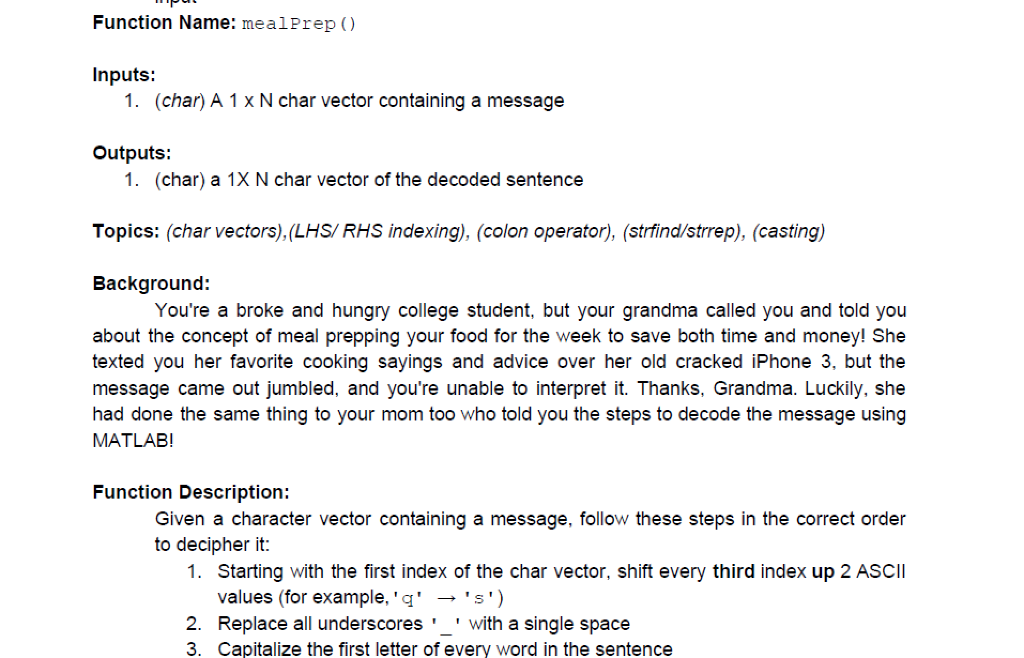
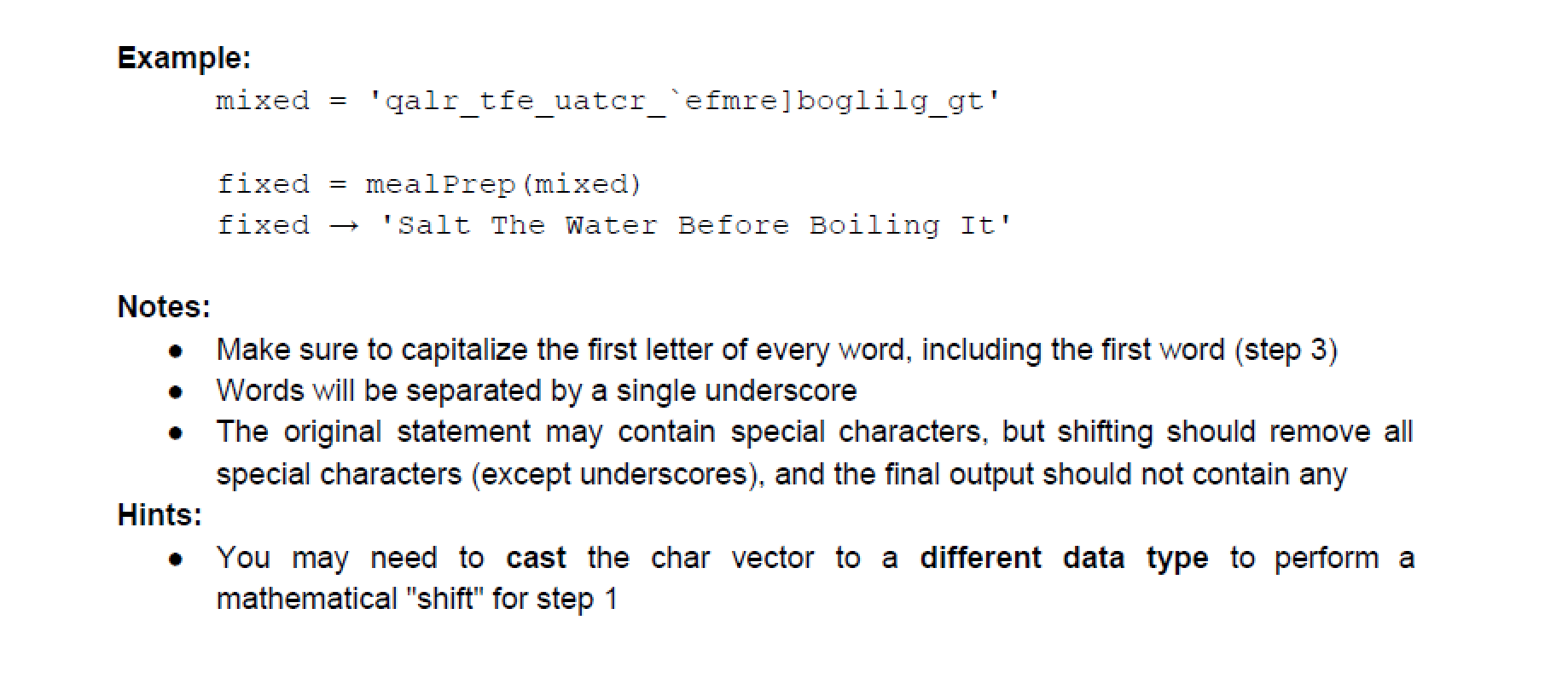
Function Name: meal Prep () Inputs: 1. (char) A 1x N char vector containing a message Outputs: 1. (char) a 1X N char vector of the decoded sentence Topics: (char vectors),(LHS/ RHS indexing), (colon operator), (strfind/strrep), (casting) Background: You're a broke and hungry college student, but your grandma called you and told you about the concept of meal prepping your food for the week to save both time and money! She texted you her favorite cooking sayings and advice over her old cracked iPhone 3, but the message came out jumbled, and you're unable to interpret it. Thanks, Grandma. Luckily, she had done the same thing to your mom too who told you the steps to decode the message using MATLAB! Function Description: Given a character vector containing a message, follow these steps in the correct order to decipher it: 1. Starting with the first index of the char vector, shift every third index up 2 ASCII values (for example,'q' -'s') 2. Replace all underscores' with a single space 3. Capitalize the first letter of every word in the sentence Example: mixed 'qalr_tfe_uatcr efmre] boglilg_gt' fixed = mealPrep (mixed) fixed 'Salt The Water Before Boiling It' Notes: Make sure to capitalize the first letter of every word, including the first word (step 3) Words will be separated by a single underscore The original statement may contain special characters, but shifting should remove all special characters (except underscores), and the final output should not contain any Hints: You may need to cast the char vector to a different data type to perform a mathematical "shift" for step 1 Function Name: meal Prep () Inputs: 1. (char) A 1x N char vector containing a message Outputs: 1. (char) a 1X N char vector of the decoded sentence Topics: (char vectors),(LHS/ RHS indexing), (colon operator), (strfind/strrep), (casting) Background: You're a broke and hungry college student, but your grandma called you and told you about the concept of meal prepping your food for the week to save both time and money! She texted you her favorite cooking sayings and advice over her old cracked iPhone 3, but the message came out jumbled, and you're unable to interpret it. Thanks, Grandma. Luckily, she had done the same thing to your mom too who told you the steps to decode the message using MATLAB! Function Description: Given a character vector containing a message, follow these steps in the correct order to decipher it: 1. Starting with the first index of the char vector, shift every third index up 2 ASCII values (for example,'q' -'s') 2. Replace all underscores' with a single space 3. Capitalize the first letter of every word in the sentence Example: mixed 'qalr_tfe_uatcr efmre] boglilg_gt' fixed = mealPrep (mixed) fixed 'Salt The Water Before Boiling It' Notes: Make sure to capitalize the first letter of every word, including the first word (step 3) Words will be separated by a single underscore The original statement may contain special characters, but shifting should remove all special characters (except underscores), and the final output should not contain any Hints: You may need to cast the char vector to a different data type to perform a mathematical "shift" for step 1
Step by Step Solution
There are 3 Steps involved in it

Get step-by-step solutions from verified subject matter experts
 Study Help