







Question: Please solve with html and css, QUICK!! 3 image files namely a1.png, a2.png and a3.png are given. Using the given files, create the following user
Please solve with html and css, QUICK!!
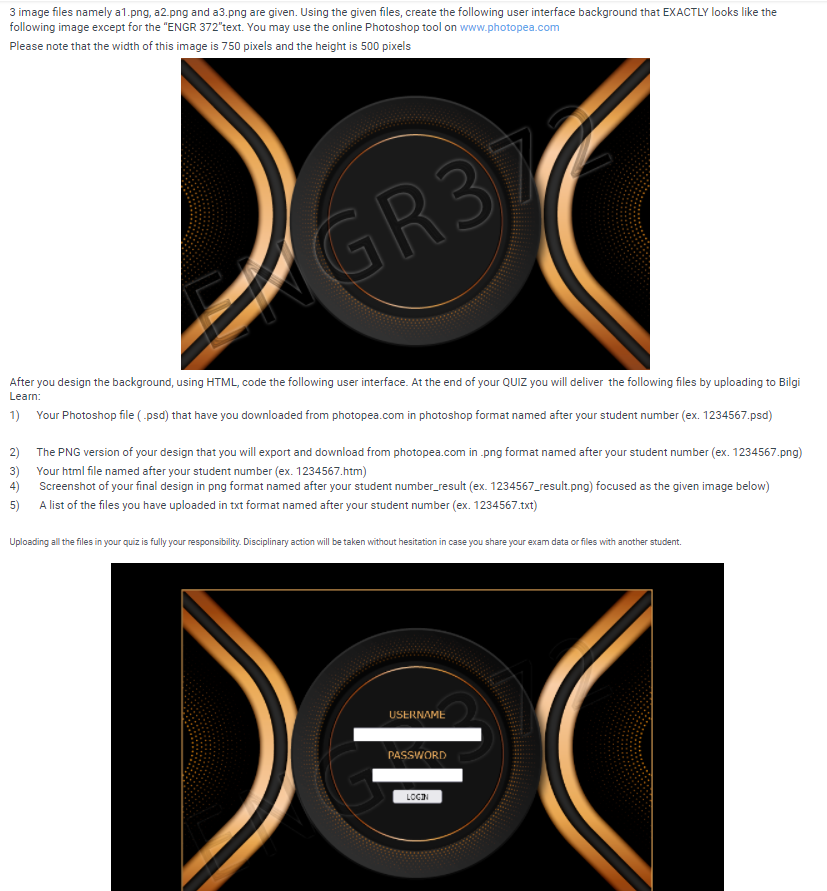



3 image files namely a1.png, a2.png and a3.png are given. Using the given files, create the following user interface background that EXACTLY looks like the following image except for the "ENGR 372"text. You may use the online Photoshop tool on www.photopea.com Please note that the width of this image is 750 pixels and the height is 500 pixels GR37 After you design the background, using HTML, code the following user interface. At the end of your QUIZ you will deliver the following files by uploading to Bilgi Learn: 1) Your Photoshop file (.psd) that have you downloaded from photopea.com in photoshop format named after your student number (ex. 1234567.psd) 2) 3) 4) 5) The PNG version of your design that you will export and download from photopea.com in.png format named after your student number (ex. 1234567.png) Your html file named after your student number (ex. 1234567.htm) Screenshot of your final design in png format named after your student number_result (ex. 1234567_result.png) focused as the given image below) A list of the files you have uploaded in txt format named after your student number (ex. 1234567.txt) Uploading all the files in your quiz is fully your responsibility. Disciplinary action will be taken without hesitation in case you share your exam data or files with another student. USERNAME PASSWORD LOGIN
Step by Step Solution
There are 3 Steps involved in it

Get step-by-step solutions from verified subject matter experts
 Study Help