







Question: Please submit in C code, this will be running on a linux machine. + The env utility examines the environment and modifies it to execute
Please submit in C code, this will be running on a linux machine.
 +
+
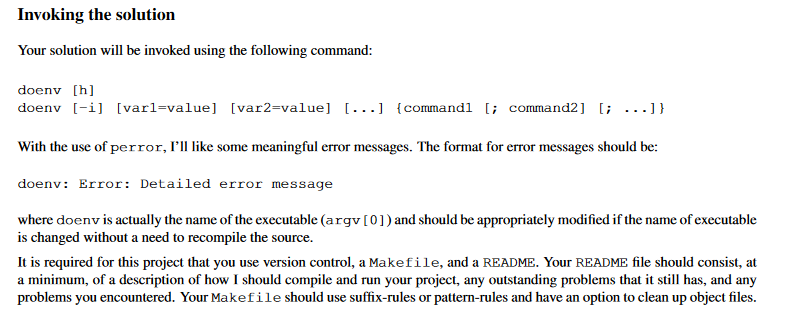
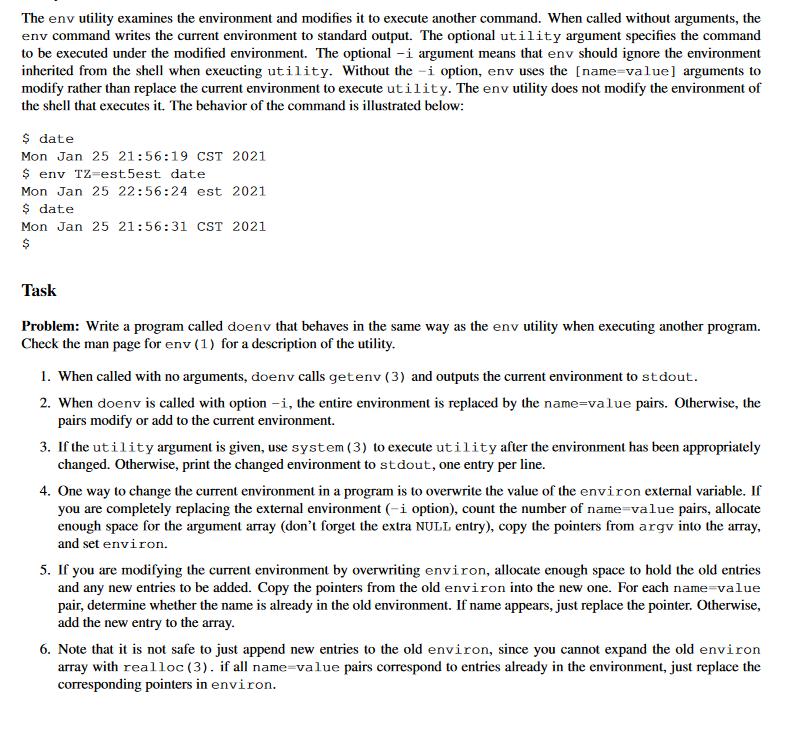
The env utility examines the environment and modifies it to execute another command. When called without arguments, the env command writes the current environment to standard output. The optional utility argument specifies the command to be executed under the modified environment. The optional -i argument means that env should ignore the environment inherited from the shell when exeucting utility. Without the -i option, env uses the [name=value] arguments to modify rather than replace the current environment to execute utility. The env utility does not modify the environment of the shell that executes it. The behavior of the command is illustrated below: $ date Mon Jan 25 21:56:19 CST 2021 $ eny Tz-est5est date Mon Jan 25 22:56:24 est 2021 $ date Mon Jan 25 21:56:31 CST 2021 $ Task Problem: Write a program called doenv that behaves in the same way as the env utility when executing another program. Check the man page for env (1) for a description of the utility. 1. When called with no arguments, doenv calls getenv (3) and outputs the current environment to stdout. 2. When doenv is called with option -i, the entire environment is replaced by the name=value pairs. Otherwise, the pairs modify or add to the current environment. 3. If the utility argument is given, use system (3) to execute utility after the environment has been appropriately changed. Otherwise, print the changed environment to stdout, one entry per line. 4. One way to change the current environment in a program is to overwrite the value of the environ external variable. If you are completely replacing the external environment (-i option), count the number of name=value pairs, allocate enough space for the argument array (don't forget the extra NULL entry), copy the pointers from argy into the array, and set environ. 5. If you are modifying the current environment by overwriting environ, allocate enough space to hold the old entries and any new entries to be added. Copy the pointers from the old environ into the new one. For each name=value pair, determine whether the name is already in the old environment. If name appears, just replace the pointer. Otherwise, add the new entry to the array. 6. Note that it is not safe to just append new entries to the old environ, since you cannot expand the old environ array with realloc(3). if all name=value pairs correspond to entries already in the environment, just replace the corresponding pointers in environ. Invoking the solution Your solution will be invoked using the following command: doeny [h] doenv [-i] [varl=value] [var2=value] [...] {commandl [; command2] [; ...]} With the use of perror, I'll like some meaningful error messages. The format for error messages should be: doenv: Error: Detailed error message where doenv is actually the name of the executable (argv[0]) and should be appropriately modified if the name of executable is changed without a need to recompile the source. It is required for this project that you use version control, a Makefile, and a README. Your README file should consist, at a minimum, of a description of how I should compile and run your project, any outstanding problems that it still has, and any problems you encountered. Your Makefile should use suffix-rules or pattern-rules and have an option to clean up object files. The env utility examines the environment and modifies it to execute another command. When called without arguments, the env command writes the current environment to standard output. The optional utility argument specifies the command to be executed under the modified environment. The optional -i argument means that env should ignore the environment inherited from the shell when exeucting utility. Without the -i option, env uses the [name=value] arguments to modify rather than replace the current environment to execute utility. The env utility does not modify the environment of the shell that executes it. The behavior of the command is illustrated below: $ date Mon Jan 25 21:56:19 CST 2021 $ eny Tz-est5est date Mon Jan 25 22:56:24 est 2021 $ date Mon Jan 25 21:56:31 CST 2021 $ Task Problem: Write a program called doenv that behaves in the same way as the env utility when executing another program. Check the man page for env (1) for a description of the utility. 1. When called with no arguments, doenv calls getenv (3) and outputs the current environment to stdout. 2. When doenv is called with option -i, the entire environment is replaced by the name=value pairs. Otherwise, the pairs modify or add to the current environment. 3. If the utility argument is given, use system (3) to execute utility after the environment has been appropriately changed. Otherwise, print the changed environment to stdout, one entry per line. 4. One way to change the current environment in a program is to overwrite the value of the environ external variable. If you are completely replacing the external environment (-i option), count the number of name=value pairs, allocate enough space for the argument array (don't forget the extra NULL entry), copy the pointers from argy into the array, and set environ. 5. If you are modifying the current environment by overwriting environ, allocate enough space to hold the old entries and any new entries to be added. Copy the pointers from the old environ into the new one. For each name=value pair, determine whether the name is already in the old environment. If name appears, just replace the pointer. Otherwise, add the new entry to the array. 6. Note that it is not safe to just append new entries to the old environ, since you cannot expand the old environ array with realloc(3). if all name=value pairs correspond to entries already in the environment, just replace the corresponding pointers in environ. Invoking the solution Your solution will be invoked using the following command: doeny [h] doenv [-i] [varl=value] [var2=value] [...] {commandl [; command2] [; ...]} With the use of perror, I'll like some meaningful error messages. The format for error messages should be: doenv: Error: Detailed error message where doenv is actually the name of the executable (argv[0]) and should be appropriately modified if the name of executable is changed without a need to recompile the source. It is required for this project that you use version control, a Makefile, and a README. Your README file should consist, at a minimum, of a description of how I should compile and run your project, any outstanding problems that it still has, and any problems you encountered. Your Makefile should use suffix-rules or pattern-rules and have an option to clean up object files
Step by Step Solution
There are 3 Steps involved in it

Get step-by-step solutions from verified subject matter experts
 Study Help