







Question: please there is this code in MATLAB which transcribes the following notepad files at the left side to the one on the right also in
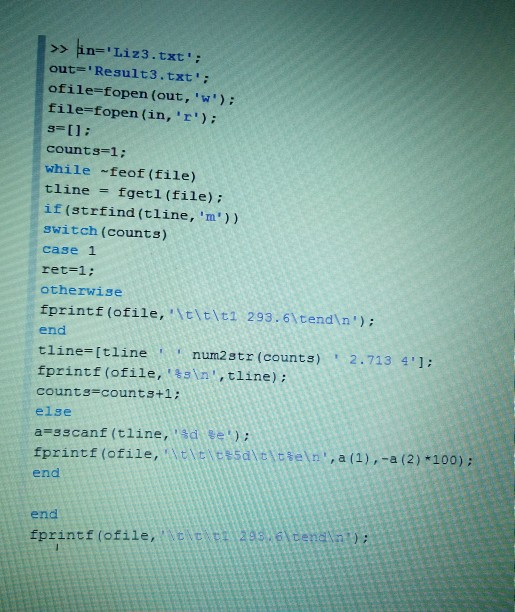
please there is this code in MATLAB
which transcribes the following notepad files at the left side to the one on the right also in notepad pad.
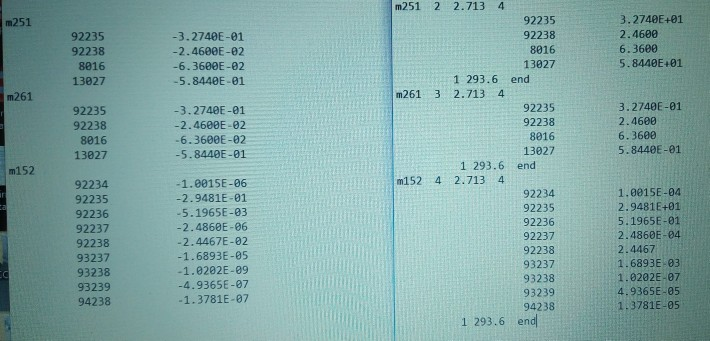
now my question
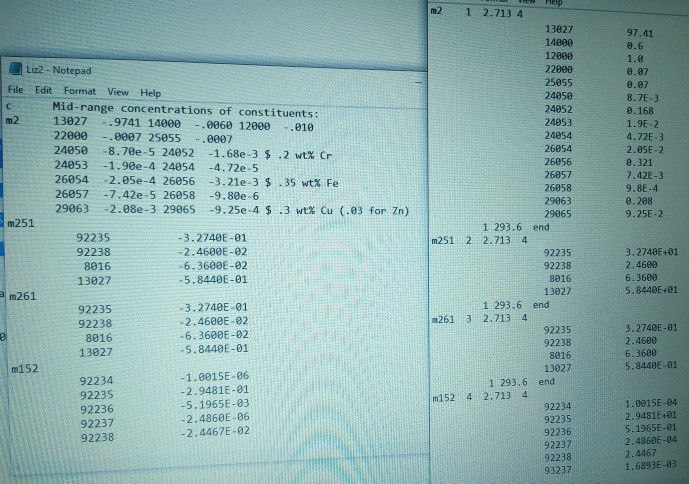
please add some lines to the above code in MATLAB to be able to extract and arrange an additional material(m2, seen at the top left side of the following) to result in the right hand side of the following
An-'Liz3.txt out="Result3. txt ' ; ofile-fopen (out, 'w') file-fopen (in, 'r s-11: counts-1: while feof (file) tline fgetl (file): if (strfind (tline, 'm')) switch (counts) case 1 ret=1 ; otherwise fprintf (ofile, 'tltlt1 293.61tend n') end tline num2 str (counts) ' 2.713 4']; ' tline fprintf (ofile, sin,tline): counts-countst1: else fprintf (ofile,Esalieleteln a(), a (2)100) end end fprintf (ofile An-'Liz3.txt out="Result3. txt ' ; ofile-fopen (out, 'w') file-fopen (in, 'r s-11: counts-1: while feof (file) tline fgetl (file): if (strfind (tline, 'm')) switch (counts) case 1 ret=1 ; otherwise fprintf (ofile, 'tltlt1 293.61tend n') end tline num2 str (counts) ' 2.713 4']; ' tline fprintf (ofile, sin,tline): counts-countst1: else fprintf (ofile,Esalieleteln a(), a (2)100) end end fprintf (ofile
Step by Step Solution
There are 3 Steps involved in it

Get step-by-step solutions from verified subject matter experts
 Study Help