







Question: Please update my code to answer Exercise 2. C++ The Task class: #pragma once #pragma once #include #include using namespace std; class Task { public:
Please update my code to answer Exercise 2. "C++"
The Task class:
#pragma once #pragma once #include
int gettaskID() const { return taskID; } string getTasktName()const { return taskName; } int getTaskDuration()const { return taskDuration; } friend ostream& operator
......................................................................................................................................................................................................................................................................................................
My Code for the first part (part a):
#include #include
}
int main() { bool found; list
//This is for bonus //Reading tasks from a file list
if (myCin.fail()) { cout > taskID >> taskName >> taskDuration) { Task td(taskID, taskName, taskDuration); tasks.push_back(td);
} myCin.close();
//Ex1..contd.. int action = 0; printMenu(); cin >> action;
while (action != 7) { found = false; switch (action) { case 1: // Search by Name(First and Second) cout > fname; cin >> lname; //your code goes here for (auto itr = team.begin(); itr != team.end()&&!found; itr++) { if (itr->getFirstName() == fname && itr->getLastName() == lname) { cout
} if (!found) { cout
}
break; case 2: //Add a new Person cout > fname; cout > lname; cout > phNum; cout getFirstName() == fname && itr->getLastName() == lname && itr->getPhNum() == phNum) { cout
break; case 3: //Delete a Person by entering Phone Number cout > phNum; //your code goes here for (auto itr = team.begin(); itr != team.end() && !found; ++itr) { if (itr->getFirstName() == fname && itr->getLastName() == lname) { cout
break;
case 4: //Print team in current order cout
for (auto itr = team.begin(); itr != team.end(); ++itr) { cout
break;
case 5: //Print team in reverse order cout
cout
} break;
//Bonus case 6: //Bonus part: Assign Tasks int days; cout > days;
//your code goes here
} cout
printMenu(); cin >> action;
} //storing updated contacts back to the file ofstream myCout("persons.txt"); for (auto it = team.begin(); it != team.end(); ++it) { myCout getFirstName() getLastName() getPhNum()
} myCin.close(); myCout.close();
}
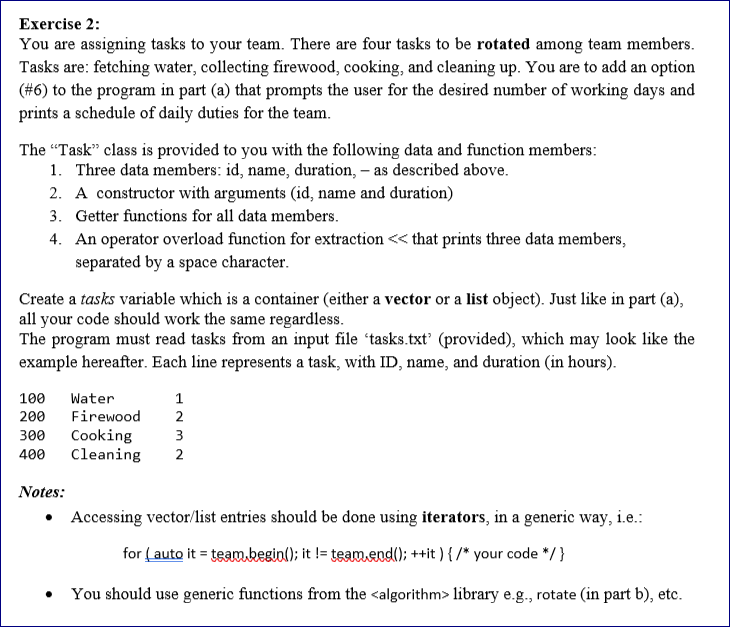
Exercise 2: You are assigning tasks to your team. There are four tasks to be rotated among team members. Tasks are: fetching water, collecting firewood, cooking, and cleaning up. You are to add an option (#6) to the program in part (a) that prompts the user for the desired number of working days and prints a schedule of daily duties for the team. The Task class is provided to you with the following data and function members: 1. Three data members: id, name, duration, - as described above. 2. A constructor with arguments (id, name and duration) 3. Getter functions for all data members. 4. An operator overload function for extraction that prints three data members, separated by a space character. Create a tasks variable which is a container (either a vector or a list object). Just like in part (a), all your code should work the same regardless. The program must read tasks from an input file 'tasks.txt' (provided), which may look like the example hereafter. Each line represents a task, with ID, name, and duration (in hours). 100 200 300 400 Water Firewood Cooking Cleaning 1 2 3 2 Notes: Accessing vector/list entries should be done using iterators, in a generic way, i.e.: for ( auto it = team kegial); it != team.end(); ++it ) { /* your code */ } You should use generic functions from the
Step by Step Solution
There are 3 Steps involved in it

Get step-by-step solutions from verified subject matter experts
 Study Help