







Question: Please use Java and use net beans , thnaks Project 6: GUI Front End and Back End use applets create GUI components labels buttons adio
Please use Java and use net beans , thnaks
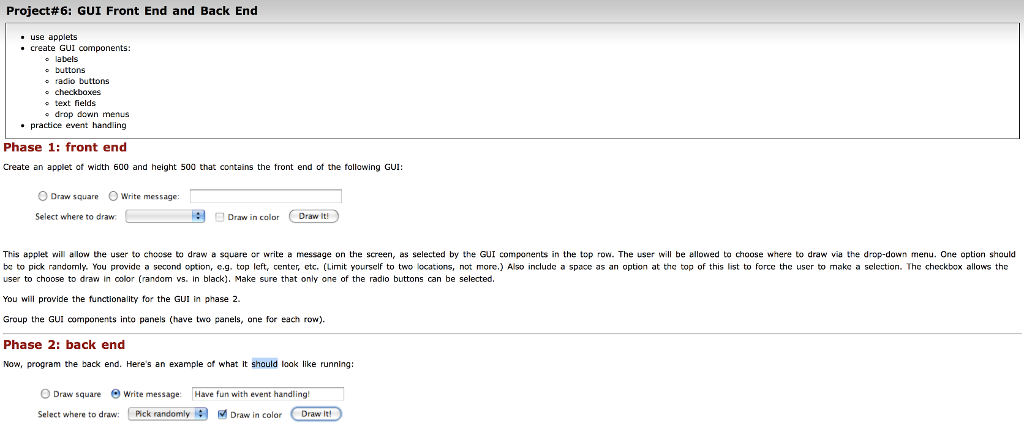

Project 6: GUI Front End and Back End use applets create GUI components labels buttons adio buttons heckboxes text field drop dow practice event handling Phase 1: front end Create an applet of width 600 and height 500 that contains the tront end of the following GU O Draw square O Write message: Draw in color Draw it! Select where to draw. This applet will allow the user to choose to draw a square or write a message on the screen, as selected by the GUI components in the top row. The user will be allowed to choose where to draw via the drop-down menu. One option should be to pick randomly. You provide a sccond option, g. top left, center, ctc. (Limit yourself to two locations, not more.) Also include a space as an option at the top of this list to force the user to make a sclection. The checkbox allows the user to choose to draw in color (random vs. in black). Make sure that only one of the radio buttons can be selected. You will provide the functionality for the GUI in phase 2. Group the GUI components into panels have two panels, one for each row Phase 2: back end Now, program the back end. Here's an example of what it should look like running O Draw square write message: Have fun with event handling! Select where to draw: pick randomly M Draw in color Draw It! Project 6: GUI Front End and Back End use applets create GUI components labels buttons adio buttons heckboxes text field drop dow practice event handling Phase 1: front end Create an applet of width 600 and height 500 that contains the tront end of the following GU O Draw square O Write message: Draw in color Draw it! Select where to draw. This applet will allow the user to choose to draw a square or write a message on the screen, as selected by the GUI components in the top row. The user will be allowed to choose where to draw via the drop-down menu. One option should be to pick randomly. You provide a sccond option, g. top left, center, ctc. (Limit yourself to two locations, not more.) Also include a space as an option at the top of this list to force the user to make a sclection. The checkbox allows the user to choose to draw in color (random vs. in black). Make sure that only one of the radio buttons can be selected. You will provide the functionality for the GUI in phase 2. Group the GUI components into panels have two panels, one for each row Phase 2: back end Now, program the back end. Here's an example of what it should look like running O Draw square write message: Have fun with event handling! Select where to draw: pick randomly M Draw in color Draw It
Step by Step Solution
There are 3 Steps involved in it

Get step-by-step solutions from verified subject matter experts
 Study Help