





Question: Please use java Your main should produce the preceding output via the following code: public static void main(String args[]) { Shape shape[] = new Shape[args.length];

Please use java
Please use java Your main should produce the preceding output via the

Your main should produce the preceding output via the following code:

public static void main(String args[]) { Shape shape[] = new Shape[args.length]; /* Some initialization from the args ... */ System.out.printf("The total area for the %d objects is %1.2f units squared. ", shape.length, AreaCalculator.calculate(shape)) }

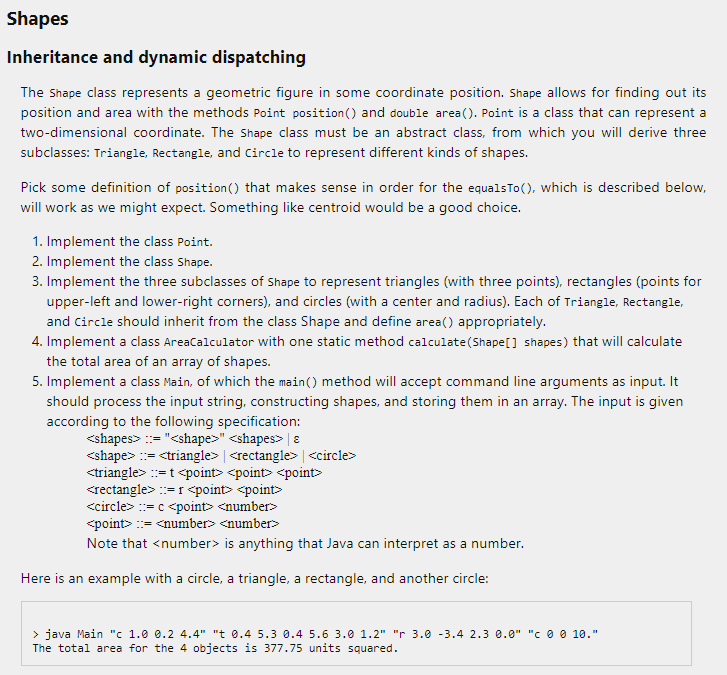
Shapes Inheritance and dynamic dispatching The Shape class represents a geometric figure in some coordinate position. Shape allows for finding out its position and area with the methods Point position() and double area(). Point is a class that can represent a two-dimensional coordinate. The Shape class must be an abstract class, from which you will derive three subclasses: Triangle, Rectangle, and Circle to represent different kinds of shapes. Pick some definition of position() that makes sense in order for the equalstoo, which is described below, will work as we might expect. Something like centroid would be a good choice. 1. Implement the class Point. 2. Implement the class Shape. 3. Implement the three subclasses of Shape to represent triangles (with three points), rectangles (points for upper-left and lower-right corners), and circles (with a center and radius). Each of Triangle, Rectangle, and Circle should inherit from the class Shape and define area() appropriately. 4. Implement a class AreaCalculator with one static method calculate (Shape() shapes) that will calculate the total area of an array of shapes. 5. Implement a class Main, of which the main() method will accept command line arguments as input. It should process the input string, constructing shapes, and storing them in an array. The input is given according to the following specification: :="" := | := t Crectangle>=1 == c := number> Note that is anything that Java can interpret as a number. Here is an example with a circle, a triangle, a rectangle, and another circle: > java Main "c 1.0 0.2 4.4" "t 0.4 5.3 0.4 5.6 3.0 1.2" " 3.0 -3.4 2.3 0.9" "CO 10." The total area for the 4 objects is 377.75 units squared. Shapes Inheritance and dynamic dispatching The Shape class represents a geometric figure in some coordinate position. Shape allows for finding out its position and area with the methods Point position() and double area(). Point is a class that can represent a two-dimensional coordinate. The Shape class must be an abstract class, from which you will derive three subclasses: Triangle, Rectangle, and Circle to represent different kinds of shapes. Pick some definition of position() that makes sense in order for the equalstoo, which is described below, will work as we might expect. Something like centroid would be a good choice. 1. Implement the class Point. 2. Implement the class Shape. 3. Implement the three subclasses of Shape to represent triangles (with three points), rectangles (points for upper-left and lower-right corners), and circles (with a center and radius). Each of Triangle, Rectangle, and Circle should inherit from the class Shape and define area() appropriately. 4. Implement a class AreaCalculator with one static method calculate (Shape() shapes) that will calculate the total area of an array of shapes. 5. Implement a class Main, of which the main() method will accept command line arguments as input. It should process the input string, constructing shapes, and storing them in an array. The input is given according to the following specification: :="" := | := t Crectangle>=1 == c := number> Note that is anything that Java can interpret as a number. Here is an example with a circle, a triangle, a rectangle, and another circle: > java Main "c 1.0 0.2 4.4" "t 0.4 5.3 0.4 5.6 3.0 1.2" " 3.0 -3.4 2.3 0.9" "CO 10." The total area for the 4 objects is 377.75 units squared

Step by Step Solution

There are 3 Steps involved in it

1 Expert Approved Answer
Step: 1 Unlock blur-text-image
Question Has Been Solved by an Expert!

Get step-by-step solutions from verified subject matter experts

Step: 2 Unlock
Step: 3 Unlock

Students Have Also Explored These Related Databases Questions!