







Question: Matrix Inversion in Excel To compute the inverse of a matrix, say matrix G, please note that this operation is only valid for square
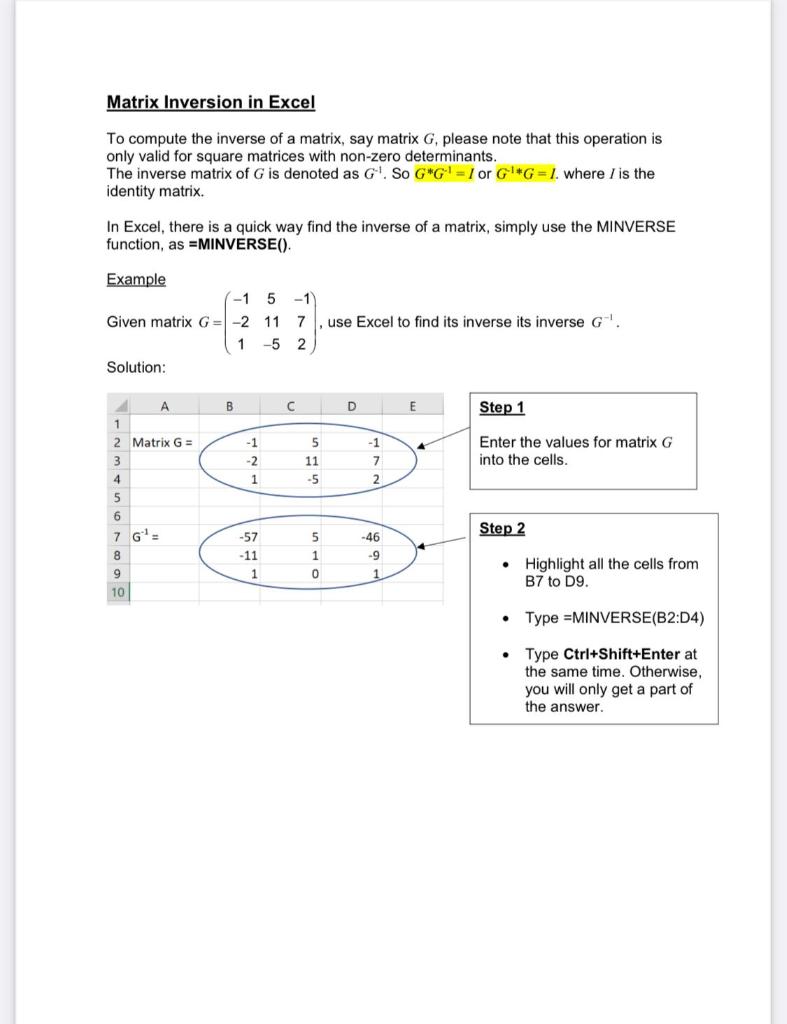
Matrix Inversion in Excel To compute the inverse of a matrix, say matrix G, please note that this operation is only valid for square matrices with non-zero determinants. The inverse matrix of G is denoted as G. So G*G = I or G*G=1. where I is the identity matrix. In Excel, there is a quick way find the inverse of a matrix, simply use the MINVERSE function, as =MINVERSE(). Example -1 Given matrix G= -2 1 Solution: A 1 2 Matrix G= 3 4 5 6 7 G = 8 9 10 B -1 -2 1 -57 -11 1 5-1) 11 7 , use Excel to find its inverse its inverse G . -5 2 C 5 11 -5 5 1 0 D -1 7 2 -46 -9 1 E A Step 1 Enter the values for matrix G into the cells. Step 2 Highlight all the cells from B7 to D9. Type =MINVERSE(B2:D4) Type Ctrl+Shift+Enter at the same time. Otherwise, you will only get a part of the answer.
Step by Step Solution
3.34 Rating (169 Votes )
There are 3 Steps involved in it
Link of the Excel File httpsdocsgooglecomspreadsh... View full answer

Get step-by-step solutions from verified subject matter experts
 Study Help