







Question: Please use python 3.6 Modify code: from tkinter import * class CalculateSphereVolume: def __init__(self): self.main_window = Tk() self.radiusFrame = Frame(self.main_window) self.volumeFrame = Frame(self.main_window) self.buttonFrame =
Please use python 3.6 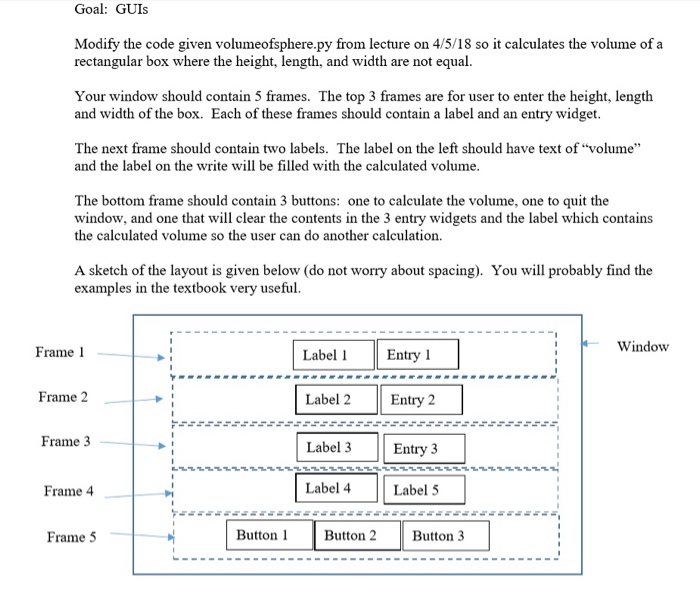
Modify code:
from tkinter import *
class CalculateSphereVolume: def __init__(self):
self.main_window = Tk()
self.radiusFrame = Frame(self.main_window) self.volumeFrame = Frame(self.main_window) self.buttonFrame = Frame(self.main_window)
# radius frame self.radiusLabel = Label(self.radiusFrame,fg = 'blue',\ text = "What is the radius? ",\ font="Time 24") self.radiusEntry = Entry(self.radiusFrame, width = 20, \ font="Time 24")
self.radiusLabel.pack(side = 'left') self.radiusEntry.pack(side = 'left')
#volume frame self.volumeLabel = Label(self.volumeFrame, text = "Volume: ",\ font="Time 24") self.vol = StringVar() self.resultLabel = Label(self.volumeFrame, textvariable = self.vol, \ font="Time 24")
self.volumeLabel.pack(side = 'left') self.resultLabel.pack(side = 'left')
#buttons self.calcButton = Button(self.buttonFrame, text = "Calculate",\ command = self.calc_vol, fg ="green", \ font="Time 24") self.quitButton = Button(self.buttonFrame, text = "Quit",\ command = self.main_window.destroy, fg ="red", \ font="Time 24") self.clearButton = Button(self.buttonFrame, text = "Clear", \ command = self.clear_data, \ font="Time 24")
self.calcButton.pack(side = 'left') self.quitButton.pack(side = 'left') self.clearButton.pack(side = 'left')
#packing frames self.radiusFrame.pack() self.volumeFrame.pack() self.buttonFrame.pack()
def calc_vol(self): self.radius = float(self.radiusEntry.get()) self.volume = 4/3* 3.14159 * self.radius**3 self.vol.set(format(self.volume, '.3f'))
def clear_data(self): self.radiusEntry.delete(0, 'end') self.vol.set("")
CalculateSphereVolume()
Eqn Too Long
Step by Step Solution
There are 3 Steps involved in it

Get step-by-step solutions from verified subject matter experts
 Study Help