







Question: Please use R commands The Excel file, Students.csv contains information about 50 students who were selected randomly form an elementary school Assume that the selected
Please use R commands
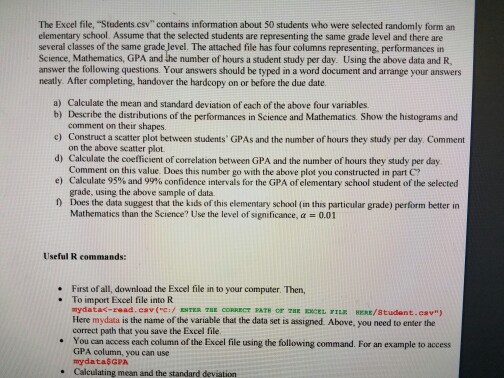
The Excel file, "Students.csv" contains information about 50 students who were selected randomly form an elementary school Assume that the selected students are representing the same grade level and there are several classes ofthe same grade Jevel. The attached file has four columns representing performances in Science, Mathematics, and the number of hours a student study per day. Using the above data and R. answer the following questions. Your answers should be typed in a word document and arrange your answers neatly. After completing, handover the hardcopy on or before the due date. a) Calculate the mean and standard deviation of each of the above four variables. b) Describe the distributions of the performances in Science and Mathematics. Show the histograms and comment on their shapes. c) Construct a scatter plot between students' GPAs and the number of hours they study per day. Comment on the above scatter plot. dy Calculate the coefficient of correlation between GPA and the number of hours they study per day. Comment on this value. Does this number go with the above plot you constructed in part C? e) Calculate 95% and 99% confidence intervals for the GPA ofelementary school student of the selected grade, using the above sample of data. Does the data suggest that the kids of this elementary school (in this particular grade) perform better in Mathematics than the Science? Use the level of significance, a 0.01 Useful R commands: Firstof all, download the Excel file in to your computer, Then, To import Excel file into R mydata
Step by Step Solution
There are 3 Steps involved in it

Get step-by-step solutions from verified subject matter experts
 Study Help