







Question: Please use step by step and formulas when inputting, thank you!! The Homework 8 spreadsheet includes actual operating income for Xbow Construction Company. The drop-down
Please use step by step and formulas when inputting, thank you!!
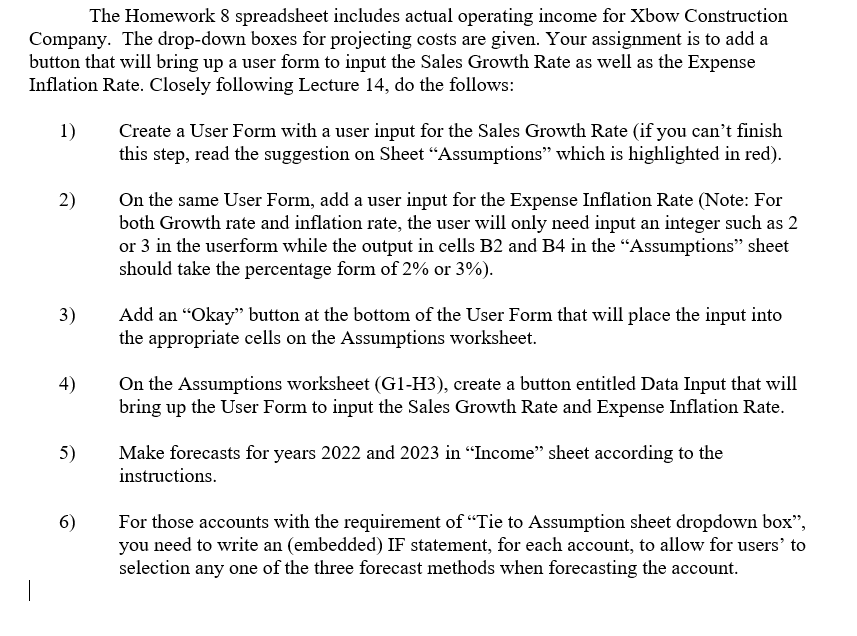
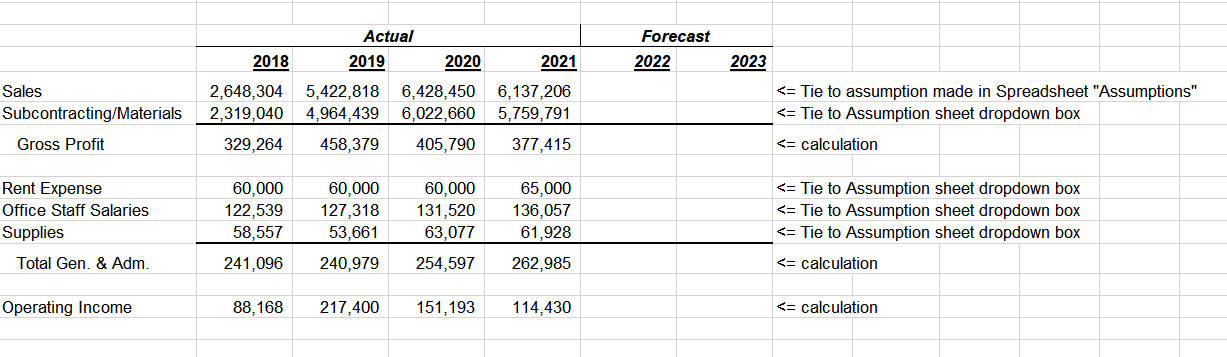
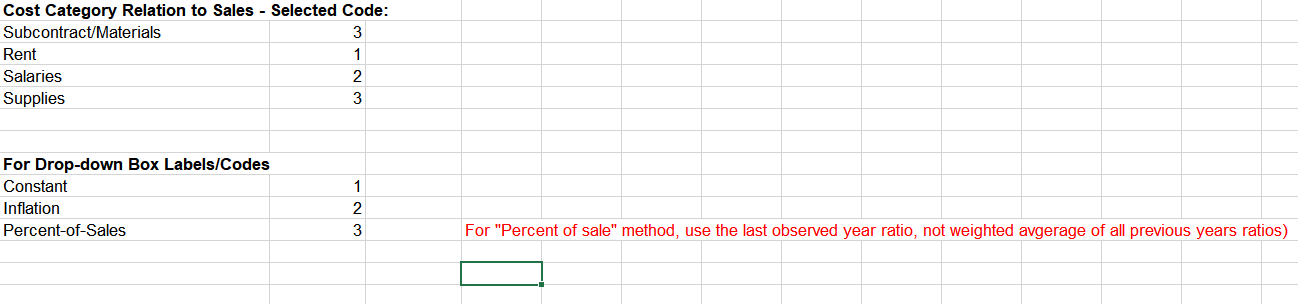
The Homework 8 spreadsheet includes actual operating income for Xbow Construction Company. The drop-down boxes for projecting costs are given. Your assignment is to add a button that will bring up a user form to input the Sales Growth Rate as well as the Expense Inflation Rate. Closely following Lecture 14, do the follows: 1) Create a User Form with a user input for the Sales Growth Rate (if you can't finish this step, read the suggestion on Sheet "Assumptions" which is highlighted in red). 2) On the same User Form, add a user input for the Expense Inflation Rate (Note: For both Growth rate and inflation rate, the user will only need input an integer such as 2 or 3 in the userform while the output in cells B2 and B4 in the "Assumptions" sheet should take the percentage form of 2% or 3% ). 3) Add an "Okay" button at the bottom of the User Form that will place the input into the appropriate cells on the Assumptions worksheet. 4) On the Assumptions worksheet (G1-H3), create a button entitled Data Input that will bring up the User Form to input the Sales Growth Rate and Expense Inflation Rate. 5) Make forecasts for years 2022 and 2023 in "Income" sheet according to the instructions. 6) For those accounts with the requirement of "Tie to Assumption sheet dropdown box", you need to write an (embedded) IF statement, for each account, to allow for users' to selection any one of the three forecast methods when forecasting the account. Cost Category Relation to Sales - Selected Code: \begin{tabular}{l|r} Subcontract/Materials & 3 \\ \hline Rent & 1 \\ \hline Salaries & 2 \\ \hline Supplies & 3 \end{tabular} For Drop-down Box Labels/Codes \begin{tabular}{l|r} \hline Constant & 1 \\ \hline Inflation & 2 \\ \hline Percent-of-Sales & 3 \end{tabular} For "Percent of sale" method, use the last observed year ratio, not weighted avgerage of all previous years ratios) The Homework 8 spreadsheet includes actual operating income for Xbow Construction Company. The drop-down boxes for projecting costs are given. Your assignment is to add a button that will bring up a user form to input the Sales Growth Rate as well as the Expense Inflation Rate. Closely following Lecture 14, do the follows: 1) Create a User Form with a user input for the Sales Growth Rate (if you can't finish this step, read the suggestion on Sheet "Assumptions" which is highlighted in red). 2) On the same User Form, add a user input for the Expense Inflation Rate (Note: For both Growth rate and inflation rate, the user will only need input an integer such as 2 or 3 in the userform while the output in cells B2 and B4 in the "Assumptions" sheet should take the percentage form of 2% or 3% ). 3) Add an "Okay" button at the bottom of the User Form that will place the input into the appropriate cells on the Assumptions worksheet. 4) On the Assumptions worksheet (G1-H3), create a button entitled Data Input that will bring up the User Form to input the Sales Growth Rate and Expense Inflation Rate. 5) Make forecasts for years 2022 and 2023 in "Income" sheet according to the instructions. 6) For those accounts with the requirement of "Tie to Assumption sheet dropdown box", you need to write an (embedded) IF statement, for each account, to allow for users' to selection any one of the three forecast methods when forecasting the account. Cost Category Relation to Sales - Selected Code: \begin{tabular}{l|r} Subcontract/Materials & 3 \\ \hline Rent & 1 \\ \hline Salaries & 2 \\ \hline Supplies & 3 \end{tabular} For Drop-down Box Labels/Codes \begin{tabular}{l|r} \hline Constant & 1 \\ \hline Inflation & 2 \\ \hline Percent-of-Sales & 3 \end{tabular} For "Percent of sale" method, use the last observed year ratio, not weighted avgerage of all previous years ratios)
Step by Step Solution
There are 3 Steps involved in it

Get step-by-step solutions from verified subject matter experts
 Study Help