







Question: * Please use the below command to create the Certified Employees table that called certified emps CREATE TABLE sertified emps( EMPLOYEE ID integer(6), FIRST NAME
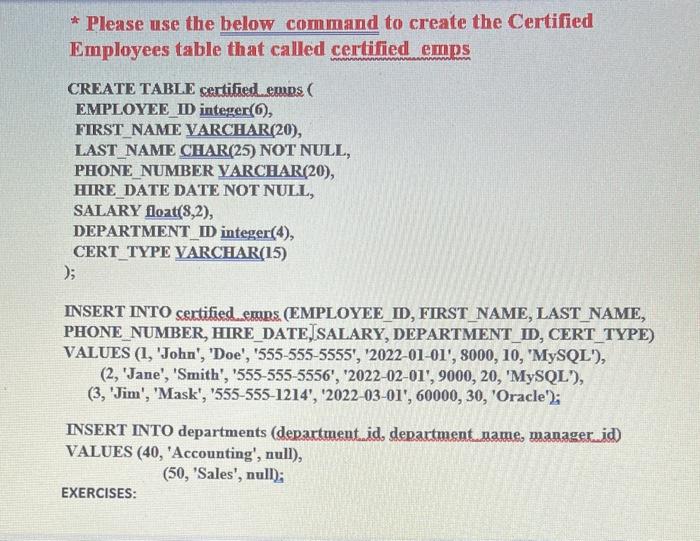
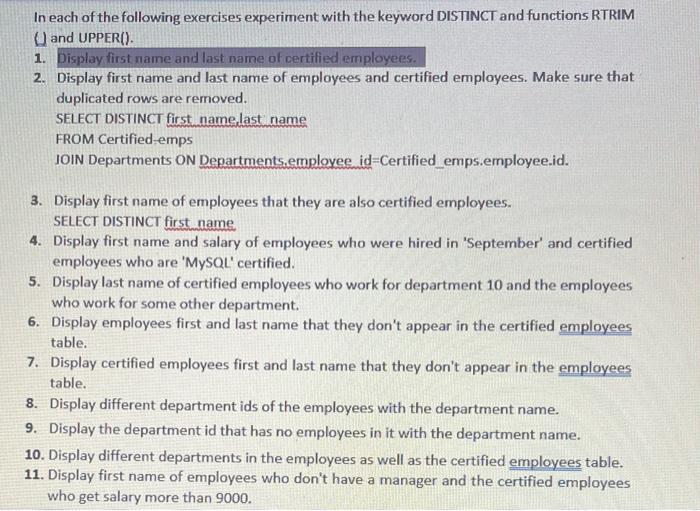
* Please use the below command to create the Certified Employees table that called certified emps CREATE TABLE sertified emps( EMPLOYEE ID integer(6), FIRST NAME VARCHAR(20), LAST_NAME CHAR(25) NOT NULL, PHONE_NUMBER VARCHAR(20), HIRE_DATE DATE NOT NULL, SALARY flozt(8,2), DEPARTMENT ID integer(4), CERT_TYPE VARCHAR(15) ) INSERT INTO sertified ermas_(EMPLOYEE_ID, FIRST_NAME, LAST_NAME, PHONE_NUMBER, HIRE_DATE,SALARY, DEPARTMENT_ID, CERT_TYPE) VALUES (1, 'John', 'Doe', '555-555-5555', '2022-01-01', 8000, 10, 'MySQL'), (2, 'Jane', 'Smith', '555-555-5556', '2022-02-01', 9000, 20, 'MySQL'), (3, 'Jim', 'Mask', '555-555-1214', '2022-03-01', 60000,30, 'Oracle'); INSERT INTO departments (department. id, department name, manager id) VALUES (40, 'Accounting', null), (50, 'Sales', null); EXERCISES: In each of the following exercises experiment with the keyword DISTINCT and functions RTRIM U and UPPER(). 1. Display first name and last name of certified employees. 2. Display first name and last name of employees and certified employees. Make sure that duplicated rows are removed. SELECT DISTINCT first name last name FROM Certified-emps JOIN Departments ON Departments,employee id=Certified_emps.employee.id. 3. Display first name of employees that they are also certified employees. SELECT DISTINCT first name 4. Display first name and salary of employees who were hired in 'September' and certified employees who are 'MySQL' certified. 5. Display last name of certified employees who work for department 10 and the employees who work for some other department. 6. Display employees first and last name that they don't appear in the certified employees table. 7. Display certified employees first and last name that they don't appear in the employees table. 8. Display different department ids of the employees with the department name. 9. Display the department id that has no employees in it with the department name. 10. Display different departments in the employees as well as the certified employees table. 11. Display first name of employees who don't have a manager and the certified employees who get salary more than 9000 . * Please use the below command to create the Certified Employees table that called certified emps CREATE TABLE sertified emps( EMPLOYEE ID integer(6), FIRST NAME VARCHAR(20), LAST_NAME CHAR(25) NOT NULL, PHONE_NUMBER VARCHAR(20), HIRE_DATE DATE NOT NULL, SALARY flozt(8,2), DEPARTMENT ID integer(4), CERT_TYPE VARCHAR(15) ) INSERT INTO sertified ermas_(EMPLOYEE_ID, FIRST_NAME, LAST_NAME, PHONE_NUMBER, HIRE_DATE,SALARY, DEPARTMENT_ID, CERT_TYPE) VALUES (1, 'John', 'Doe', '555-555-5555', '2022-01-01', 8000, 10, 'MySQL'), (2, 'Jane', 'Smith', '555-555-5556', '2022-02-01', 9000, 20, 'MySQL'), (3, 'Jim', 'Mask', '555-555-1214', '2022-03-01', 60000,30, 'Oracle'); INSERT INTO departments (department. id, department name, manager id) VALUES (40, 'Accounting', null), (50, 'Sales', null); EXERCISES: In each of the following exercises experiment with the keyword DISTINCT and functions RTRIM U and UPPER(). 1. Display first name and last name of certified employees. 2. Display first name and last name of employees and certified employees. Make sure that duplicated rows are removed. SELECT DISTINCT first name last name FROM Certified-emps JOIN Departments ON Departments,employee id=Certified_emps.employee.id. 3. Display first name of employees that they are also certified employees. SELECT DISTINCT first name 4. Display first name and salary of employees who were hired in 'September' and certified employees who are 'MySQL' certified. 5. Display last name of certified employees who work for department 10 and the employees who work for some other department. 6. Display employees first and last name that they don't appear in the certified employees table. 7. Display certified employees first and last name that they don't appear in the employees table. 8. Display different department ids of the employees with the department name. 9. Display the department id that has no employees in it with the department name. 10. Display different departments in the employees as well as the certified employees table. 11. Display first name of employees who don't have a manager and the certified employees who get salary more than 9000
Step by Step Solution
There are 3 Steps involved in it

Get step-by-step solutions from verified subject matter experts
 Study Help