





Question: Please use the Google Sheet below to answer the question: https://docs.google.com/spreadsheets/d/1HsTfcs_6g9cdaINEOvhKENEMmsHLL_EbQQT2SO7duLQ/edit?usp=sharing COUNTIF(S) / SUMIF(S): Q1: Your boss wants to get a better idea of how

Please use the Google Sheet below to answer the question:

https://docs.google.com/spreadsheets/d/1HsTfcs_6g9cdaINEOvhKENEMmsHLL_EbQQT2SO7duLQ/edit?usp=sharing
Please use the Google Sheet below to answer the

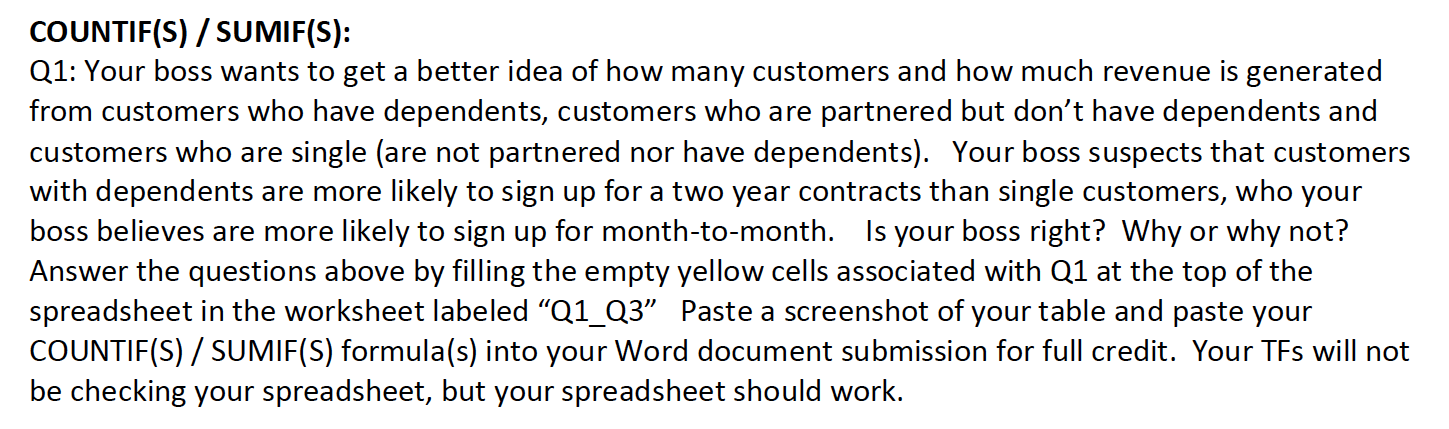
COUNTIF(S) / SUMIF(S): Q1: Your boss wants to get a better idea of how many customers and how much revenue is generated from customers who have dependents, customers who are partnered but don't have dependents and customers who are single (are not partnered nor have dependents). Your boss suspects that customers with dependents are more likely to sign up for a two year contracts than single customers, who your boss believes are more likely to sign up for month-to-month. Is your boss right? Why or why not? Answer the questions above by filling the empty yellow cells associated with Q1 at the top of the spreadsheet in the worksheet labeled Q1_Q3" Paste a screenshot of your table and paste your COUNTIF(S) / SUMIF(S) formula(s) into your Word document submission for full credit. Your TFs will not be checking your spreadsheet, but your spreadsheet should work. COUNTIF(S) / SUMIF(S): Q1: Your boss wants to get a better idea of how many customers and how much revenue is generated from customers who have dependents, customers who are partnered but don't have dependents and customers who are single (are not partnered nor have dependents). Your boss suspects that customers with dependents are more likely to sign up for a two year contracts than single customers, who your boss believes are more likely to sign up for month-to-month. Is your boss right? Why or why not? Answer the questions above by filling the empty yellow cells associated with Q1 at the top of the spreadsheet in the worksheet labeled Q1_Q3" Paste a screenshot of your table and paste your COUNTIF(S) / SUMIF(S) formula(s) into your Word document submission for full credit. Your TFs will not be checking your spreadsheet, but your spreadsheet should work

Step by Step Solution

There are 3 Steps involved in it

1 Expert Approved Answer
Step: 1 Unlock blur-text-image

Question Has Been Solved by an Expert!

Get step-by-step solutions from verified subject matter experts

Step: 2 Unlock
Step: 3 Unlock

Students Have Also Explored These Related General Management Questions!