







Question: PLEASE USE VBA EXCEL AND OPTION EXPLICIT Exercise: Clown catapult Youve kidnapped clowns to use as ammunition for your clownapult. Write a program that will
PLEASE USE VBA EXCEL AND OPTION EXPLICIT
Exercise: Clown catapult
Youve kidnapped clowns to use as ammunition for your clownapult.
Write a program that will scan through clown data, and identify clowns that meet the users criteria.
Heres a sample:
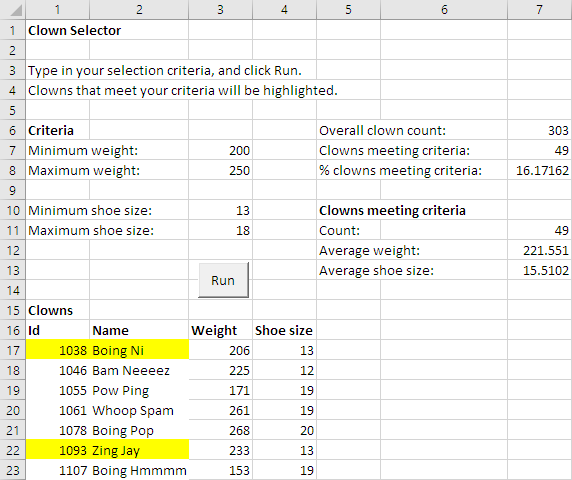
The user types in criteria for weight and shoe size, and clicks Run. The program highlights clowns that meet the criteria by setting the background color of their id and name cells to yellow. Clowns that do not meet the criteria are set to white. Clowns must meet all criteria to be selected.
Assume that the user makes no mistakes when typing in the data. Assume there are no errors in the clown data.
The program also shows some statistics. The overall clown count is the total number of clowns in the data set. You dont need to round the averages.
Heres another example:
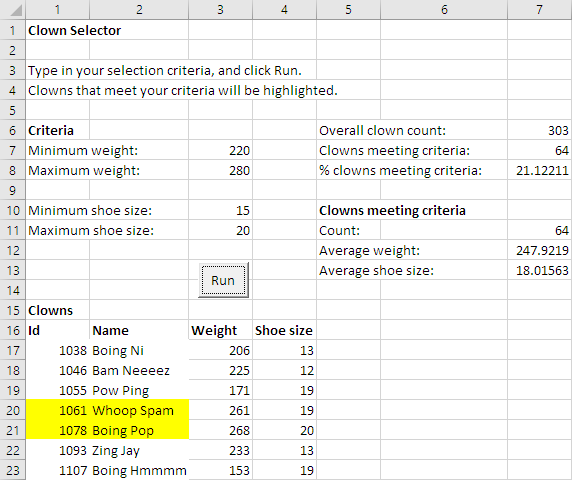
A clown that was marked in yellow for one run, might be marked in white the next time. So, you need to explicitly set the cell color for each clown to yellow or white.
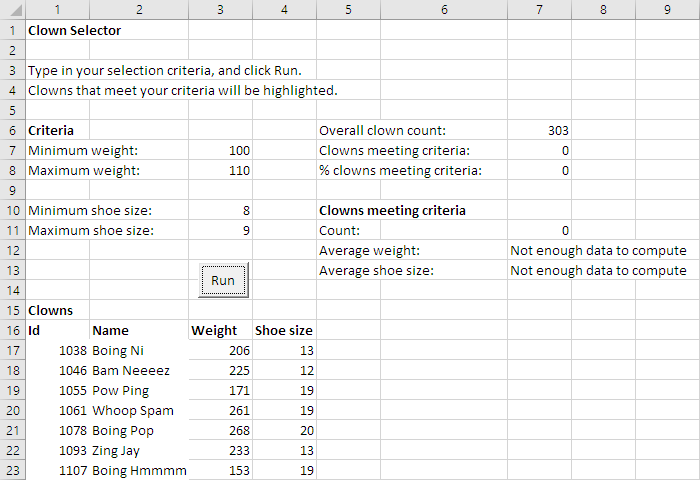
If no clowns meet the criteria, you wont able to calculate the average. In that case, show messages instead:
Dont start from scratch. Download and use the starting workbook that has been created for you.
The usual coding standards apply.
Hint: Declare variables for totaling as Longs, rather than Integers. The starting workbook has those declarations for you.
Step by Step Solution
There are 3 Steps involved in it

Get step-by-step solutions from verified subject matter experts
 Study Help