







Question: Please using visual studio 2019, the output still be ddd.d for example if you enter x=1, y=2 the output should be 1.3. Again in assembly
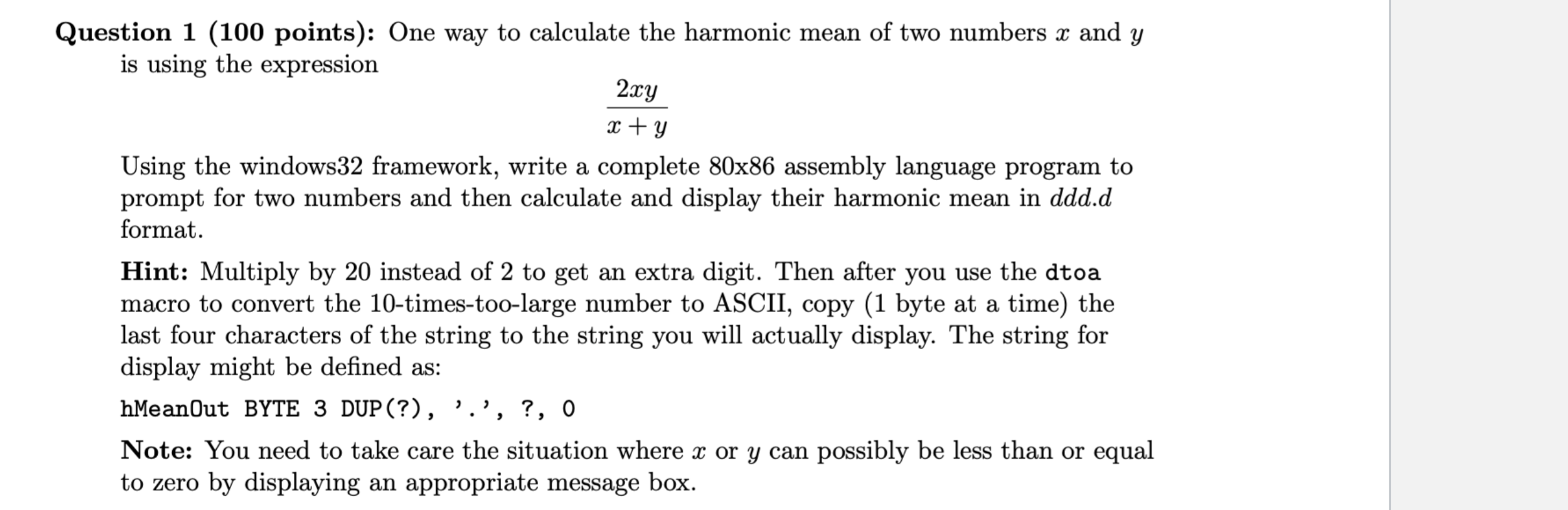 Please using visual studio 2019, the output still be ddd.d for example if you enter x=1, y=2 the output should be 1.3. Again in assembly language not C or C++. If Correct I WILL UPVOTE FOR SURE. THANK YOU!!! Here is the Windows 32 framework in assembly language
; Explain what this program does
; Author: Your name
; Date: put the date
.586
.MODEL FLAT
INCLUDE io.h ; header file for input/output
.STACK 4096
.DATA
number1 DWORD ?
number2 DWORD ?
prompt1 BYTE "Enter first number", 0
prompt2 BYTE "Enter second number", 0
string BYTE 40 DUP (?)
resultLbl BYTE "The sum is", 0
sum BYTE 11 DUP (?), 0
.CODE
_MainProc PROC
input prompt1, string, 40 ; read ASCII characters
atod string ; convert to integer
mov number1, eax ; store in memory
input prompt2, string, 40 ; repeat for second number
atod string
mov number2, eax
mov eax, number1 ; first number to EAX
add eax, number2 ; add second number
dtoa sum, eax ; convert to ASCII characters
output resultLbl, sum ; output label and sum
mov eax, 0 ; exit with return code 0
ret
_MainProc ENDP
END ; end of source code
Question 1 (100 points): One way to calculate the harmonic mean of two numbers x and y is using the expression x+y2xy Using the windows32 framework, write a complete 80x86 assembly language program to prompt for two numbers and then calculate and display their harmonic mean in ddd.d format. Hint: Multiply by 20 instead of 2 to get an extra digit. Then after you use the dtoa macro to convert the 10-times-too-large number to ASCII, copy (1 byte at a time) the last four characters of the string to the string you will actually display. The string for display might be defined as: hMeanOut BYTE 3 DUP(?), ',', ?, 0 Note: You need to take care the situation where x or y can possibly be less than or equal to zero by displaying an appropriate message box
Step by Step Solution
There are 3 Steps involved in it

Get step-by-step solutions from verified subject matter experts
 Study Help