







Question: Please utilize Python 3.6. And provide with a screenshot of your code. Problem: Expand on the problem from Lab 7 (Magic 8 ball) by making
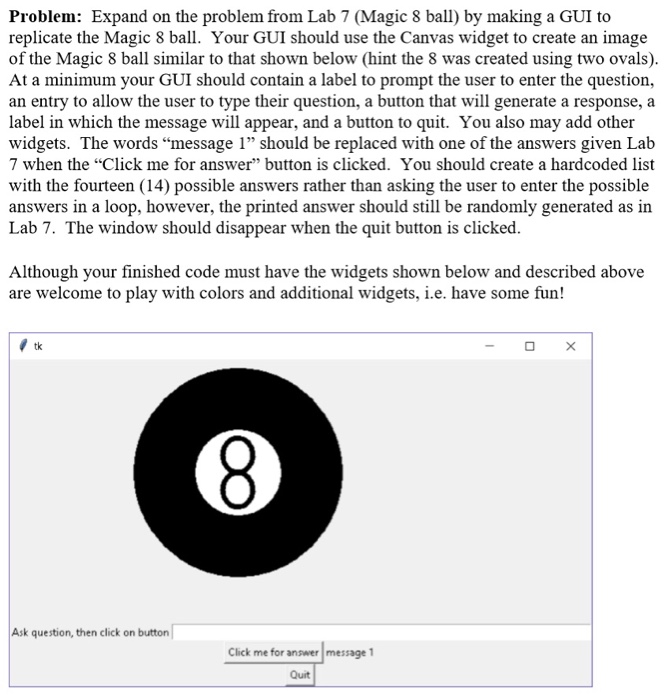
Problem: Expand on the problem from Lab 7 (Magic 8 ball) by making a GUI to replicate the Magic 8 ball. Your GUI should use the Canvas widget to create an image of the Magic 8 ball similar to that shown below (hint the 8 was created using two ovals) At a minimum your GUI should contain a label to prompt the user to enter the question, an entry to allow the user to type their question, a button that will generate a response, a label in which the message will appear, and a button to quit. You also may add other widgets. The words "message 1" should be replaced with one of the answers given Lab 7 when the "Click me for answer" button is clicked. You should create a hardcoded list with the fourteen (14) possible answers rather than asking the user to enter the possible answers in a loop, however, the printed answer should still be randomly generated as in Lab 7. The window should disappear when the quit button is clicked Although your finished code must have the widgets shown below and described above are welcome to play with colors and additional widgets, i.e. have some fun! 5 Ask question, then click on button Click me for answer message 1 Quit
Step by Step Solution
There are 3 Steps involved in it

Get step-by-step solutions from verified subject matter experts
 Study Help