







Question: please work this out on excel!! in detailed steps as well as clear photos! i need it fast, thank you!! the second photo is the
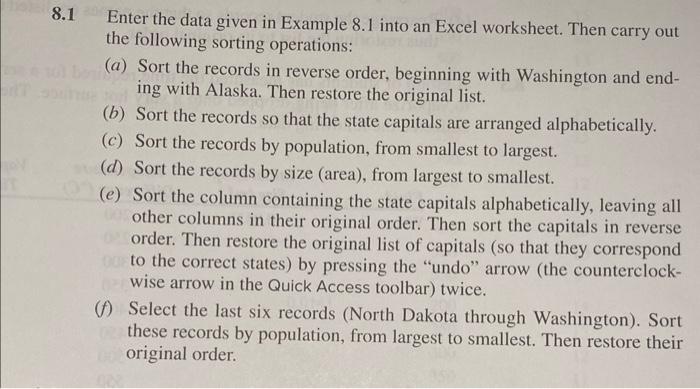
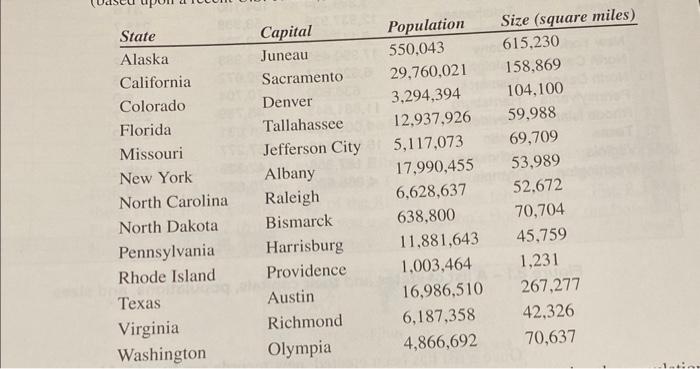
8.1 Enter the data given in Example 8.1 into an Excel worksheet. Then carry out the following sorting operations: (a) Sort the records in reverse order, beginning with Washington and ending with Alaska. Then restore the original list. (b) Sort the records so that the state capitals are arranged alphabetically. (c) Sort the records by population, from smallest to largest. (d) Sort the records by size (area), from largest to smallest. (e) Sort the column containing the state capitals alphabetically, leaving all other columns in their original order. Then sort the capitals in reverse order. Then restore the original list of capitals (so that they correspond to the correct states) by pressing the "undo" arrow (the counterclockwise arrow in the Quick Access toolbar) twice. (f) Select the last six records (North Dakota through Washington). Sort these records by population, from largest to smallest. Then restore their original order. \begin{tabular}{llll} State & Capital & Population & Size (square miles) \\ \hline Alaska & Juneau & 550,043 & 615,230 \\ California & Sacramento & 29,760,021 & 158,869 \\ Colorado & Denver & 3,294,394 & 104,100 \\ Florida & Tallahassee & 12,937,926 & 59,988 \\ Missouri & Jefferson City & 5,117,073 & 69,709 \\ New York & Albany & 17,990,455 & 53,989 \\ North Carolina & Raleigh & 6,628,637 & 52,672 \\ North Dakota & Bismarck & 638,800 & 70,704 \\ Pennsylvania & Harrisburg & 11,881,643 & 45,759 \\ Rhode Island & Providence & 1,003,464 & 1,231 \\ Texas & Austin & 16,986,510 & 267,277 \\ Virginia & Richmond & 6,187,358 & 42,326 \\ Washington & Olympia & 4,866,692 & 70,637 \end{tabular}
Step by Step Solution
There are 3 Steps involved in it

Get step-by-step solutions from verified subject matter experts
 Study Help