







Question: Please write code in eclipse //Do not alter----------------------------------------------- import java.util.Scanner; import java.io.*; public class GroceryListTester { //The grocery list being tested public static GroceryList gList
Please write code in eclipse
//Do not alter----------------------------------------------- import java.util.Scanner; import java.io.*; public class GroceryListTester { //The grocery list being tested public static GroceryList gList = new GroceryList(); //Name of the provide file assumed to be in the project's directory public static String fileName = "./GroceryList.txt"; //The grocery list is assumed to be tab-delimited public static final String DELIM = "\t"; //The file is assumed to have the data name and value for each item, thus 2 fields public static final int FIELD_AMT = 2; public static void main(String[] args) { System.out.println("Grocery List Tester."); test01(); test02(); test03(); test04(); } //Adding elements to the list from a file public static void test01() { printTest(1); System.out.println("Reading the grocery list."); try { //Creates the scanner to read the file Scanner fileScanner = new Scanner(new File(fileName)); //While there is a next line while(fileScanner.hasNextLine()) { //Read the next line in the file String fileLine = fileScanner.nextLine(); //Split said line based on the tab delimiter String[] splitLines = fileLine.split(DELIM); //Check if it is the correct size if(splitLines.length != FIELD_AMT) continue;//If not then skip it //Otherwise create a new Grocery Item from the data in split line String name = splitLines[0]; double value = Double.parseDouble(splitLines[1]);//Converts the String value to a double value GroceryItem g = new GroceryItem(name,value); //Adds the new item to the end of the list gList.addItem(g); } fileScanner.close();//Closes the file Scanner gList.showList();//Prints out the list } catch(Exception e) { e.printStackTrace(); } } public static void test02() { printTest(2); System.out.println("Finding the total cost."); System.out.println("Total Cost: "+gList.totalCost()); } public static void test03() { printTest(3); GroceryItem g = new GroceryItem("Potatoes",5.32); System.out.println("Checking Contains with item known to be in the list "+g); System.out.println("Contains? "+gList.contains(g)); g = new GroceryItem(); System.out.println("Checking Contains with item known to NOT be in the list "+g); System.out.println("Contains? "+gList.contains(g)); } public static void test04() { printTest(4); System.out.println("Accessing First Item in the list"); GroceryItem g = gList.getCurrent(); System.out.println(g); System.out.println(" Removing First Item in the list"); gList.removeCurrent(); gList.showList(); System.out.println(" Accessing Fourth Item in the list"); gList.gotoNext(); gList.gotoNext(); gList.gotoNext(); g = gList.getCurrent(); System.out.println(g); System.out.println(" Removing Fourth Item in the list"); gList.removeCurrent(); gList.showList(); } public static void printTest(int testNum) { System.out.println(" ----------------------------------------------- "+ "Test "+testNum+ " -----------------------------------------------"); } } //-----------------------------------------------
Apples 4.42 Bananas 1.51 Strawberries 2.51 Bell Peppers 0.98 Carrots 3.52 Broccoli 2.04 Garlic 6.12 Lemons/Limes 0.32 Onion 5.74 Parsley 2.16 Cilantro 3.11 Basil 6.98 Potatoes 5.32 Spinach 4.11 Tomatoes 7.38 Butter 5.51 Sliced Cheese 1.26 Shredded Cheese 3.63 Milk 4.67 Sour Cream 0.74 Greek Yogurt 7.21 Breadcrumbs 4.93 Pasta 1.49 Quinoa 4.78 Rice 6.96 Sandwich Bread 1.22 Tortillas 4.17
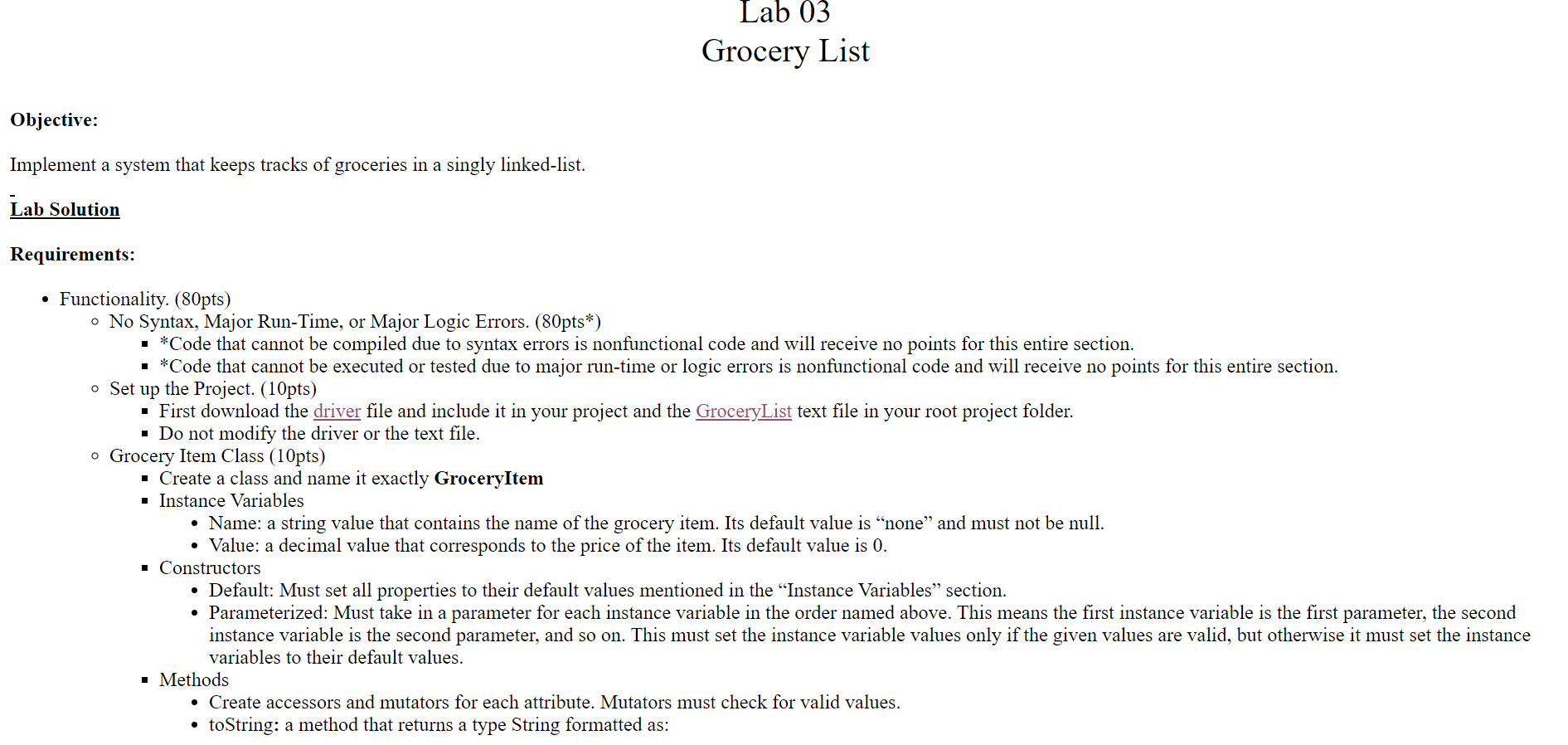
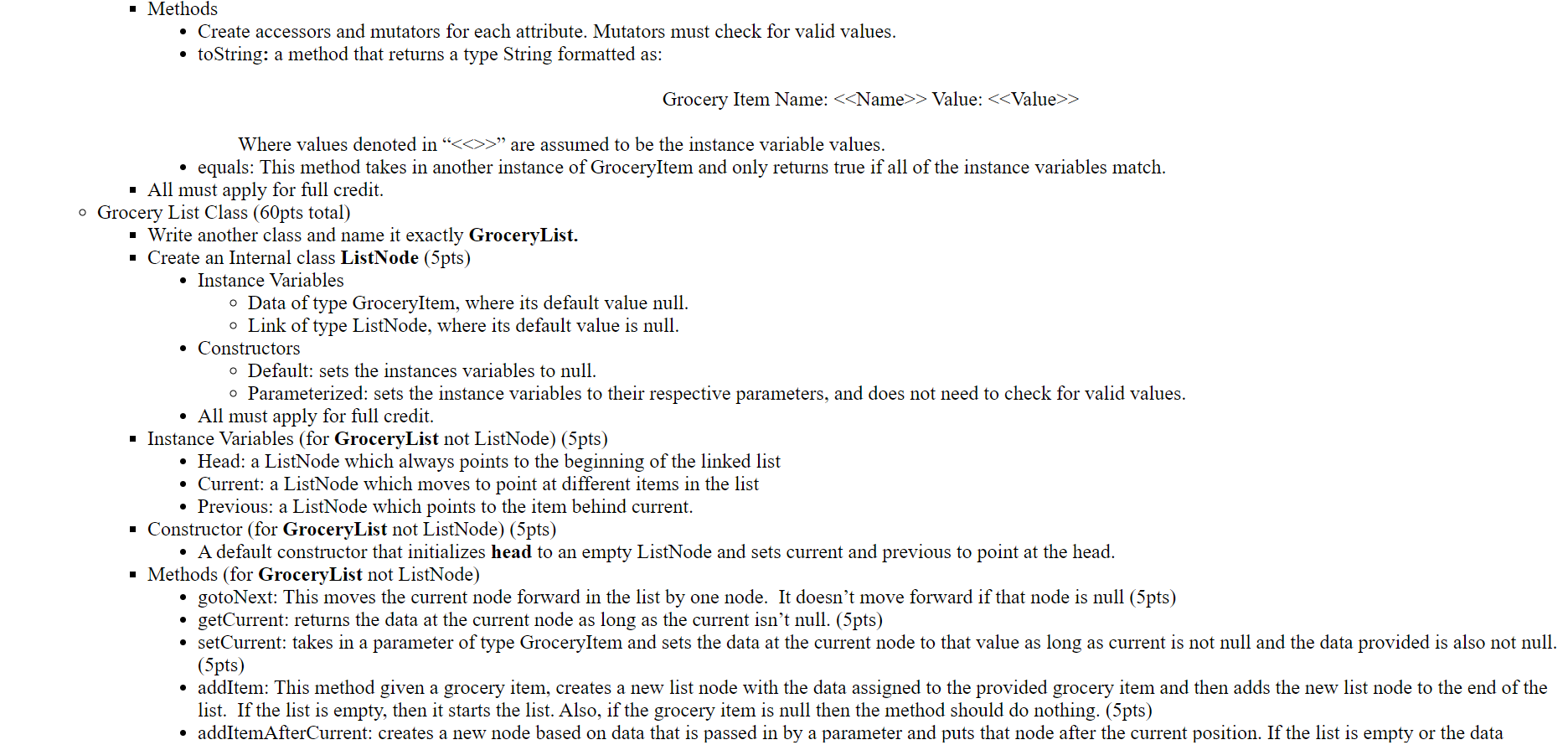
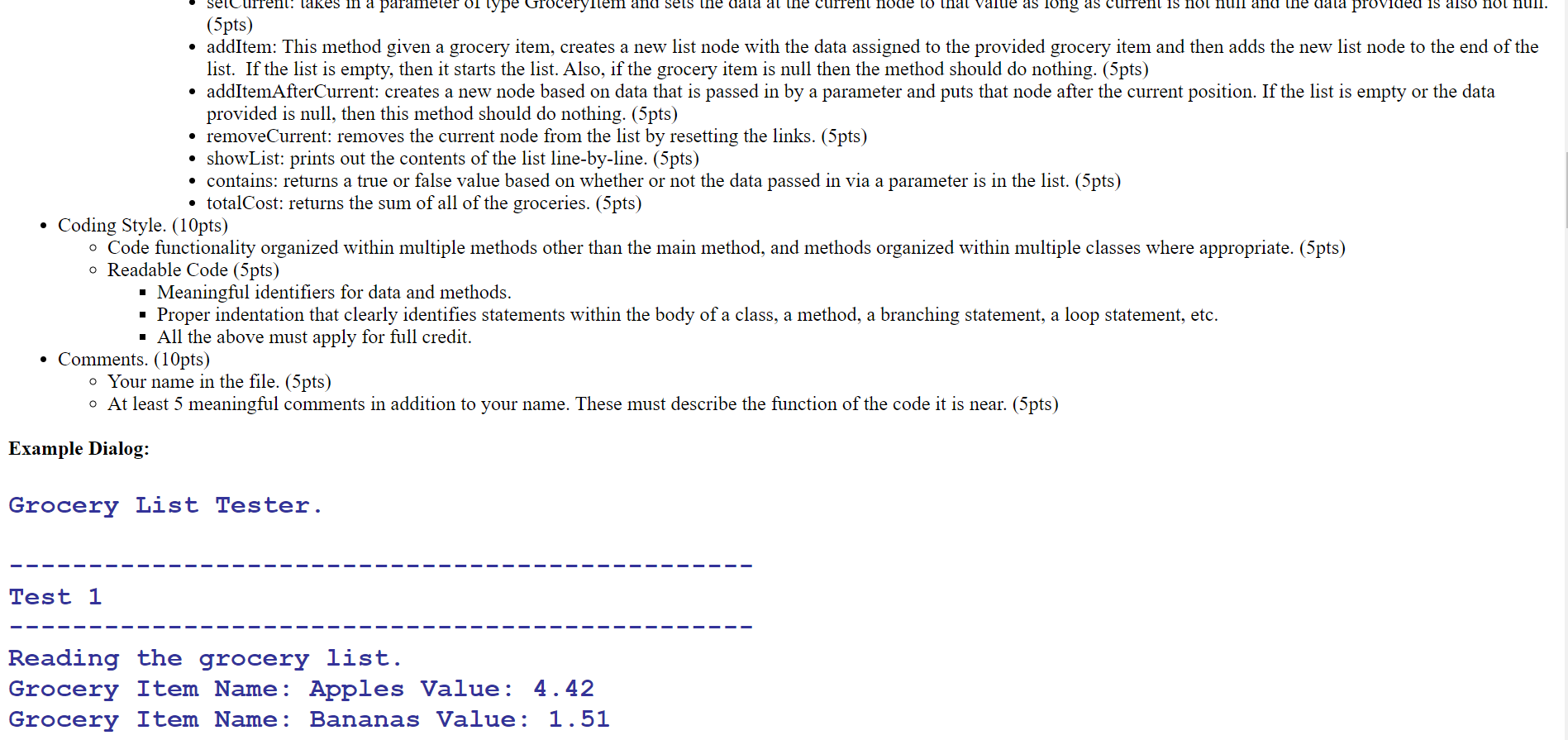
plement a system that keeps tracks of groceries in a singly linked-list. b Solution quirements: - Functionality. (80pts) - No Syntax, Major Run-Time, or Major Logic Errors. (80pts*) - *Code that cannot be compiled due to syntax errors is nonfunctional code and will receive no points for this entire section. - *Code that cannot be executed or tested due to major run-time or logic errors is nonfunctional code and will receive no points for this entire section. - Set up the Project. (10pts) - First download the driver file and include it in your project and the GroceryList text file in your root project folder. - Do not modify the driver or the text file. - Grocery Item Class (10pts) - Create a class and name it exactly GroceryItem - Instance Variables - Name: a string value that contains the name of the grocery item. Its default value is "none" and must not be null. - Value: a decimal value that corresponds to the price of the item. Its default value is 0 . - Constructors - Default: Must set all properties to their default values mentioned in the "Instance Variables" section. - Parameterized: Must take in a parameter for each instance variable in the order named above. This means the first instance variable is the first parameter, the secc instance variable is the second parameter, and so on. This must set the instance variable values only if the given values are valid, but otherwise it must set the ins variables to their default values. - Methods - Create accessors and mutators for each attribute. Mutators must check for valid values. - toString: a method that returns a type String formatted as: Grocery Item Name: > Value: > Where values denoted in " > " are assumed to be the instance variable values. - equals: This method takes in another instance of GroceryItem and only returns true if all of the instance variables match. - All must apply for full credit. - Grocery List Class (60pts total) - Write another class and name it exactly GroceryList. - Create an Internal class ListNode (5pts) - Instance Variables - Data of type GroceryItem, where its default value null. - Link of type ListNode, where its default value is null. - Constructors - Default: sets the instances variables to null. - Parameterized: sets the instance variables to their respective parameters, and does not need to check for valid values. - All must apply for full credit. - Instance Variables (for GroceryList not ListNode) (5pts) - Head: a ListNode which always points to the beginning of the linked list - Current: a ListNode which moves to point at different items in the list - Previous: a ListNode which points to the item behind current. - Constructor (for GroceryList not ListNode) (5pts) - A default constructor that initializes head to an empty ListNode and sets current and previous to point at the head. - Methods (for GroceryList not ListNode) - gotoNext: This moves the current node forward in the list by one node. It doesn't move forward if that node is null (5pts) - getCurrent: returns the data at the current node as long as the current isn't null. (5pts) - setCurrent: takes in a parameter of type GroceryItem and sets the data at the current node to that value as long as current is not (5pts) - addItem: This method given a grocery item, creates a new list node with the data assigned to the provided grocery item and ther list. If the list is empty, then it starts the list. Also, if the grocery item is null then the method should do nothing. (5pts) - addItem: This method given a grocery item, creates a new list node with the data assigned to the provided grocery item and then adds the new list node to the end of the list. If the list is empty, then it starts the list. Also, if the grocery item is null then the method should do nothing. (5pts) - addItemAfterCurrent: creates a new node based on data that is passed in by a parameter and puts that node after the current position. If the list is empty or the data provided is null, then this method should do nothing. (5pts) - removeCurrent: removes the current node from the list by resetting the links. (5pts) - showList: prints out the contents of the list line-by-line. (5pts) - contains: returns a true or false value based on whether or not the data passed in via a parameter is in the list. (5pts) - totalCost: returns the sum of all of the groceries. (5pts) - Coding Style. (10pts) - Code functionality organized within multiple methods other than the main method, and methods organized within multiple classes where appropriate. (5pts) - Readable Code (5pts) - Meaningful identifiers for data and methods. - Proper indentation that clearly identifies statements within the body of a class, a method, a branching statement, a loop statement, etc. - All the above must apply for full credit. - Comments. (10pts) - Your name in the file. (5pts) - At least 5 meaningful comments in addition to your name. These must describe the function of the code it is near. (5pts) Example Dialog: Grocery List Tester. Test 1 Reading the grocery list. Grocery Item Name: Apples Value: 4.42 Grocery Item Name: Bananas Value: 1.51
Step by Step Solution
There are 3 Steps involved in it

Get step-by-step solutions from verified subject matter experts
 Study Help