







Question: Please write in Java Task 3 is not needed, This is my code so far: ////////////////////////// (UserRepoistory is just the same methods but void) public
Please write in Java
Task 3 is not needed, This is my code so far:
//////////////////////////
(UserRepoistory is just the same methods but void)
public class SerializedUserRepository implements UserRepository { private String filePath; private String fileName; private List users; private static String PATH = System.getProperty("user.home") + File.separator + "Java2" + File.separator; private static String FILE_NAME = "LinkedInUsers.dat"; @Override public void init(String filePath, String fileName) { this.filePath = filePath; this.fileName = fileName; this.users = users; } @Override public void add(LinkedInUser user) throws LinkedInException { Scanner input = new Scanner(System.in); System.out.println("Please enter a username"); String username = input.nextLine(); if(username.isEmpty()) { throw new LinkedInException("Please enter a username"); } else if(username != null) { throw new LinkedInException("User already exists"); } System.out.println("Please enter a password"); String password = input.nextLine(); System.out.println("Please enter the type of user (P or S)".toUpperCase()); String type = input.nextLine(); if(!type.equals("P") && !type.equals("S")) { throw new LinkedInException("Invalid user type. Valid types are P or S"); } user.setType(type); this.users.add(user); saveAll();
}
@Override public void saveAll() { File file = new File(PATH + FILE_NAME); if(file.exists()) { file.delete(); } new File(PATH).mkdirs(); try (FileOutputStream fout = new FileOutputStream(file)) { ObjectOutputStream oos = new ObjectOutputStream(fout); { oos.writeObject(users); } }catch (Exception ex) { throw new RuntimeException(ex); } }
@Override public void delete(LinkedInUser user) { this.users.remove(user); saveAll(); }
@Override public LinkedInUser retrieve(String username) { int idx = users.indexOf(new LinkedInUser(username,"")); final LinkedInUser user; if(idx
@SuppressWarnings("unchecked") @Override public List retrieveAll() { File file = new File(PATH + FILE_NAME); if(file.exists()) { try(FileInputStream fis = new FileInputStream(file); ObjectInputStream ois = new ObjectInputStream(fis)){ users = (List) ois.readObject(); }catch (Exception exception) { throw new RuntimeException(exception); } } return users; } public String readText(String filePath) { File file = new File(filePath); if(!file.exists()) { System.out.println("File not found"); return ""; } StringBuilder lines = new StringBuilder(); Scanner scanner = null; try { scanner = new Scanner(file); while(scanner.hasNext()) { String line = scanner.nextLine(); lines.append(line).append(" "); } return lines.toString(); }catch (IOException exception) { throw new RuntimeException(exception); }finally { if(scanner !=null) { scanner.close(); } } }
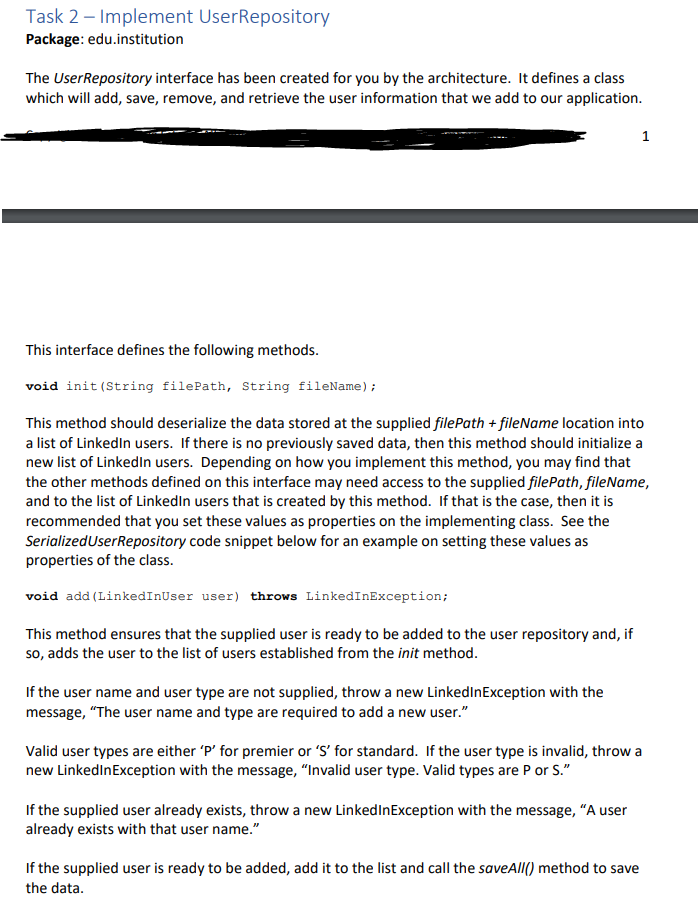
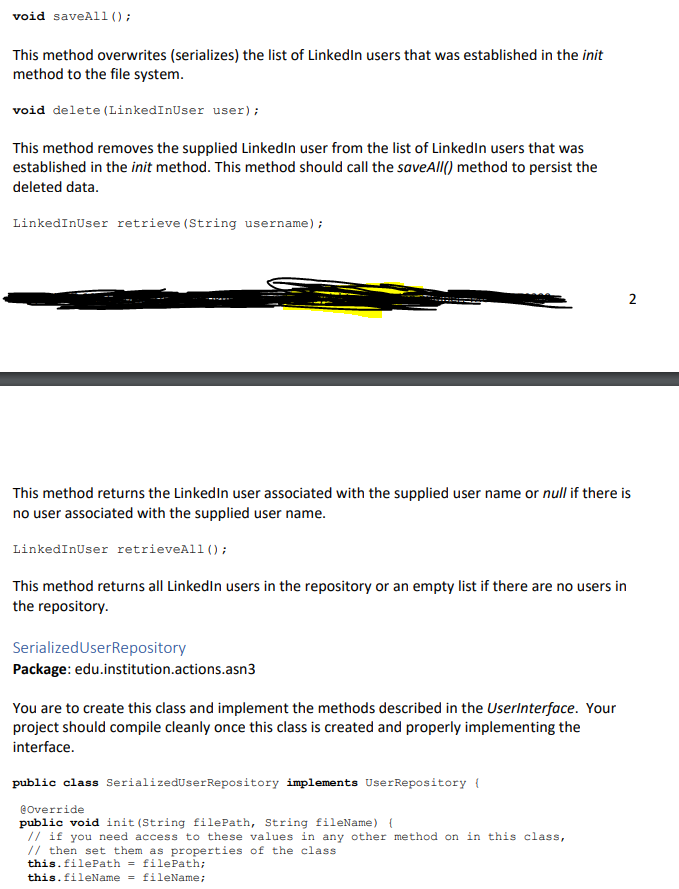
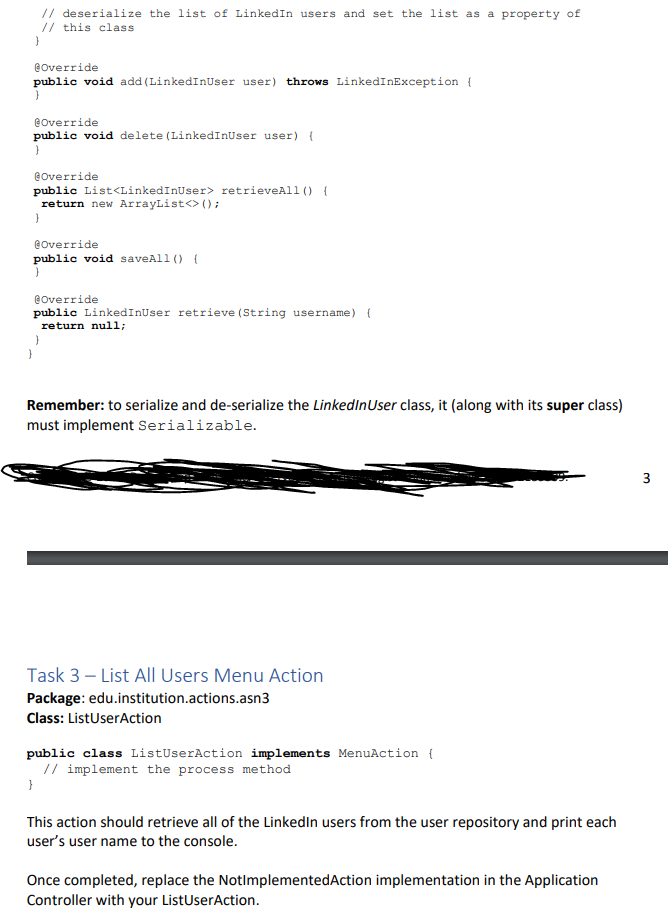
Task 2 - Implement UserRepository Package: edu.institution The User Repository interface has been created for you by the architecture. It defines a class which will add, save, remove, and retrieve the user information that we add to our application. This interface defines the following methods. void init(String filePath, String fileName); This method should deserialize the data stored at the supplied filePath + fileName location into a list of LinkedIn users. If there is no previously saved data, then this method should initialize a new list of LinkedIn users. Depending on how you implement this method, you may find that the other methods defined on this interface may need access to the supplied filePath, fileName, and to the list of LinkedIn users that is created by this method. If that is the case, then it is recommended that you set these values as properties on the implementing class. See the SerializedUser Repository code snippet below for an example on setting these values as properties of the class. void add (LinkedInUser user) throws LinkedInException; This method ensures that the supplied user is ready to be added to the user repository and, if so, adds the user to the list of users established from the init method. If the user name and user type are not supplied, throw a new LinkedInException with the message, The user name and type are required to add a new user." Valid user types are either 'P' for premier or 'S' for standard. If the user type is invalid, throw a new LinkedInException with the message, "Invalid user type. Valid types are P or S. If the supplied user already exists, throw a new LinkedinException with the message, A user already exists with that user name." If the supplied user is ready to be added, add it to the list and call the saveAll() method to save the data. void saveAll(); This method overwrites (serializes) the list of LinkedIn users that was established in the init method to the file system. void delete (LinkedInUser user); This method removes the supplied LinkedIn user from the list of LinkedIn users that was established in the init method. This method should call the saveAll() method to persist the deleted data. LinkedInUser retrieve (String username); 2 This method returns the LinkedIn user associated with the supplied user name or null if there is no user associated with the supplied user name. LinkedInUser retrieveAll(); This method returns all LinkedIn users in the repository or an empty list if there are no users in the repository. SerializedUserRepository Package: edu.institution.actions.asn3 You are to create this class and implement the methods described in the Userinterface. Your project should compile cleanly once this class is created and properly implementing the interface. public class SerializedUser Repository implements UserRepository ! @Override public void init(String filePath, String fileName) { // if you need access to these values in any other method on in this class, // then set them as properties of the class this. filePath = filePath; this.fileName = fileName; // deserialize the list of LinkedIn users and set the list as a property of // this class } @Override public void add (LinkedInUser user) throws LinkedInException { @Override public void delete (LinkedInuser user) { 1 @Override public ListStep by Step Solution
There are 3 Steps involved in it

Get step-by-step solutions from verified subject matter experts
 Study Help