







Question: Please write the code using MIPS ASSEMBLY ONLY!!! start code: .globl main .data str_prompt: .asciiz Enter a ASCII string (max 8 characters): int_prompt: .asciiz
Please write the code using MIPS ASSEMBLY ONLY!!! start code: .globl main .data str_prompt: .asciiz "Enter a ASCII string (max 8 characters): " int_prompt: .asciiz "Enter an integer in range +/- 2^16: " int_badinput: .asciiz "Bad Input! " .align 2 inputString: # additional label refering to the same address as 1stChar Char1: .space 1 Char2: .space 1 Char3: .space 1 Char4: .space 1 Char5: .space 1 Char6: .space 1 Char7: .space 1 Char8: .space 1 forNewline: .space 1 forNull: .space 1 .text main: # Your code goes here
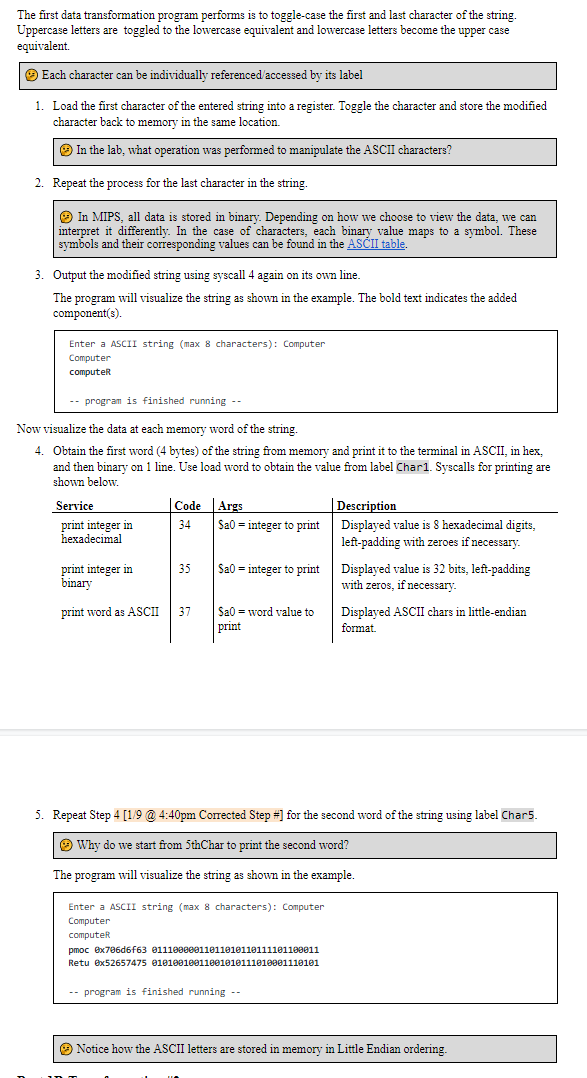
The first data transformation program performs is to toggle-case the first and last character of the string. Uppercase letters are toggled to the lowercase equivalent and lowercase letters become the upper case equivalent. Each character can be individually referenced accessed by its label 1. Load the first character of the entered string into a register. Toggle the character and store the modified character back to memory in the same location. In the lab, what operation was performed to manipulate the ASCII characters? 2. Repeat the process for the last character in the string. In MIPS, all data is stored in binary. Depending on how we choose to view the data, we can interpret it differently. In the case of characters, each binary value maps to a symbol. These symbols and their corresponding values can be found in the ASCII table. 3. Output the modified string using syscall 4 again on its own line. The program will visualize the string as shown in the example. The bold text indicates the added component(s). Enter a ASCII string (max 8 characters): Computer Computer computer -- program is finished running -- Now visualize the data at each memory word of the string, 4. Obtain the first word (4 bytes) of the string from memory and print it to the terminal in ASCII, in hex, and then binary on 1 line. Use load word to obtain the value from label Chari. Syscalls for printing are shown below Service Code Args Description print integer in 34 Sa0 = integer to print Displayed value is 8 hexadecimal digits, hexadecimal left-padding with zeroes if necessary. print integer in 35 Sa0 = integer to print Displayed value is 32 bits, left-padding binary with zeros, if necessary. print word as ASCII 37 Sa0 = word value to Displayed ASCII chars in little-endian print format. 5. Repeat Step 4 [119 @ 4:40pm Corrected Step #) for the second word of the string using label Char5. Why do we start from 5thChar to print the second word? The program alize string as example. Enter a ASCII string (max 8 characters): Computer Computer computer pmoc 6x706d6f63 01110980011011010110111101199011 Retu @x52657475 01010010011001010111010001110101 -- program is finished running -- Notice how the ASCII letters are stored in memory in Little Endian ordering. The first data transformation program performs is to toggle-case the first and last character of the string. Uppercase letters are toggled to the lowercase equivalent and lowercase letters become the upper case equivalent. Each character can be individually referenced accessed by its label 1. Load the first character of the entered string into a register. Toggle the character and store the modified character back to memory in the same location. In the lab, what operation was performed to manipulate the ASCII characters? 2. Repeat the process for the last character in the string. In MIPS, all data is stored in binary. Depending on how we choose to view the data, we can interpret it differently. In the case of characters, each binary value maps to a symbol. These symbols and their corresponding values can be found in the ASCII table. 3. Output the modified string using syscall 4 again on its own line. The program will visualize the string as shown in the example. The bold text indicates the added component(s). Enter a ASCII string (max 8 characters): Computer Computer computer -- program is finished running -- Now visualize the data at each memory word of the string, 4. Obtain the first word (4 bytes) of the string from memory and print it to the terminal in ASCII, in hex, and then binary on 1 line. Use load word to obtain the value from label Chari. Syscalls for printing are shown below Service Code Args Description print integer in 34 Sa0 = integer to print Displayed value is 8 hexadecimal digits, hexadecimal left-padding with zeroes if necessary. print integer in 35 Sa0 = integer to print Displayed value is 32 bits, left-padding binary with zeros, if necessary. print word as ASCII 37 Sa0 = word value to Displayed ASCII chars in little-endian print format. 5. Repeat Step 4 [119 @ 4:40pm Corrected Step #) for the second word of the string using label Char5. Why do we start from 5thChar to print the second word? The program alize string as example. Enter a ASCII string (max 8 characters): Computer Computer computer pmoc 6x706d6f63 01110980011011010110111101199011 Retu @x52657475 01010010011001010111010001110101 -- program is finished running -- Notice how the ASCII letters are stored in memory in Little Endian ordering
Step by Step Solution
There are 3 Steps involved in it

Get step-by-step solutions from verified subject matter experts
 Study Help