







Question: Please write the commands and steps by steps Complete all of the following steps: IMPORTANT! Before you start the assignment, make sure you understand the
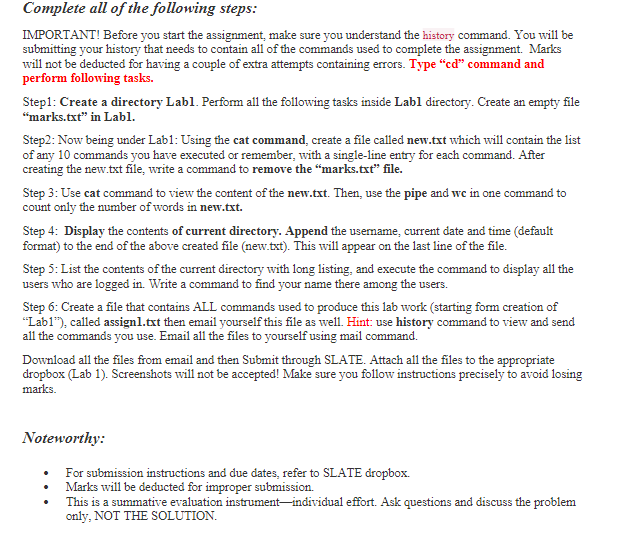
Complete all of the following steps: IMPORTANT! Before you start the assignment, make sure you understand the history command. You will be submitting your history that needs to contain all of the commands used to complete the assignment. Marks will not be deducted for having a couple of extra attempts containing errors. Type "cd" command and perform following tasks. Step1: Create a directory Labl. Perform all the following tasks inside Labl directory. Create an empty file "marks.txt" in Labl. Step2: Now being under Lab1: Using the cat command, create a file called new.txt which will contain the list of any 10 commands you have executed or remember, with a single-line entry for each command. After creating the new.txt file, write a command to remove the "marks.txt" file. Step 3: Use cat command to view the content of the new.txt. Then, use the pipe and wc in one command to count only the number of words in new.txt. Step 4: Display the contents of current directory. Append the username, current date and time (default format) to the end of the above created file (new.txt). This will appear on the last line of the file. Step 5: List the contents of the current directory with long listing, and execute the command to display all the users who are logged in. Write a command to find your name there among the users. Step 6: Create a file that contains ALL commands used to produce this lab work (starting form creation of "Lab1"), called assign1.txt then email yourself this file as well. Hint: use history command to view and send all the commands you use. Email all the files to yourself using mail command. Download all the files from email and then Submit through SLATE. Attach all the files to the appropriate dropbox (Lab 1). Screenshots will not be accepted! Make sure you follow instructions precisely to avoid losing marks. Noteworthy: For submission instructions and due dates, refer to SLATE dropbox. Marks will be deducted for improper submission. This is a summative evaluation instrument-individual effort. Ask questions and discuss the problem only, NOT THE SOLUTION.
Step by Step Solution
3.42 Rating (152 Votes )
There are 3 Steps involved in it
Ill complete the steps and provide the commands used to complete the assignment Ill also provide the output of each command Step 1 Create a directory ... View full answer

Get step-by-step solutions from verified subject matter experts
 Study Help